> ## Documentation Index
> Fetch the complete documentation index at: https://docs.apiyi.com/llms.txt
> Use this file to discover all available pages before exploring further.
# GPT-Image-2-VIP Image Gen/Editing
> GPT image generation reverse-engineered model gpt-image-2-vip (Codex line). Flat $0.03/image. Supports 30 explicit sizes (10 ratios × 3 resolution tiers: 1K / 2K / 4K). Same call format as gpt-image-2-all. About 90–150s per image — for workloads that need locked output dimensions.
**The `size` parameter is available again** (updated 2026-07-22): passing `size` explicitly now locks the output dimensions as expected, and the 30-size reference table on this page is back in effect. Note: `size` only works on the `/v1/images/generations` and `/v1/images/edits` endpoints — **the `/v1/chat/completions` chat endpoint does not support the `size` parameter**, so chat-based image generation cannot lock dimensions. For the latest status, see the [Live Updates](/en/live) section.
All image APIs are **synchronous** — there is no task ID to poll, and if your client disconnects the result is lost while the request is still billed. Set a generous timeout for this model; see [Image API Essentials & Best Practices](/en/api-capabilities/image-api-best-practices).
## Overview
**gpt-image-2-vip** is the **GPT image generation reverse-engineered model** on the Codex line, available on the APIYI platform. Same flat **\$0.03/image** as [`gpt-image-2-all`](/en/api-capabilities/gpt-image-2-all/overview) and **identical request/response format** — the only meaningful difference is that `vip` **accepts a `size` field** with **30 common sizes (10 aspect ratios × 3 resolution tiers: 1K Fast / 2K Recommended / 4K Detail)**, including 4K.
**🎨 Positioning**: use `gpt-image-2-vip` when you need to **lock the output size** (e-commerce hero shots, poster templates, video thumbnails, 4K wallpapers, etc.). Just swap the `model` field to `gpt-image-2-vip` and add a `size` field — every other line of code stays identical to `gpt-image-2-all`.
`/v1/images/generations` — text prompt + `size` for explicit output dimensions.
`/v1/images/edits` — multipart upload with edit/fusion instructions.
## Key differences vs `gpt-image-2-all`
`gpt-image-2-vip` and [`gpt-image-2-all`](/en/api-capabilities/gpt-image-2-all/overview) are both reverse-engineered channels, same price, same call code. **They mirror each other** — swap the `model` field on the same request and behavior is largely identical. The differences:
| Dimension | `gpt-image-2-all` | `gpt-image-2-vip` |
| ------------------------- | -------------------------------------------------------------------------------- | --------------------------------------------------------- |
| **Channel** | Reverse-engineered ChatGPT web | Reverse-engineered Codex line |
| **Price** | \$0.03 / image | \$0.03 / image (flat across all sizes) |
| **`size` parameter** | ❌ Not accepted (describe in prompt) | ✅ 30 sizes incl. 4K |
| **4K (e.g. `3840x2160`)** | ❌ | ✅ 4K Detail tier |
| **Generation time** | \~30–60 seconds | \~90–150 seconds (on par with the official `gpt-image-2`) |
| **`quality` parameter** | ❌ Not accepted | ❌ Not accepted (do not pass) |
| **Endpoints** | `/images/generations` + `/images/edits` | Same as left (identical) |
| **Response format** | `b64_json` (default, raw base64, no prefix) / `url` (explicit `response_format`) | Same as left |
| **Best for** | Prompt-driven, size-insensitive | Need locked output size (incl. 4K) |
**One-line decision**: **don't need strict size, want fastest output** → `gpt-image-2-all`; **need locked size or 4K** → `gpt-image-2-vip`; **need a `quality` knob or strict OpenAI-API field parity** → use the official [`gpt-image-2`](/en/api-capabilities/gpt-image-2/overview).
## Core Features
The `size` field accepts 30 common sizes — e-commerce hero shots, poster templates, 4K wallpapers all output at exact pixels.
The 4K Detail tier covers 2880×2880 / 3840×2160 / 3840×1632 etc., suitable for large deliverables.
1K / 2K / 4K all cost \$0.03/image — no surcharge for 4K.
Request structure, fields, and response shape are identical to `gpt-image-2-all` — switch models with just the `model` string.
Stable rendering of Chinese/English text, signs, and poster text — ideal for infographics and marketing assets
Native understanding of Chinese descriptions without translation
Edit via conversational descriptions, no masks required, supports multi-turn iteration
Compatible with the OpenAI Images API standard endpoints `/images/generations` and `/images/edits`
## Pricing
| Model | Billing | Price | Output |
| ----------------- | -------- | ------------------ | ----------------------------------------------------- |
| `gpt-image-2-vip` | Per-call | **\$0.03 / image** | 1 image per call, `size` field locks output dimension |
**Billing notes**:
* **Flat \$0.03/image across all 30 sizes** — no surcharge for 4K Detail
* Failed requests are not charged (auth failures, parameter validation errors)
* For N images, call the API N times in parallel
## Group Setup
`gpt-image-2-vip` lives on the `Default` group — **no extra group needed**. The reverse channel currently has stable supply, so there's no enterprise-group fallback story like the official-relay `gpt-image-2` has.
| Model | Group | Notes |
| ----------------- | ------------ | ---------------------------------------------------------------------------------------------------------------------------- |
| `gpt-image-2-vip` | `Default` | Codex reverse line, flat \$0.03/img, \~90–150s |
| `gpt-image-2-vip` | `image2_OSS` | **1x multiplier (no surcharge)**, deterministic URL output — never falls back to base64 when the default group is under load |
### Need deterministic URL output → switch to the `image2_OSS` group
As measured in July 2026 on the default group, `gpt-image-2-vip` (and `gpt-image-2-all`) return `b64_json` when `response_format` is omitted; pass `response_format: "url"` explicitly to get an image URL. The default group's output format is **not guaranteed** — it has historically defaulted to `url` with fallback to `b64_json` under load, and has changed across channel versions.
If your business **depends on URL output** (writing URLs straight to your database, frontend rendering by URL, base64 not acceptable), switch your token's group to **`image2_OSS`** — a group purpose-built for **deterministic URL output**, at a **1x multiplier (no surcharge)**, effective for both reverse models `gpt-image-2-vip` and `gpt-image-2-all`. It guarantees the response always carries an image URL and never falls back to base64.
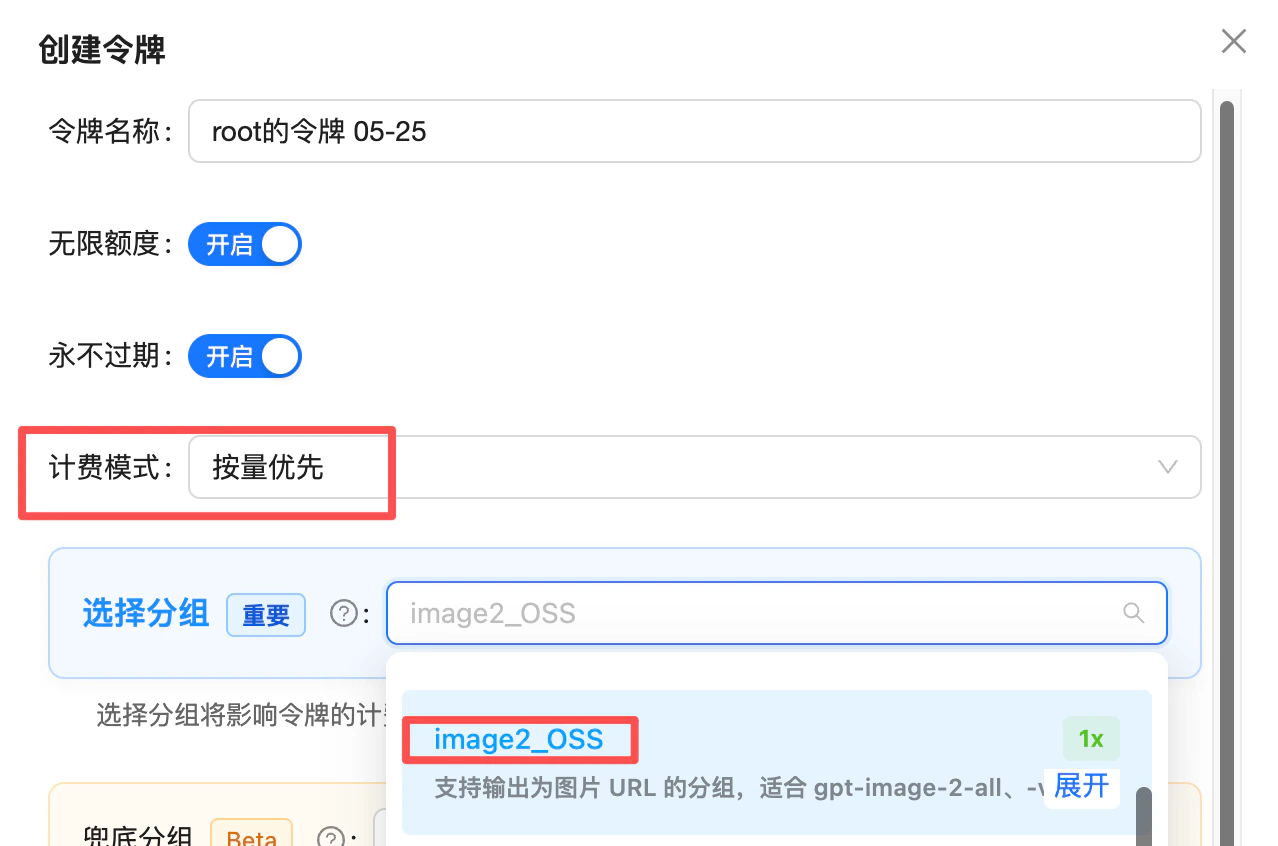 **Advanced (when you also use `gpt-image-2-all` and the official-relay `gpt-image-2`)**: if your token covers all three models, set the token's group priority like this:
* **First priority**: `image2Enterprise` (1.2x enterprise group, dedicated stable lane for the official relay)
* **Default fallback**: `Default` (both reverse models live here and route by model)
Result: official-relay `gpt-image-2` rides the enterprise lane for stability, while the two reverse models stay on the default group — one token covers all three, no interference.
📖 About the `image2Enterprise` group: [/en/live/2026-04/image2-enterprise-stable](/en/live/2026-04/image2-enterprise-stable)
## Technical Specs
| Attribute | Value |
| --------------------------- | ---------------------------------------------------------------------------------------------------------- |
| **Model name** | `gpt-image-2-vip` |
| **Channel type** | Official reverse-engineered (Codex line) |
| **Pricing** | \$0.03 / image, per-call (flat across all sizes) |
| **Generation time** | **\~90–150 seconds** (on par with the official `gpt-image-2`; slower than `gpt-image-2-all`'s 30–60s) |
| **`size` parameter** | ✅ 30 sizes: 10 ratios × 3 resolution tiers (1K Fast / 2K Recommended / 4K Detail) |
| **4K support** | ✅ 4K Detail tier (e.g., `3840x2160` / `2880x2880`) |
| **`quality` parameter** | ❌ Not supported, do not pass |
| **`n` parameter** | ❌ Not supported, single image per call |
| **Default response format** | `b64_json` (raw base64, **no `data:` prefix**, verified 2026-07; always pass `response_format` explicitly) |
| **Optional format** | `url` (R2 CDN accelerated link, **\~1-day validity**, requires explicit `response_format: "url"`) |
| **Chinese prompts** | ✅ Natively supported |
| **Capabilities** | Text-to-image, single-image editing, multi-image fusion, natural-language editing |
**⏰ Image URL validity: \~1 day (default)**
The `url` field of a `url`-mode response is an R2 CDN link that **expires in about 24 hours** — requests after that will 404. For images that need long-term retention, **download and persist them to your own storage** as soon as possible after generation, or use the `b64_json` response format.
## Endpoints
`gpt-image-2-vip` is compatible with the **exact same** two endpoints as `gpt-image-2-all`. Just swap the `model` field and add a `size` if needed:
| Endpoint | Purpose | Content-Type | Best for |
| ----------------------------- | ---------------------------- | --------------------- | ---------------------------------------------------------------------------------------- |
| `POST /v1/images/generations` | Text-to-image | `application/json` | OpenAI Images API standard format — same code can hit both official and reverse channels |
| `POST /v1/images/edits` | Image editing (single/multi) | `multipart/form-data` | OpenAI Images API standard format — same code can hit both official and reverse channels |
**Use the OpenAI Images API** (`/v1/images/generations` + `/v1/images/edits`), for two reasons:
1. **More stable**: upstream resource supply for the Images API channel is more plentiful, so call success rates are higher
2. **Compatible with the official relay for easy switching**: the call method and parameters like `size` are fully compatible with the official-relay [`gpt-image-2`](/en/api-capabilities/gpt-image-2/overview) — if the reverse channel hits risk-control turbulence, **just swap the `model` name** with zero code changes
There is also a chat-based endpoint (`/v1/chat/completions`, no longer recommended) — see the FAQ below.
**Domain options**: `api.apiyi.com` is the main domain. You can also use alternate gateway domains such as `b.apiyi.com` / `vip.apiyi.com`. Response behavior is identical.
## Supported sizes (full 30-size table)
`gpt-image-2-vip` supports **10 aspect ratios × 3 resolution tiers = 30 sizes**. Pass `size: "WIDTHxHEIGHT"` (lowercase ASCII `x`) directly in the request body.
### 1K Fast — drafts and low-cost iterations
| Ratio | Name | Pixels |
| ----- | -------- | ----------- |
| 1:1 | Square | `1280x1280` |
| 2:3 | Portrait | `848x1280` |
| 3:2 | Photo | `1280x848` |
| 3:4 | Portrait | `960x1280` |
| 4:3 | Standard | `1280x960` |
| 4:5 | Social | `1024x1280` |
| 5:4 | Large | `1280x1024` |
| 9:16 | Story | `720x1280` |
| 16:9 | Wide | `1280x720` |
| 21:9 | Cinema | `1280x544` |
### 2K Recommended — default tier (most production outputs)
| Ratio | Name | Pixels |
| ----- | -------- | ----------- |
| 1:1 | Square | `2048x2048` |
| 2:3 | Portrait | `1360x2048` |
| 3:2 | Photo | `2048x1360` |
| 3:4 | Portrait | `1536x2048` |
| 4:3 | Standard | `2048x1536` |
| 4:5 | Social | `1632x2048` |
| 5:4 | Large | `2048x1632` |
| 9:16 | Story | `1152x2048` |
| 16:9 | Wide | `2048x1152` |
| 21:9 | Cinema | `2048x864` |
### 4K Detail — large deliverables
| Ratio | Name | Pixels |
| ----- | -------- | ----------- |
| 1:1 | Square | `2880x2880` |
| 2:3 | Portrait | `2336x3520` |
| 3:2 | Photo | `3520x2336` |
| 3:4 | Portrait | `2480x3312` |
| 4:3 | Standard | `3312x2480` |
| 4:5 | Social | `2560x3216` |
| 5:4 | Large | `3216x2560` |
| 9:16 | Story | `2160x3840` |
| 16:9 | Wide | `3840x2160` |
| 21:9 | Cinema | `3840x1632` |
**Flat pricing across all 30 sizes**: \$0.03/image. No surcharge for 4K Detail.
**Picking a tier**:
* **1K Fast** — drafts, thumbnails, A/B tests. Fastest output (price is flat, but iteration loop is shorter).
* **2K Recommended** — **default tier**. Covers most production outputs (e-commerce hero shots, posters, infographics).
* **4K Detail** — print, large displays, video thumbnails, desktop / outdoor large format.
**Minimal call example** (only pass `size`, **do not pass `quality`**):
```bash theme={null}
curl "https://api.apiyi.com/v1/images/generations" \
-H "Content-Type: application/json" \
-H "Authorization: Bearer $YI_API_KEY" \
-d '{
"model": "gpt-image-2-vip",
"prompt": "Product shot of a white ceramic mug on a gray desk, soft natural light, clean background",
"size": "2048x1360"
}'
```
## Best Practices
Compress each image you upload to **under 1.5MB** (JPEG quality 80-90 / down-sized resolution); apply the same cap per image in multi-image fusion. Sporadic `shell_api_error` / `Unknown error` responses are most often triggered by oversized inputs — compressing measurably improves success rate and latency. **Output resolution is governed by the `size` field, not by input size** — shrinking the input only speeds things up, it does not hurt quality. Stuffing `4K` / `8K` into the prompt does not produce a 4K image; resolution is set by `size`, not by prompt fluff.
1K Fast for drafts, 2K Recommended for production, 4K Detail for print/large displays. Pricing is flat — pick by need.
Send `"size": "1536x1024"` — not `1536×1024`, not uppercase `X`.
`quality` is rejected; `n` returns 1 image per call regardless — for multiple images, call in parallel.
Typical generation is 90–150s, but image upload / download time and peak-tail latency push it higher. **Set 300s as a conservative baseline.**
Use `b64_json` for direct web rendering; `url` for server-side storage/forwarding.
Same code works for both — switch `model` between `gpt-image-2-all` and `gpt-image-2-vip` as needed. Use vip when you need locked size, switch back to -all for fastest iteration.
## Error Codes and Retries
| Status | Meaning | Suggestion |
| ------------------- | ------------------------------------------------------------------------ | ------------------------------------------------------------------------------------------------------------------------------------------------------------------------ |
| `400` | size not in the 30-size set, or malformed | Use the exact strings from the table above |
| `401` | Invalid token | Check Bearer Token |
| `429` | Rate limit / quota exhausted | Exponential backoff retry |
| `500` (4K sporadic) | OpenAI upstream compute fluctuation; 4K Detail tier hits this more often | **Drop to 2K Recommended** and retry; if 4K is mandatory, switch to official-proxy [`gpt-image-2`](/en/api-capabilities/gpt-image-2/overview) + `image2Enterprise` group |
| `5xx` (other) | Transient gateway/backend error | Retry 1–2 times |
| Timeout | Codex peak + 4K long tail | Set client timeout **≥ 300s** (conservative) |
**Client recommendations**:
* Request timeout **starting at 300 seconds** (conservative; typical 90–150s, but 4K Detail + peak tails go higher)
* Use **exponential backoff** for 5xx and timeouts (2–3 retries recommended)
* Log the `request-id` response header for debugging
## FAQ
**Yes, almost identical.** Both endpoints (`/v1/images/generations`, `/v1/images/edits`) share request fields, response fields, and `b64_json` prefix behavior. The only differences:
1. `model` field: `gpt-image-2-vip` ↔ `gpt-image-2-all`
2. `size` field: vip accepts the 30-size set; -all rejects `size` (size goes into the prompt instead)
Practical pattern: keep one codebase with an `if model == 'vip': payload['size'] = ...` switch.
`gpt-image-2-vip` uses the Codex reverse channel — **typical 90–150 seconds**, on par with the official `gpt-image-2` (100–120s) and slower than ChatGPT-web-line `gpt-image-2-all` (30–60s). For **latency-sensitive** workloads, prefer `gpt-image-2-all`; switch to vip only when you **need locked size or 4K**.
**Yes — stick to the 30-size set.** Off-list sizes may trigger upstream `invalid_request_error`. Pick the closest tier for your deliverable.
**Symptom**: at the 4K Detail tier (e.g., `3840x2160` / `2880x2880`), `status_code: 500` errors are easier to trigger, with upstream returning `invalid_request_error`:
```json theme={null}
{
"status_code": 500,
"error": {
"message": "An error occurred while processing your request. ... Please include the request ID xxxxxxxx in your message.",
"type": "invalid_request_error",
"code": null
}
}
```
**Root cause**: **OpenAI compute fluctuation** — not your request parameters. The same payload usually goes through at 2K. The Codex reverse channel is more sensitive to large outputs like 4K, especially at peak hours.
**Mitigation** (by cost-effectiveness):
1. **Prefer 2K Recommended** (e.g., `2048x1360` / `2048x2048`) — significantly higher success rate, same **\$0.03/image**
2. **Send fewer input images** for img2img / multi-image fusion — the Codex reverse channel struggles under heavy input load, further pushing up 4K failure rates; pre-compressing each input image **under 1.5MB** also helps
3. **For guaranteed 4K** — switch to the official-proxy [`gpt-image-2`](/en/api-capabilities/gpt-image-2/overview) + **`image2Enterprise` group**. The official-proxy 4K is pricier (**\~\$0.3+/image**), but markedly more stable — appropriate when 4K delivery is a hard requirement.
📖 Field note: [/en/live/2026-05/gpt-image-2-vip-4k-tips](/en/live/2026-05/gpt-image-2-vip-4k-tips)
**Yes, strongly recommended.** Compress each input image to **under 1.5MB** (JPEG quality 80-90 / down-sized resolution): sporadic `shell_api_error` / `Unknown error` responses are most often triggered by oversized inputs, and compressing measurably improves success rate and latency. Note: 1.5MB is the **recommended ceiling** for reliability and speed; the 10MB number in the FAQ above is the gateway hard limit.
**Don't worry about compression hurting quality** — output resolution is governed by the `size` parameter, not by your input size. Shrinking the input only speeds things up.
**Stuffing `4K` / `8K` into the prompt does not actually produce 4K output.** If your prompt says `8K ultra HD` but you set `size` to `1024x1024`, you still get a 1K-quality image. **For 4K, set it in the `size` field** — 1K / 2K / 4K all cost the same flat \$0.03/image across the 30-size set.
📖 Source: [/en/live/2026-05/gpt-image-2-vip-unknown-error](/en/live/2026-05/gpt-image-2-vip-unknown-error)
**No surcharge.** The 4K Detail tier (`3840x2160` / `2880x2880` etc.) costs the same \$0.03/image as 1K and 2K.
**No.** This model returns 1 image per call — for multiple images, use **repeated / concurrent calls** instead.
⚠️ **Important**: if you pass `n=3` in the request, **billing will be 0.03 × 3 = \$0.09**, but **only 1 image is actually returned**. Drop the `n` field to avoid wasted charges.
This is a reverse-engineered channel using **synchronous chat-style responses**. Outcomes split into two cases with **different billing rules**:
**1) HTTP 5xx returned → NOT billed**
When upstream content policy hard-blocks the request, you'll see something like:
```json theme={null}
{
"error": {
"message": "Image was not generated as expected. Please adjust the prompt and retry (traceid: 0672821c6951af183dbf847130caaf16)",
"localized_message": "Unknown error",
"type": "invalid_request_error",
"param": "",
"code": null
}
}
```
These hard errors are **not billed**. Ask the user to adjust the prompt and retry.
**2) HTTP 200 with a text "soft refusal" → BILLED**
When the model soft-refuses inside the conversation (e.g. "I can't do that", "Sorry, this request involves…"), at the protocol level it looks like a normal chat completion, so **it is billed**. The reverse channel cannot reliably distinguish "refusal text" from "image output" at the protocol layer.
**Why we can't just waive soft refusals**
Auto-waiving every soft refusal would mean the platform absorbs every failed upstream call. More importantly, **frequently triggering upstream content safety also raises the risk of the supplier's account being banned** — that's a real supply-side cost we can't fully eliminate.
**Recommendations for integrators**
* ✅ **Pre-filter and warn users**: add a keyword/scenario filter at the frontend or gateway (real-person names, copyrighted characters, sensitive topics) and surface a UI hint like "Celebrity / IP topics may fail and still be billed by upstream policy." This cuts wasted charges sharply.
* ✅ **Monthly reimbursement for consumer products**: we understand consumer-facing products can't fully gate user input. If your monthly spend is large enough (**\$1000+/month**), you can **batch your logs monthly** (short-latency calls are usually soft refusals) and contact support for a one-off manual credit — no need to file per-call appeals.
📖 Related: [500 errors are usually content-policy hits (not billed)](/en/live/2026-04/gpt-image-2-all-500-content-policy)
**Detect first, then handle.** As verified in July 2026, the returned `b64_json` is **raw base64 without the `data:` prefix** — decode it to write a file, or prepend the prefix yourself before rendering; **earlier versions did include the prefix**. Add a `startsWith('data:')` check in your code: if the prefix is present, use the value directly as `img src`; if not, decode or prepend first — this avoids double-prefixing or decoding a prefixed string into a broken image.
Recommended **≤ 10MB per image**, formats `png` / `jpg` / `webp`. Overly large images may hit gateway limits. Each image in multi-image fusion must meet this limit.
The `url` field of a `url`-mode response is an **R2 CDN link that expires in about 1 day (24 hours)** — requests after that will 404.
**Strongly recommended**: download and persist generated images to your **own object storage (S3 / OSS / R2), CDN, or database** shortly after generation.
No. This model returns the image in one shot; streaming is not supported. If latency matters, show a "generating..." progress indicator on the client side and configure a **300s timeout** (conservative).
Yes. Point `base_url` to `https://api.apiyi.com/v1` and set `api_key` to your APIYI token. `client.images.generate(model="gpt-image-2-vip", size="2048x1360", prompt=...)` works directly.
Yes, the endpoint still works, but it is **no longer recommended** — use `/v1/images/generations` and `/v1/images/edits` instead (more stable, and the same code works with the official-relay `gpt-image-2`).
The chat-based style only makes sense in two scenarios: multi-turn iterative editing, or passing online image URLs directly. Note that when the image intent is ambiguous, the model may return plain text instead of an image (prepend a fixed prefix like "Generate an image:" to your prompt to reinforce it).
For full parameters, see the [chat-based API reference](/en/api-capabilities/gpt-image-2-vip/chat-completions).
When you need a `quality` knob (low/medium/high), mask-based local repaint, or strict OpenAI-API field parity — use [`gpt-image-2`](/en/api-capabilities/gpt-image-2/overview). See the [Official vs Reverse comparison](/en/api-capabilities/gpt-image-2/vs-gpt-image-2-all).
## Related Documentation
* [GPT-Image-2-All Overview](/en/api-capabilities/gpt-image-2-all/overview) - Sister model at the same price with faster output, ideal when you don't need to lock size
* [⚖️ Official vs Reverse Comparison](/en/api-capabilities/gpt-image-2/vs-gpt-image-2-all) - Side-by-side selection guide vs the official `gpt-image-2` (covers `-all` / `-vip`)
* [Text-to-Image Playground](/en/api-capabilities/gpt-image-2-vip/text-to-image) - `/v1/images/generations` compatible endpoint, pass `size` to lock dimensions
* [Image Editing Playground](/en/api-capabilities/gpt-image-2-vip/image-edit) - `/v1/images/edits` multi-image fusion and editing
* [GPT-Image-2 Official](/en/api-capabilities/gpt-image-2/overview) - For `quality` parameter / mask-based repaint / strict OpenAI-API field parity
* [GPT-Image Series Overview](/en/api-capabilities/gpt-image-series) - Official GPT-Image comparison
* [API Manual](/en/api-manual) - General calling conventions
gpt-image-2-vip is a reverse-engineered channel (Codex line). Behavior is aligned but pricing/capabilities may not fully match the official version. For full official-API parity, use [`gpt-image-2`](/en/api-capabilities/gpt-image-2/overview).
**Advanced (when you also use `gpt-image-2-all` and the official-relay `gpt-image-2`)**: if your token covers all three models, set the token's group priority like this:
* **First priority**: `image2Enterprise` (1.2x enterprise group, dedicated stable lane for the official relay)
* **Default fallback**: `Default` (both reverse models live here and route by model)
Result: official-relay `gpt-image-2` rides the enterprise lane for stability, while the two reverse models stay on the default group — one token covers all three, no interference.
📖 About the `image2Enterprise` group: [/en/live/2026-04/image2-enterprise-stable](/en/live/2026-04/image2-enterprise-stable)
## Technical Specs
| Attribute | Value |
| --------------------------- | ---------------------------------------------------------------------------------------------------------- |
| **Model name** | `gpt-image-2-vip` |
| **Channel type** | Official reverse-engineered (Codex line) |
| **Pricing** | \$0.03 / image, per-call (flat across all sizes) |
| **Generation time** | **\~90–150 seconds** (on par with the official `gpt-image-2`; slower than `gpt-image-2-all`'s 30–60s) |
| **`size` parameter** | ✅ 30 sizes: 10 ratios × 3 resolution tiers (1K Fast / 2K Recommended / 4K Detail) |
| **4K support** | ✅ 4K Detail tier (e.g., `3840x2160` / `2880x2880`) |
| **`quality` parameter** | ❌ Not supported, do not pass |
| **`n` parameter** | ❌ Not supported, single image per call |
| **Default response format** | `b64_json` (raw base64, **no `data:` prefix**, verified 2026-07; always pass `response_format` explicitly) |
| **Optional format** | `url` (R2 CDN accelerated link, **\~1-day validity**, requires explicit `response_format: "url"`) |
| **Chinese prompts** | ✅ Natively supported |
| **Capabilities** | Text-to-image, single-image editing, multi-image fusion, natural-language editing |
**⏰ Image URL validity: \~1 day (default)**
The `url` field of a `url`-mode response is an R2 CDN link that **expires in about 24 hours** — requests after that will 404. For images that need long-term retention, **download and persist them to your own storage** as soon as possible after generation, or use the `b64_json` response format.
## Endpoints
`gpt-image-2-vip` is compatible with the **exact same** two endpoints as `gpt-image-2-all`. Just swap the `model` field and add a `size` if needed:
| Endpoint | Purpose | Content-Type | Best for |
| ----------------------------- | ---------------------------- | --------------------- | ---------------------------------------------------------------------------------------- |
| `POST /v1/images/generations` | Text-to-image | `application/json` | OpenAI Images API standard format — same code can hit both official and reverse channels |
| `POST /v1/images/edits` | Image editing (single/multi) | `multipart/form-data` | OpenAI Images API standard format — same code can hit both official and reverse channels |
**Use the OpenAI Images API** (`/v1/images/generations` + `/v1/images/edits`), for two reasons:
1. **More stable**: upstream resource supply for the Images API channel is more plentiful, so call success rates are higher
2. **Compatible with the official relay for easy switching**: the call method and parameters like `size` are fully compatible with the official-relay [`gpt-image-2`](/en/api-capabilities/gpt-image-2/overview) — if the reverse channel hits risk-control turbulence, **just swap the `model` name** with zero code changes
There is also a chat-based endpoint (`/v1/chat/completions`, no longer recommended) — see the FAQ below.
**Domain options**: `api.apiyi.com` is the main domain. You can also use alternate gateway domains such as `b.apiyi.com` / `vip.apiyi.com`. Response behavior is identical.
## Supported sizes (full 30-size table)
`gpt-image-2-vip` supports **10 aspect ratios × 3 resolution tiers = 30 sizes**. Pass `size: "WIDTHxHEIGHT"` (lowercase ASCII `x`) directly in the request body.
### 1K Fast — drafts and low-cost iterations
| Ratio | Name | Pixels |
| ----- | -------- | ----------- |
| 1:1 | Square | `1280x1280` |
| 2:3 | Portrait | `848x1280` |
| 3:2 | Photo | `1280x848` |
| 3:4 | Portrait | `960x1280` |
| 4:3 | Standard | `1280x960` |
| 4:5 | Social | `1024x1280` |
| 5:4 | Large | `1280x1024` |
| 9:16 | Story | `720x1280` |
| 16:9 | Wide | `1280x720` |
| 21:9 | Cinema | `1280x544` |
### 2K Recommended — default tier (most production outputs)
| Ratio | Name | Pixels |
| ----- | -------- | ----------- |
| 1:1 | Square | `2048x2048` |
| 2:3 | Portrait | `1360x2048` |
| 3:2 | Photo | `2048x1360` |
| 3:4 | Portrait | `1536x2048` |
| 4:3 | Standard | `2048x1536` |
| 4:5 | Social | `1632x2048` |
| 5:4 | Large | `2048x1632` |
| 9:16 | Story | `1152x2048` |
| 16:9 | Wide | `2048x1152` |
| 21:9 | Cinema | `2048x864` |
### 4K Detail — large deliverables
| Ratio | Name | Pixels |
| ----- | -------- | ----------- |
| 1:1 | Square | `2880x2880` |
| 2:3 | Portrait | `2336x3520` |
| 3:2 | Photo | `3520x2336` |
| 3:4 | Portrait | `2480x3312` |
| 4:3 | Standard | `3312x2480` |
| 4:5 | Social | `2560x3216` |
| 5:4 | Large | `3216x2560` |
| 9:16 | Story | `2160x3840` |
| 16:9 | Wide | `3840x2160` |
| 21:9 | Cinema | `3840x1632` |
**Flat pricing across all 30 sizes**: \$0.03/image. No surcharge for 4K Detail.
**Picking a tier**:
* **1K Fast** — drafts, thumbnails, A/B tests. Fastest output (price is flat, but iteration loop is shorter).
* **2K Recommended** — **default tier**. Covers most production outputs (e-commerce hero shots, posters, infographics).
* **4K Detail** — print, large displays, video thumbnails, desktop / outdoor large format.
**Minimal call example** (only pass `size`, **do not pass `quality`**):
```bash theme={null}
curl "https://api.apiyi.com/v1/images/generations" \
-H "Content-Type: application/json" \
-H "Authorization: Bearer $YI_API_KEY" \
-d '{
"model": "gpt-image-2-vip",
"prompt": "Product shot of a white ceramic mug on a gray desk, soft natural light, clean background",
"size": "2048x1360"
}'
```
## Best Practices
Compress each image you upload to **under 1.5MB** (JPEG quality 80-90 / down-sized resolution); apply the same cap per image in multi-image fusion. Sporadic `shell_api_error` / `Unknown error` responses are most often triggered by oversized inputs — compressing measurably improves success rate and latency. **Output resolution is governed by the `size` field, not by input size** — shrinking the input only speeds things up, it does not hurt quality. Stuffing `4K` / `8K` into the prompt does not produce a 4K image; resolution is set by `size`, not by prompt fluff.
1K Fast for drafts, 2K Recommended for production, 4K Detail for print/large displays. Pricing is flat — pick by need.
Send `"size": "1536x1024"` — not `1536×1024`, not uppercase `X`.
`quality` is rejected; `n` returns 1 image per call regardless — for multiple images, call in parallel.
Typical generation is 90–150s, but image upload / download time and peak-tail latency push it higher. **Set 300s as a conservative baseline.**
Use `b64_json` for direct web rendering; `url` for server-side storage/forwarding.
Same code works for both — switch `model` between `gpt-image-2-all` and `gpt-image-2-vip` as needed. Use vip when you need locked size, switch back to -all for fastest iteration.
## Error Codes and Retries
| Status | Meaning | Suggestion |
| ------------------- | ------------------------------------------------------------------------ | ------------------------------------------------------------------------------------------------------------------------------------------------------------------------ |
| `400` | size not in the 30-size set, or malformed | Use the exact strings from the table above |
| `401` | Invalid token | Check Bearer Token |
| `429` | Rate limit / quota exhausted | Exponential backoff retry |
| `500` (4K sporadic) | OpenAI upstream compute fluctuation; 4K Detail tier hits this more often | **Drop to 2K Recommended** and retry; if 4K is mandatory, switch to official-proxy [`gpt-image-2`](/en/api-capabilities/gpt-image-2/overview) + `image2Enterprise` group |
| `5xx` (other) | Transient gateway/backend error | Retry 1–2 times |
| Timeout | Codex peak + 4K long tail | Set client timeout **≥ 300s** (conservative) |
**Client recommendations**:
* Request timeout **starting at 300 seconds** (conservative; typical 90–150s, but 4K Detail + peak tails go higher)
* Use **exponential backoff** for 5xx and timeouts (2–3 retries recommended)
* Log the `request-id` response header for debugging
## FAQ
**Yes, almost identical.** Both endpoints (`/v1/images/generations`, `/v1/images/edits`) share request fields, response fields, and `b64_json` prefix behavior. The only differences:
1. `model` field: `gpt-image-2-vip` ↔ `gpt-image-2-all`
2. `size` field: vip accepts the 30-size set; -all rejects `size` (size goes into the prompt instead)
Practical pattern: keep one codebase with an `if model == 'vip': payload['size'] = ...` switch.
`gpt-image-2-vip` uses the Codex reverse channel — **typical 90–150 seconds**, on par with the official `gpt-image-2` (100–120s) and slower than ChatGPT-web-line `gpt-image-2-all` (30–60s). For **latency-sensitive** workloads, prefer `gpt-image-2-all`; switch to vip only when you **need locked size or 4K**.
**Yes — stick to the 30-size set.** Off-list sizes may trigger upstream `invalid_request_error`. Pick the closest tier for your deliverable.
**Symptom**: at the 4K Detail tier (e.g., `3840x2160` / `2880x2880`), `status_code: 500` errors are easier to trigger, with upstream returning `invalid_request_error`:
```json theme={null}
{
"status_code": 500,
"error": {
"message": "An error occurred while processing your request. ... Please include the request ID xxxxxxxx in your message.",
"type": "invalid_request_error",
"code": null
}
}
```
**Root cause**: **OpenAI compute fluctuation** — not your request parameters. The same payload usually goes through at 2K. The Codex reverse channel is more sensitive to large outputs like 4K, especially at peak hours.
**Mitigation** (by cost-effectiveness):
1. **Prefer 2K Recommended** (e.g., `2048x1360` / `2048x2048`) — significantly higher success rate, same **\$0.03/image**
2. **Send fewer input images** for img2img / multi-image fusion — the Codex reverse channel struggles under heavy input load, further pushing up 4K failure rates; pre-compressing each input image **under 1.5MB** also helps
3. **For guaranteed 4K** — switch to the official-proxy [`gpt-image-2`](/en/api-capabilities/gpt-image-2/overview) + **`image2Enterprise` group**. The official-proxy 4K is pricier (**\~\$0.3+/image**), but markedly more stable — appropriate when 4K delivery is a hard requirement.
📖 Field note: [/en/live/2026-05/gpt-image-2-vip-4k-tips](/en/live/2026-05/gpt-image-2-vip-4k-tips)
**Yes, strongly recommended.** Compress each input image to **under 1.5MB** (JPEG quality 80-90 / down-sized resolution): sporadic `shell_api_error` / `Unknown error` responses are most often triggered by oversized inputs, and compressing measurably improves success rate and latency. Note: 1.5MB is the **recommended ceiling** for reliability and speed; the 10MB number in the FAQ above is the gateway hard limit.
**Don't worry about compression hurting quality** — output resolution is governed by the `size` parameter, not by your input size. Shrinking the input only speeds things up.
**Stuffing `4K` / `8K` into the prompt does not actually produce 4K output.** If your prompt says `8K ultra HD` but you set `size` to `1024x1024`, you still get a 1K-quality image. **For 4K, set it in the `size` field** — 1K / 2K / 4K all cost the same flat \$0.03/image across the 30-size set.
📖 Source: [/en/live/2026-05/gpt-image-2-vip-unknown-error](/en/live/2026-05/gpt-image-2-vip-unknown-error)
**No surcharge.** The 4K Detail tier (`3840x2160` / `2880x2880` etc.) costs the same \$0.03/image as 1K and 2K.
**No.** This model returns 1 image per call — for multiple images, use **repeated / concurrent calls** instead.
⚠️ **Important**: if you pass `n=3` in the request, **billing will be 0.03 × 3 = \$0.09**, but **only 1 image is actually returned**. Drop the `n` field to avoid wasted charges.
This is a reverse-engineered channel using **synchronous chat-style responses**. Outcomes split into two cases with **different billing rules**:
**1) HTTP 5xx returned → NOT billed**
When upstream content policy hard-blocks the request, you'll see something like:
```json theme={null}
{
"error": {
"message": "Image was not generated as expected. Please adjust the prompt and retry (traceid: 0672821c6951af183dbf847130caaf16)",
"localized_message": "Unknown error",
"type": "invalid_request_error",
"param": "",
"code": null
}
}
```
These hard errors are **not billed**. Ask the user to adjust the prompt and retry.
**2) HTTP 200 with a text "soft refusal" → BILLED**
When the model soft-refuses inside the conversation (e.g. "I can't do that", "Sorry, this request involves…"), at the protocol level it looks like a normal chat completion, so **it is billed**. The reverse channel cannot reliably distinguish "refusal text" from "image output" at the protocol layer.
**Why we can't just waive soft refusals**
Auto-waiving every soft refusal would mean the platform absorbs every failed upstream call. More importantly, **frequently triggering upstream content safety also raises the risk of the supplier's account being banned** — that's a real supply-side cost we can't fully eliminate.
**Recommendations for integrators**
* ✅ **Pre-filter and warn users**: add a keyword/scenario filter at the frontend or gateway (real-person names, copyrighted characters, sensitive topics) and surface a UI hint like "Celebrity / IP topics may fail and still be billed by upstream policy." This cuts wasted charges sharply.
* ✅ **Monthly reimbursement for consumer products**: we understand consumer-facing products can't fully gate user input. If your monthly spend is large enough (**\$1000+/month**), you can **batch your logs monthly** (short-latency calls are usually soft refusals) and contact support for a one-off manual credit — no need to file per-call appeals.
📖 Related: [500 errors are usually content-policy hits (not billed)](/en/live/2026-04/gpt-image-2-all-500-content-policy)
**Detect first, then handle.** As verified in July 2026, the returned `b64_json` is **raw base64 without the `data:` prefix** — decode it to write a file, or prepend the prefix yourself before rendering; **earlier versions did include the prefix**. Add a `startsWith('data:')` check in your code: if the prefix is present, use the value directly as `img src`; if not, decode or prepend first — this avoids double-prefixing or decoding a prefixed string into a broken image.
Recommended **≤ 10MB per image**, formats `png` / `jpg` / `webp`. Overly large images may hit gateway limits. Each image in multi-image fusion must meet this limit.
The `url` field of a `url`-mode response is an **R2 CDN link that expires in about 1 day (24 hours)** — requests after that will 404.
**Strongly recommended**: download and persist generated images to your **own object storage (S3 / OSS / R2), CDN, or database** shortly after generation.
No. This model returns the image in one shot; streaming is not supported. If latency matters, show a "generating..." progress indicator on the client side and configure a **300s timeout** (conservative).
Yes. Point `base_url` to `https://api.apiyi.com/v1` and set `api_key` to your APIYI token. `client.images.generate(model="gpt-image-2-vip", size="2048x1360", prompt=...)` works directly.
Yes, the endpoint still works, but it is **no longer recommended** — use `/v1/images/generations` and `/v1/images/edits` instead (more stable, and the same code works with the official-relay `gpt-image-2`).
The chat-based style only makes sense in two scenarios: multi-turn iterative editing, or passing online image URLs directly. Note that when the image intent is ambiguous, the model may return plain text instead of an image (prepend a fixed prefix like "Generate an image:" to your prompt to reinforce it).
For full parameters, see the [chat-based API reference](/en/api-capabilities/gpt-image-2-vip/chat-completions).
When you need a `quality` knob (low/medium/high), mask-based local repaint, or strict OpenAI-API field parity — use [`gpt-image-2`](/en/api-capabilities/gpt-image-2/overview). See the [Official vs Reverse comparison](/en/api-capabilities/gpt-image-2/vs-gpt-image-2-all).
## Related Documentation
* [GPT-Image-2-All Overview](/en/api-capabilities/gpt-image-2-all/overview) - Sister model at the same price with faster output, ideal when you don't need to lock size
* [⚖️ Official vs Reverse Comparison](/en/api-capabilities/gpt-image-2/vs-gpt-image-2-all) - Side-by-side selection guide vs the official `gpt-image-2` (covers `-all` / `-vip`)
* [Text-to-Image Playground](/en/api-capabilities/gpt-image-2-vip/text-to-image) - `/v1/images/generations` compatible endpoint, pass `size` to lock dimensions
* [Image Editing Playground](/en/api-capabilities/gpt-image-2-vip/image-edit) - `/v1/images/edits` multi-image fusion and editing
* [GPT-Image-2 Official](/en/api-capabilities/gpt-image-2/overview) - For `quality` parameter / mask-based repaint / strict OpenAI-API field parity
* [GPT-Image Series Overview](/en/api-capabilities/gpt-image-series) - Official GPT-Image comparison
* [API Manual](/en/api-manual) - General calling conventions
gpt-image-2-vip is a reverse-engineered channel (Codex line). Behavior is aligned but pricing/capabilities may not fully match the official version. For full official-API parity, use [`gpt-image-2`](/en/api-capabilities/gpt-image-2/overview).