> ## Documentation Index
> Fetch the complete documentation index at: https://docs.apiyi.com/llms.txt
> Use this file to discover all available pages before exploring further.
# Sora 2 Video Generation
> Complete guide to OpenAI Sora 2 / Sora 2 Pro official-relay video generation: text-to-video and image-to-video on a unified async endpoint, supporting 4 / 8 / 12 second clips at 720p / 1024p / 1080p.
## Overview
**Sora 2** is OpenAI's flagship video generation series, producing 4–12 second high-fidelity clips with **synchronized audio** from text prompts or reference images. APIYI provides a **transparent proxy (official-relay) channel** that forwards requests directly to OpenAI's `/v1/videos` endpoint with identical request and response semantics.
**🎬 Highlights**: Transparent proxy to the official OpenAI API, synchronized audio + video output, flexible 4 / 8 / 12 second durations, and three resolution tiers — Standard (720p), HD (1024p), and Full HD (1080p, Pro only). **Suited for ad shorts, e-commerce assets, social-media clips, and product demos** where precise instruction following and consistent quality matter.
`POST /v1/videos`, generate video from text only — JSON request body, the simplest entry point.
`POST /v1/videos` + multipart upload of `input_reference` to animate a static image into a clip.
Debug this endpoint directly in the iCover visual testing tool — no code required.
View submitted video tasks and download video links in the APIYI console — a lookup entry outside the API.
## Why APIYI's Sora 2 Official Relay?
Drop-in replacement for the OpenAI official channel, optimized for production scenarios across **stability**, **integration friction**, and **cost**:
Transparent forward to OpenAI's official `/v1/videos` — no intermediate processing, no protocol bypass risk. Request and response behavior matches the upstream exactly. **No need to manage OpenAI account tiers or risk-control fluctuations**.
Linearly scale batch shoots, ad pipelines, and high-volume asset production — no per-account tier ceilings. **Default capacity is production-ready**; contact us for custom resource pools.
Identical per-second rates to OpenAI official, stacked with [top-up bonuses](/en/faq/recharge-promotions) for further savings. Failed tasks are not billed.
**No overseas server or proxy required** — connect to `api.apiyi.com` directly from Mainland China data centers, residential networks, or overseas nodes. Skip the OpenAI cross-border setup entirely.
Endpoint path `/v1/videos` matches OpenAI exactly. Point the official OpenAI SDK to APIYI's `base_url` and call as-is — parameter and field names align one-to-one.
Our team has deep expertise in video generation: prompt engineering, resolution selection, batch production, and post-processing. Full PoC-to-production technical support for enterprise customers.
## Key Features
Sora 2 natively outputs **video with synchronized audio tracks** (ambient sound, dialogue, score) — no separate audio post-production needed.
`sora-2` supports 720p (`720x1280` / `1280x720`); `sora-2-pro` adds 1024p and 1080p tiers up to `1920x1080`.
Per-second billing means you pay for exactly what you produce. 8 seconds is the most common tier — balancing visual continuity and cost.
Sora 2 leads its tier on camera motion, object physics, and character expression fidelity — closer to your prompt intent than competitors.
Upload one image as the starting frame to animate static visuals. See [Image-to-Video](/en/api-capabilities/sora-2/image-to-video).
Submit returns a `video_id` immediately. Poll status independently and download the final video — ideal for batch management and resume-on-failure flows.
`base_url=https://api.apiyi.com/v1` works as a drop-in replacement for the official OpenAI SDK.
In async mode, failed generations, content-policy rejections, and capacity errors are **not billed**.
## Pricing
Billed by **video duration in seconds**, identical to OpenAI official rates. `sora-2-pro` has three resolution tiers, each with distinct per-second pricing.
### `sora-2` (Standard)
| Resolution | Rate | 4 sec | 8 sec | 12 sec |
| ----------------------- | ---------- | ------ | ------ | ------ |
| `720x1280` / `1280x720` | \$0.10/sec | \$0.40 | \$0.80 | \$1.20 |
### `sora-2-pro` (Pro)
| Resolution | Rate | 4 sec | 8 sec | 12 sec |
| ------------------------- | ---------- | ------ | ------ | ------ |
| `720x1280` / `1280x720` | \$0.30/sec | \$1.20 | \$2.40 | \$3.60 |
| `1024x1792` / `1792x1024` | \$0.50/sec | \$2.00 | \$4.00 | \$6.00 |
| `1080x1920` / `1920x1080` | \$0.70/sec | \$2.80 | \$5.60 | \$8.40 |
**Billing notes**:
* Charged by **actual generated seconds** (`seconds` × rate), independent of prompt length or whether `input_reference` is provided
* In async mode, failed generations / content-policy rejections / capacity errors are **all not billed**
* Requests must use the **usage-based billing** mode in your APIYI console (switch under API Key settings); per-request billing groups cannot route to the official-relay channel
* Top-up bonus tiers are listed under [Top-Up Promotions](/en/faq/recharge-promotions)
## Group Setup
Sora 2 official relay routes through the dedicated `Sora2Official` group (1x). **Two conditions must be met** for a token to reach the channel:
1. **Billing mode**: pick **Usage-Based Priority** (pay-as-you-go) — per-request billing tokens cannot route to the official relay
2. **Group**: must include `Sora2Official`
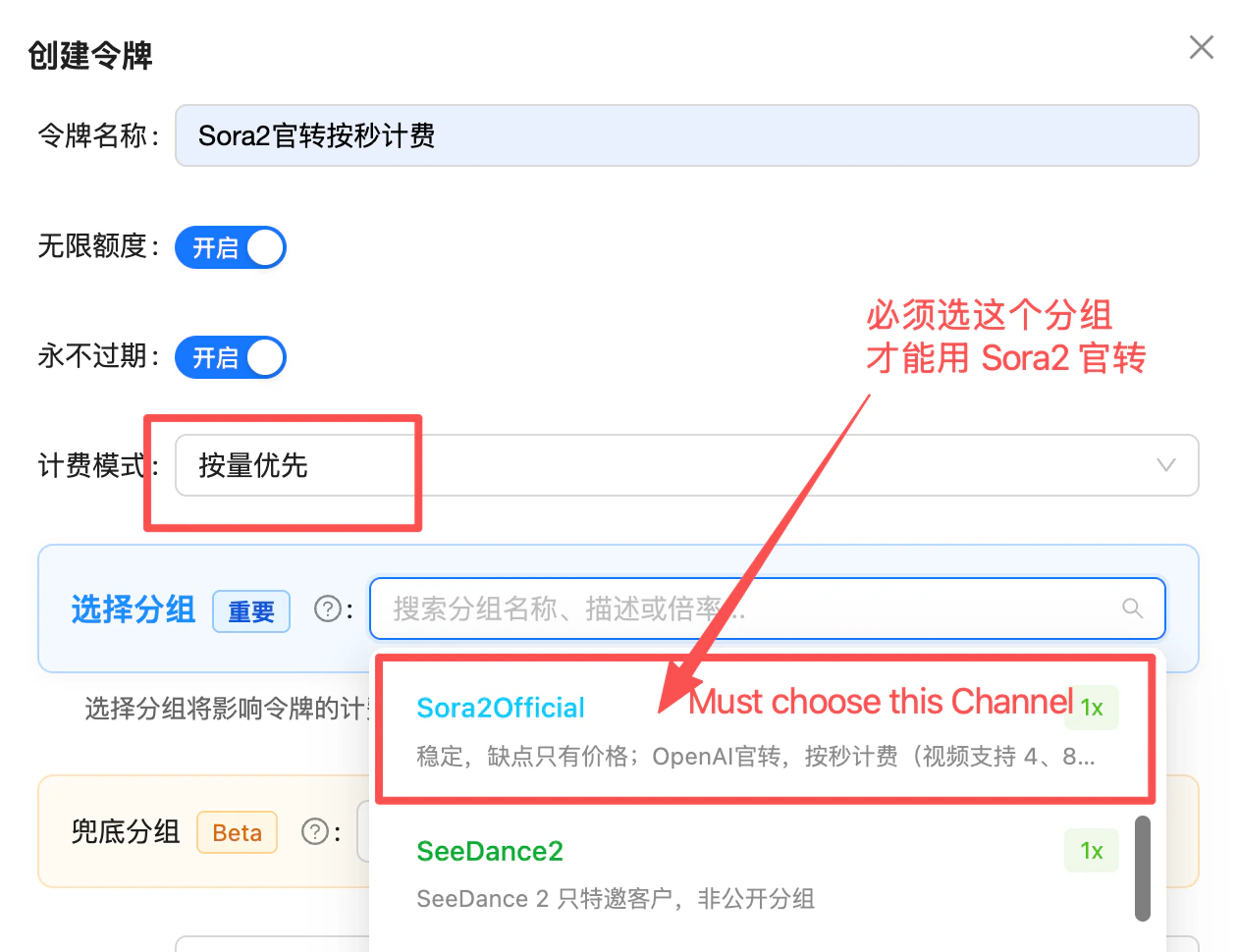 Two recommended setups — pick whichever fits your isolation needs:
| Setup | When to use | How |
| ---------------------------------- | --------------------------------------------------------------------- | ----------------------------------------------------------------------------------------------------------------------------------------------------------------------------------------------------- |
| **A. Single token, multi-purpose** | Same token also calls other models (GPT / Claude / image / …) | Keep your usual `Default` (or other) as the primary group, set `Sora2Official` as **fallback** — non-Sora requests stay on primary, while `sora-2` / `sora-2-pro` calls auto-route to `Sora2Official` |
| **B. Dedicated token** | Video workloads kept separate, need isolated billing & quota controls | Create a new token with **only the `Sora2Official` group selected**, used exclusively for Sora 2 |
Recommend **B (dedicated token)** for production video workloads: cleaner billing, easier quota and alert management. A fits solo dev or low-frequency use.
## Technical Specs
| Dimension | sora-2 | sora-2-pro |
| ------------------------------------- | -------------------------------------------------------------------- | ------------------------------------------------------------------------------- |
| **Model ID** | `sora-2` | `sora-2-pro` |
| **Current snapshot** | `sora-2-2025-12-08` | Synced with alias |
| **Deprecated snapshot** | `sora-2-2025-10-06` | — |
| **Supported resolutions** | `720x1280` / `1280x720` | `720x1280` / `1280x720` / `1024x1792` / `1792x1024` / `1080x1920` / `1920x1080` |
| **Supported durations (seconds)** | `4` / `8` / `12` | `4` / `8` / `12` |
| **Audio track** | ✅ Synchronized | ✅ Synchronized |
| **Image-to-video (input\_reference)** | ✅ | ✅ |
| **Typical generation time** | 3–5 minutes | 5–10 minutes |
| **Video retention** | 1 day | 1 day |
| **Response fields** | `id` / `status` / `progress`; download via `/v1/videos/{id}/content` | Same |
## API Endpoints
| Endpoint | Method | Purpose | Content-Type |
| ------------------------------- | ------ | ----------------------------------------------------------------- | ------------------------------------------- |
| `/v1/videos` | POST | Submit a video generation task (text-to-video and image-to-video) | `application/json` or `multipart/form-data` |
| `/v1/videos/{video_id}` | GET | Poll task status and progress | — |
| `/v1/videos/{video_id}/content` | GET | Download the generated video file | — |
**Domain options**: `api.apiyi.com` is the primary endpoint. `vip.apiyi.com` / `b.apiyi.com` are equivalent backup gateways with identical behavior.
## Key Parameters
### `seconds` (Video Duration)
Only three string-typed enum values (not numbers):
| Value | Meaning | Use Case |
| ------ | ------------------- | -------------------------------------------------- |
| `"4"` | 4 seconds (default) | Short demos, single shots, quick prompt iteration |
| `"8"` | 8 seconds | Standard short-form video, social-media clips |
| `"12"` | 12 seconds | Long shots, continuous action, narrative sequences |
`seconds` must be passed as a **string** `"4"` / `"8"` / `"12"`. Passing the integer `4` or other values like `"10"` / `"15"` returns 400.
### `size` (Output Resolution)
Supported tiers differ between `sora-2` and `sora-2-pro`:
| Tier | Pixels | sora-2 | sora-2-pro |
| --------------- | ----------- | ------ | -------------- |
| 720p Portrait | `720x1280` | ✅ | ✅ (\$0.30/sec) |
| 720p Landscape | `1280x720` | ✅ | ✅ (\$0.30/sec) |
| 1024p Portrait | `1024x1792` | ❌ | ✅ (\$0.50/sec) |
| 1024p Landscape | `1792x1024` | ❌ | ✅ (\$0.50/sec) |
| 1080p Portrait | `1080x1920` | ❌ | ✅ (\$0.70/sec) |
| 1080p Landscape | `1920x1080` | ❌ | ✅ (\$0.70/sec) |
* Passing 1024p / 1080p sizes to `sora-2` returns 400
* The actual rendered vertical pixel count for sora-2 720p videos is **704** (not 720) — this is OpenAI's actual upstream behavior and does not affect display
* **For image-to-video, the `input_reference` image dimensions must exactly match `size`**, otherwise you get `Inpaint image must match the requested width and height`
## Best Practices
* **Cost-conscious** → `sora-2` (720p only, \$0.10/sec, \$0.40 for a 4-sec clip)
* **Need 1080p Full HD / strongest instruction following** → `sora-2-pro` (up to \$0.70/sec, supports `1920x1080`)
* **Internal demos / first iterations** → start with `sora-2` 4 seconds
Run each new prompt at `seconds: "4"` first to verify camera direction, style, and overall composition (\~3 minutes, \$0.40). Only scale to 8 / 12 seconds once the look is locked.
In the APIYI console, set your API Key to **usage-based billing** and the **Sora2官转 (Sora2 Official)** group. Per-request billing groups cannot route to the official-relay channel.
The official-relay channel is **async-only**: POST to submit and get a `video_id`, poll `/v1/videos/{id}` every 10–30 seconds until `status: "completed"`, then download from `/v1/videos/{id}/content`.
The POST itself just enqueues the task and does not block on generation. With multipart `input_reference` uploads, large images extend connection time — start with a 30-second timeout.
Videos are retained on OpenAI servers for **1 day only**; after that, `/content` returns 404. Production flows must persist to your own OSS / CDN as soon as `status: "completed"`.
When uploading `input_reference`, pre-crop your image with ffmpeg / Pillow to the exact target `size` (e.g. `1280x720`) to avoid 400 errors.
## Error Codes & Retries
| Status | Meaning | Recommended Action |
| ------------- | ---------------------------------------------------------------------------------------------------- | ----------------------------------------------------------------------- |
| `400` | Invalid parameters (seconds not in 4/8/12, size not supported, input\_reference dimensions mismatch) | Validate parameters; pre-crop reference images to the target resolution |
| `401` | Invalid token | Check your Bearer Token and group setting (must be `Sora2官转`) |
| `403` | Content-policy rejection / wrong billing mode | Adjust prompt; confirm API Key is on usage-based billing |
| `429` | Rate limit / insufficient balance | Exponential backoff; usable immediately after top-up |
| `5xx` | Gateway / upstream error | Retry the async task 1–2 times (no charge) |
| Task `failed` | Generation failed (mostly content policy or upstream capacity) | Adjust prompt and retry; **the failed task is not billed** |
**Recommended client config**:
* POST submission timeout: **30 seconds** (longer for multipart uploads)
* GET polling interval: **10–30 seconds**, max wait **15 minutes** (Pro 1080p 12 seconds may take 8–10 minutes)
* Exponential backoff retries on 5xx and `failed` tasks (recommend 2 retries)
* Log the `x-request-id` response header for debugging
## FAQ
**Official-relay (this page)**: Direct forward to OpenAI's `/v1/videos`, with request/response fields matching upstream. Per-second billing, 99.99% uptime, requires usage-based billing group.
**Reverse-engineered**: A reverse-engineered Sora 2 interface, billed per-request and cheaper, but subject to OpenAI risk control. **As of January 2026 OpenAI policy adjustment, free accounts were disabled and APIYI now offers only the official-relay channel.** Contact sales for special needs.
The official-relay channel settles by **actual OpenAI seconds**, which is a different billing dimension from per-request. In the APIYI console, switch your API Key to **usage-based billing** + **Sora2官转 group** to access this route — per-request groups will get 403.
The official `/v1/videos` endpoint is itself **async task-based** — there's no SSE or WebSocket streaming. Generating a 4-second clip typically takes 3–5 minutes; 12 seconds can take 8–10 minutes. Synchronous waits would hang HTTP connections for too long and become unreliable. Always use the POST → poll → download flow.
OpenAI officially exposes only `"4"` / `"8"` / `"12"` as enum string values. The 10 / 15 second values were unofficial durations from the older reverse-engineered channel and are **not supported by the official relay**. If your code passes `"10"`, change it to `"8"` or `"12"`.
Yes. OpenAI recently extended `sora-2-pro` to include `1080x1920` / `1920x1080` Full HD at \$0.70/sec. The prior 720p (\$0.30) and 1024p (\$0.50) tiers are unchanged. Our pricing table above reflects the latest official rates.
Videos are stored on OpenAI servers for **1 day only**. After expiration, `/v1/videos/{id}/content` returns 404 / 410. Production flows must download and persist to your own OSS / CDN immediately after `status: "completed"`.
No. Tasks that end up as `failed`, content-policy rejections, capacity errors, and parameter errors are all not billed. **Only tasks that actually complete (`status: "completed"`) and produce a video file are billed by `seconds` rate.**
Yes. OpenAI Python SDK 1.50+ supports the `videos` namespace. Point `base_url` at `https://api.apiyi.com/v1`:
```python theme={null}
from openai import OpenAI
client = OpenAI(api_key="sk-your-key", base_url="https://api.apiyi.com/v1")
video = client.videos.create(
model="sora-2",
prompt="A golden retriever running on the beach at sunset",
seconds="8",
size="1280x720"
)
print(video.id, video.status)
```
No. `input_reference` is a **multipart/form-data file upload field** (accepts `image/jpeg` / `image/png` / `image/webp`) and requires a multipart request. If your image is base64, decode and write to a temp file first. See [Image-to-Video](/en/api-capabilities/sora-2/image-to-video).
**Not currently**. Sora 2 / Pro outputs synchronized audio (ambient sound, dialogue, score) by default, and OpenAI does not expose a parameter to disable it. For audio-free output, strip with `ffmpeg -an` after download.
No. The official `/v1/videos` endpoint does not provide a cancel operation — once submitted, a task runs to completion. Validate prompts at `seconds: "4"` first to avoid wasting long-duration runs.
Subject to upstream OpenAI account tier limits, but pooled through APIYI's gateway there is no obvious bottleneck for typical use. **Enterprise batch needs** (>10 concurrent, >100 clips per day) should contact sales for a dedicated resource pool.
Yes. Each POST `/v1/videos` returns an independent `video_id`. Submit and poll in parallel; manage your video\_id list in a task queue to avoid polling storms.
## Related Docs
* [Text-to-Video Playground](/en/api-capabilities/sora-2/text-to-video) — `POST /v1/videos` (JSON) interactive debugger with 5 language samples
* [Image-to-Video Playground](/en/api-capabilities/sora-2/image-to-video) — `POST /v1/videos` (multipart) + `input_reference` walkthrough
* [Top-Up Promotions](/en/faq/recharge-promotions) — Bonus tiers and applicable channels
* [API Manual](/en/api-manual) — General request, timeout, and retry guidance
* OpenAI official model page: `platform.openai.com/docs/models/sora-2`
* OpenAI official API reference: `platform.openai.com/docs/api-reference/videos/create`
Sora 2 on APIYI is delivered through an authorized Plus-tier account pool for stable official-relay service. Response fields, error codes, and billing dimensions match OpenAI exactly for drop-in compatibility with existing code. Open a ticket from your console for any feedback.
Two recommended setups — pick whichever fits your isolation needs:
| Setup | When to use | How |
| ---------------------------------- | --------------------------------------------------------------------- | ----------------------------------------------------------------------------------------------------------------------------------------------------------------------------------------------------- |
| **A. Single token, multi-purpose** | Same token also calls other models (GPT / Claude / image / …) | Keep your usual `Default` (or other) as the primary group, set `Sora2Official` as **fallback** — non-Sora requests stay on primary, while `sora-2` / `sora-2-pro` calls auto-route to `Sora2Official` |
| **B. Dedicated token** | Video workloads kept separate, need isolated billing & quota controls | Create a new token with **only the `Sora2Official` group selected**, used exclusively for Sora 2 |
Recommend **B (dedicated token)** for production video workloads: cleaner billing, easier quota and alert management. A fits solo dev or low-frequency use.
## Technical Specs
| Dimension | sora-2 | sora-2-pro |
| ------------------------------------- | -------------------------------------------------------------------- | ------------------------------------------------------------------------------- |
| **Model ID** | `sora-2` | `sora-2-pro` |
| **Current snapshot** | `sora-2-2025-12-08` | Synced with alias |
| **Deprecated snapshot** | `sora-2-2025-10-06` | — |
| **Supported resolutions** | `720x1280` / `1280x720` | `720x1280` / `1280x720` / `1024x1792` / `1792x1024` / `1080x1920` / `1920x1080` |
| **Supported durations (seconds)** | `4` / `8` / `12` | `4` / `8` / `12` |
| **Audio track** | ✅ Synchronized | ✅ Synchronized |
| **Image-to-video (input\_reference)** | ✅ | ✅ |
| **Typical generation time** | 3–5 minutes | 5–10 minutes |
| **Video retention** | 1 day | 1 day |
| **Response fields** | `id` / `status` / `progress`; download via `/v1/videos/{id}/content` | Same |
## API Endpoints
| Endpoint | Method | Purpose | Content-Type |
| ------------------------------- | ------ | ----------------------------------------------------------------- | ------------------------------------------- |
| `/v1/videos` | POST | Submit a video generation task (text-to-video and image-to-video) | `application/json` or `multipart/form-data` |
| `/v1/videos/{video_id}` | GET | Poll task status and progress | — |
| `/v1/videos/{video_id}/content` | GET | Download the generated video file | — |
**Domain options**: `api.apiyi.com` is the primary endpoint. `vip.apiyi.com` / `b.apiyi.com` are equivalent backup gateways with identical behavior.
## Key Parameters
### `seconds` (Video Duration)
Only three string-typed enum values (not numbers):
| Value | Meaning | Use Case |
| ------ | ------------------- | -------------------------------------------------- |
| `"4"` | 4 seconds (default) | Short demos, single shots, quick prompt iteration |
| `"8"` | 8 seconds | Standard short-form video, social-media clips |
| `"12"` | 12 seconds | Long shots, continuous action, narrative sequences |
`seconds` must be passed as a **string** `"4"` / `"8"` / `"12"`. Passing the integer `4` or other values like `"10"` / `"15"` returns 400.
### `size` (Output Resolution)
Supported tiers differ between `sora-2` and `sora-2-pro`:
| Tier | Pixels | sora-2 | sora-2-pro |
| --------------- | ----------- | ------ | -------------- |
| 720p Portrait | `720x1280` | ✅ | ✅ (\$0.30/sec) |
| 720p Landscape | `1280x720` | ✅ | ✅ (\$0.30/sec) |
| 1024p Portrait | `1024x1792` | ❌ | ✅ (\$0.50/sec) |
| 1024p Landscape | `1792x1024` | ❌ | ✅ (\$0.50/sec) |
| 1080p Portrait | `1080x1920` | ❌ | ✅ (\$0.70/sec) |
| 1080p Landscape | `1920x1080` | ❌ | ✅ (\$0.70/sec) |
* Passing 1024p / 1080p sizes to `sora-2` returns 400
* The actual rendered vertical pixel count for sora-2 720p videos is **704** (not 720) — this is OpenAI's actual upstream behavior and does not affect display
* **For image-to-video, the `input_reference` image dimensions must exactly match `size`**, otherwise you get `Inpaint image must match the requested width and height`
## Best Practices
* **Cost-conscious** → `sora-2` (720p only, \$0.10/sec, \$0.40 for a 4-sec clip)
* **Need 1080p Full HD / strongest instruction following** → `sora-2-pro` (up to \$0.70/sec, supports `1920x1080`)
* **Internal demos / first iterations** → start with `sora-2` 4 seconds
Run each new prompt at `seconds: "4"` first to verify camera direction, style, and overall composition (\~3 minutes, \$0.40). Only scale to 8 / 12 seconds once the look is locked.
In the APIYI console, set your API Key to **usage-based billing** and the **Sora2官转 (Sora2 Official)** group. Per-request billing groups cannot route to the official-relay channel.
The official-relay channel is **async-only**: POST to submit and get a `video_id`, poll `/v1/videos/{id}` every 10–30 seconds until `status: "completed"`, then download from `/v1/videos/{id}/content`.
The POST itself just enqueues the task and does not block on generation. With multipart `input_reference` uploads, large images extend connection time — start with a 30-second timeout.
Videos are retained on OpenAI servers for **1 day only**; after that, `/content` returns 404. Production flows must persist to your own OSS / CDN as soon as `status: "completed"`.
When uploading `input_reference`, pre-crop your image with ffmpeg / Pillow to the exact target `size` (e.g. `1280x720`) to avoid 400 errors.
## Error Codes & Retries
| Status | Meaning | Recommended Action |
| ------------- | ---------------------------------------------------------------------------------------------------- | ----------------------------------------------------------------------- |
| `400` | Invalid parameters (seconds not in 4/8/12, size not supported, input\_reference dimensions mismatch) | Validate parameters; pre-crop reference images to the target resolution |
| `401` | Invalid token | Check your Bearer Token and group setting (must be `Sora2官转`) |
| `403` | Content-policy rejection / wrong billing mode | Adjust prompt; confirm API Key is on usage-based billing |
| `429` | Rate limit / insufficient balance | Exponential backoff; usable immediately after top-up |
| `5xx` | Gateway / upstream error | Retry the async task 1–2 times (no charge) |
| Task `failed` | Generation failed (mostly content policy or upstream capacity) | Adjust prompt and retry; **the failed task is not billed** |
**Recommended client config**:
* POST submission timeout: **30 seconds** (longer for multipart uploads)
* GET polling interval: **10–30 seconds**, max wait **15 minutes** (Pro 1080p 12 seconds may take 8–10 minutes)
* Exponential backoff retries on 5xx and `failed` tasks (recommend 2 retries)
* Log the `x-request-id` response header for debugging
## FAQ
**Official-relay (this page)**: Direct forward to OpenAI's `/v1/videos`, with request/response fields matching upstream. Per-second billing, 99.99% uptime, requires usage-based billing group.
**Reverse-engineered**: A reverse-engineered Sora 2 interface, billed per-request and cheaper, but subject to OpenAI risk control. **As of January 2026 OpenAI policy adjustment, free accounts were disabled and APIYI now offers only the official-relay channel.** Contact sales for special needs.
The official-relay channel settles by **actual OpenAI seconds**, which is a different billing dimension from per-request. In the APIYI console, switch your API Key to **usage-based billing** + **Sora2官转 group** to access this route — per-request groups will get 403.
The official `/v1/videos` endpoint is itself **async task-based** — there's no SSE or WebSocket streaming. Generating a 4-second clip typically takes 3–5 minutes; 12 seconds can take 8–10 minutes. Synchronous waits would hang HTTP connections for too long and become unreliable. Always use the POST → poll → download flow.
OpenAI officially exposes only `"4"` / `"8"` / `"12"` as enum string values. The 10 / 15 second values were unofficial durations from the older reverse-engineered channel and are **not supported by the official relay**. If your code passes `"10"`, change it to `"8"` or `"12"`.
Yes. OpenAI recently extended `sora-2-pro` to include `1080x1920` / `1920x1080` Full HD at \$0.70/sec. The prior 720p (\$0.30) and 1024p (\$0.50) tiers are unchanged. Our pricing table above reflects the latest official rates.
Videos are stored on OpenAI servers for **1 day only**. After expiration, `/v1/videos/{id}/content` returns 404 / 410. Production flows must download and persist to your own OSS / CDN immediately after `status: "completed"`.
No. Tasks that end up as `failed`, content-policy rejections, capacity errors, and parameter errors are all not billed. **Only tasks that actually complete (`status: "completed"`) and produce a video file are billed by `seconds` rate.**
Yes. OpenAI Python SDK 1.50+ supports the `videos` namespace. Point `base_url` at `https://api.apiyi.com/v1`:
```python theme={null}
from openai import OpenAI
client = OpenAI(api_key="sk-your-key", base_url="https://api.apiyi.com/v1")
video = client.videos.create(
model="sora-2",
prompt="A golden retriever running on the beach at sunset",
seconds="8",
size="1280x720"
)
print(video.id, video.status)
```
No. `input_reference` is a **multipart/form-data file upload field** (accepts `image/jpeg` / `image/png` / `image/webp`) and requires a multipart request. If your image is base64, decode and write to a temp file first. See [Image-to-Video](/en/api-capabilities/sora-2/image-to-video).
**Not currently**. Sora 2 / Pro outputs synchronized audio (ambient sound, dialogue, score) by default, and OpenAI does not expose a parameter to disable it. For audio-free output, strip with `ffmpeg -an` after download.
No. The official `/v1/videos` endpoint does not provide a cancel operation — once submitted, a task runs to completion. Validate prompts at `seconds: "4"` first to avoid wasting long-duration runs.
Subject to upstream OpenAI account tier limits, but pooled through APIYI's gateway there is no obvious bottleneck for typical use. **Enterprise batch needs** (>10 concurrent, >100 clips per day) should contact sales for a dedicated resource pool.
Yes. Each POST `/v1/videos` returns an independent `video_id`. Submit and poll in parallel; manage your video\_id list in a task queue to avoid polling storms.
## Related Docs
* [Text-to-Video Playground](/en/api-capabilities/sora-2/text-to-video) — `POST /v1/videos` (JSON) interactive debugger with 5 language samples
* [Image-to-Video Playground](/en/api-capabilities/sora-2/image-to-video) — `POST /v1/videos` (multipart) + `input_reference` walkthrough
* [Top-Up Promotions](/en/faq/recharge-promotions) — Bonus tiers and applicable channels
* [API Manual](/en/api-manual) — General request, timeout, and retry guidance
* OpenAI official model page: `platform.openai.com/docs/models/sora-2`
* OpenAI official API reference: `platform.openai.com/docs/api-reference/videos/create`
Sora 2 on APIYI is delivered through an authorized Plus-tier account pool for stable official-relay service. Response fields, error codes, and billing dimensions match OpenAI exactly for drop-in compatibility with existing code. Open a ticket from your console for any feedback.