> ## Documentation Index
> Fetch the complete documentation index at: https://docs.apiyi.com/llms.txt
> Use this file to discover all available pages before exploring further.
# API Manual
> APIYI interface usage manual. APIYI is an OpenAI-compatible AI gateway — one set of code connects you to 400+ mainstream large models. This page helps you find models, test online, and integrate fast.
APIYI is an **OpenAI-compatible AI gateway**: one standard interface and one API Key let you call 400+ mainstream large models. This page is a navigation hub — it helps you quickly find **which model to use**, **test endpoints online**, and learn **how to integrate**.
## Platform Overview
### OpenAI Compatible Mode
APIYI uses the **OpenAI-compatible format**. Once it works, switching models only means **changing the `model` field** — everything else stays the same:
```python theme={null}
from openai import OpenAI
client = OpenAI(
api_key="YOUR_API_KEY",
base_url="https://api.apiyi.com/v1"
)
# Switching models = change only the `model` field, nothing else
response = client.chat.completions.create(
model="gpt-5-chat-latest", # swap in any supported model name
messages=[{"role": "user", "content": "Hello!"}]
)
print(response.choices[0].message.content)
```
For exact model names, pricing, and recommended use cases, see the two dedicated pages under "Choose a Model" below. We don't list them here to avoid stale information.
### Feature Support Scope
* Chat Completions
* Image / video generation
* Speech transcription (Whisper)
* Embeddings
* Function Calling
* Streaming output (SSE)
* Standard OpenAI params: `temperature`, `top_p`, `max_tokens`, etc.
* Responses endpoint
* Fine-tuning
* Files management
* Organization management
* Billing management
## Choose a Model
Not sure which model to use? These two pages are kept up to date with pricing, capability comparisons, and recommendations:
Capabilities, pricing, and selection guidance for GPT, Claude, Gemini, Grok, DeepSeek, Qwen, Kimi, GLM, and more.
Image models like Nano Banana, GPT-image, Seedream, and Flux, plus video models like VEO, Sora, and Wan — pricing and usage.
## Basic Information
### API Endpoints
* **Primary**: `https://api.apiyi.com/v1`
* **Backup**: `https://vip.apiyi.com/v1`
### Authentication
Every request must include your API Key in the header:
```http theme={null}
Authorization: Bearer YOUR_API_KEY
```
### Request Format
* **Content-Type**: `application/json`
* **Encoding**: UTF-8
* **Method**: `POST` for most endpoints
## Quick Start
### Get an API Key
1. Visit the [APIYI console](https://api.apiyi.com/token) and log in
2. On the token management page, click "Add" to create an API Key
3. Copy the generated key for use in your requests
### Get Multi-Language Code Examples
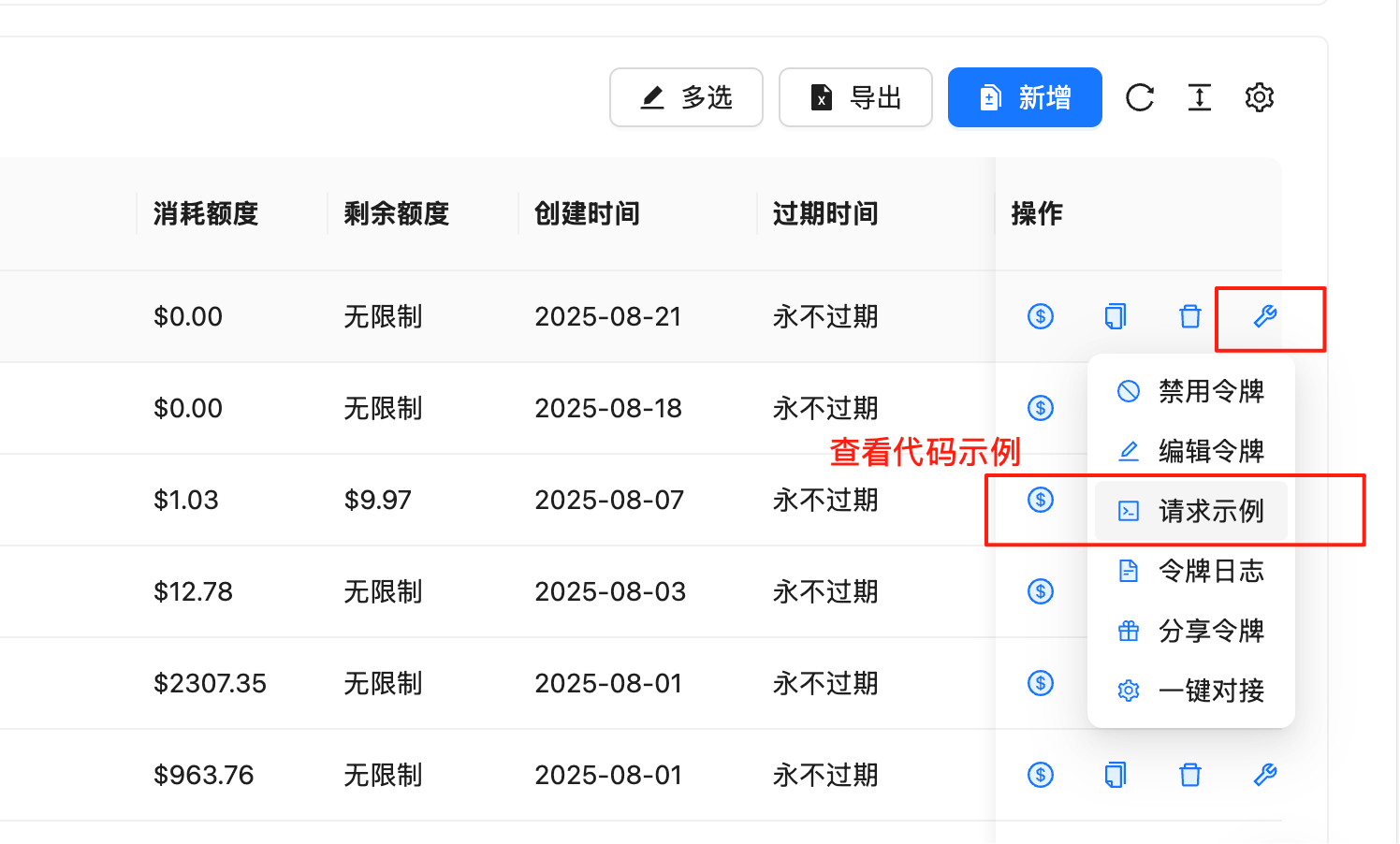
The console has built-in, ready-to-run code examples for many languages, updated in sync with the latest API version — **use these first**:
1. Go to the [token management page](https://api.apiyi.com/token)
2. On the row of the target API Key, click the 🔧 wrench icon in the "Actions" column
3. Select "Request Example" to view complete examples in cURL, Python, Node.js, Java, C#, Go, PHP, Ruby, and more
 ## Online Testing (Playground)
The "API Reference" section provides an **online Playground**: enter your API Key to send requests and view live responses directly — no code required.
`POST /v1/chat/completions` — the main chat and multimodal endpoint.
`GET /v1/models` — query currently available models.
`POST /v1/embeddings` — text vectorization.
Playgrounds for image and video generation endpoints live on their respective model pages (see the image / video model page under "Choose a Model" above).
## Minimal Example
The most common endpoint — Chat Completions — copy and run. For more parameters and languages, use the Playground above or the console's "Request Example":
```python theme={null}
from openai import OpenAI
client = OpenAI(
api_key="YOUR_API_KEY",
base_url="https://api.apiyi.com/v1"
)
response = client.chat.completions.create(
model="gpt-5-chat-latest",
messages=[
{"role": "system", "content": "You are a helpful AI assistant."},
{"role": "user", "content": "Hello! Please introduce yourself."}
],
temperature=0.7,
max_tokens=1000
)
print(response.choices[0].message.content)
```
```bash theme={null}
curl -X POST "https://api.apiyi.com/v1/chat/completions" \
-H "Authorization: Bearer YOUR_API_KEY" \
-H "Content-Type: application/json" \
-d '{
"model": "gpt-5-chat-latest",
"messages": [
{"role": "system", "content": "You are a helpful AI assistant."},
{"role": "user", "content": "Hello! Please introduce yourself."}
],
"temperature": 0.7,
"max_tokens": 1000
}'
```
## Streaming Response
Set `stream: true` in the request, and the response is returned chunk by chunk as Server-Sent Events (SSE) — ideal for typewriter-style output:
```python theme={null}
stream = client.chat.completions.create(
model="gpt-5-chat-latest",
messages=[{"role": "user", "content": "Tell a short joke"}],
stream=True
)
for chunk in stream:
content = chunk.choices[0].delta.content or ""
print(content, end="", flush=True)
```
Each SSE line starts with `data: `, and the final line `data: [DONE]` signals the end.
## Error Handling
Endpoints follow the OpenAI error format:
```json theme={null}
{
"error": {
"message": "Invalid API key provided",
"type": "invalid_request_error",
"code": "invalid_api_key"
}
}
```
Common error codes:
| Error Code | HTTP Status | Description |
| ----------------------- | ----------- | -------------------------- |
| invalid\_api\_key | 401 | Invalid API key |
| insufficient\_quota | 429 | Insufficient balance |
| model\_not\_found | 404 | Model does not exist |
| invalid\_request\_error | 400 | Invalid request parameters |
| rate\_limit\_exceeded | 429 | Request rate too high |
| server\_error | 500 | Internal server error |
Implement exponential backoff: on 429 / 500, retry with doubling intervals to greatly improve stability. Store your API Key in environment variables — never hard-code it.
## Rate Limits
| Limit Type | Default | Description |
| ------------------------- | ------- | --------------------------------- |
| RPM (requests per minute) | 3000 | Per API key |
| TPM (tokens per minute) | 1000000 | Per API key |
| Concurrent requests | 100 | Requests processed simultaneously |
Exceeding limits returns `429`. Please control your request rate accordingly.
## Need Help?
Text / multimodal model recommendations and pricing.
Open the API Reference Playground and send requests directly.
* Visit the website: [api.apiyi.com](https://api.apiyi.com)
* Technical support email: `support@apiyi.com`
## Online Testing (Playground)
The "API Reference" section provides an **online Playground**: enter your API Key to send requests and view live responses directly — no code required.
`POST /v1/chat/completions` — the main chat and multimodal endpoint.
`GET /v1/models` — query currently available models.
`POST /v1/embeddings` — text vectorization.
Playgrounds for image and video generation endpoints live on their respective model pages (see the image / video model page under "Choose a Model" above).
## Minimal Example
The most common endpoint — Chat Completions — copy and run. For more parameters and languages, use the Playground above or the console's "Request Example":
```python theme={null}
from openai import OpenAI
client = OpenAI(
api_key="YOUR_API_KEY",
base_url="https://api.apiyi.com/v1"
)
response = client.chat.completions.create(
model="gpt-5-chat-latest",
messages=[
{"role": "system", "content": "You are a helpful AI assistant."},
{"role": "user", "content": "Hello! Please introduce yourself."}
],
temperature=0.7,
max_tokens=1000
)
print(response.choices[0].message.content)
```
```bash theme={null}
curl -X POST "https://api.apiyi.com/v1/chat/completions" \
-H "Authorization: Bearer YOUR_API_KEY" \
-H "Content-Type: application/json" \
-d '{
"model": "gpt-5-chat-latest",
"messages": [
{"role": "system", "content": "You are a helpful AI assistant."},
{"role": "user", "content": "Hello! Please introduce yourself."}
],
"temperature": 0.7,
"max_tokens": 1000
}'
```
## Streaming Response
Set `stream: true` in the request, and the response is returned chunk by chunk as Server-Sent Events (SSE) — ideal for typewriter-style output:
```python theme={null}
stream = client.chat.completions.create(
model="gpt-5-chat-latest",
messages=[{"role": "user", "content": "Tell a short joke"}],
stream=True
)
for chunk in stream:
content = chunk.choices[0].delta.content or ""
print(content, end="", flush=True)
```
Each SSE line starts with `data: `, and the final line `data: [DONE]` signals the end.
## Error Handling
Endpoints follow the OpenAI error format:
```json theme={null}
{
"error": {
"message": "Invalid API key provided",
"type": "invalid_request_error",
"code": "invalid_api_key"
}
}
```
Common error codes:
| Error Code | HTTP Status | Description |
| ----------------------- | ----------- | -------------------------- |
| invalid\_api\_key | 401 | Invalid API key |
| insufficient\_quota | 429 | Insufficient balance |
| model\_not\_found | 404 | Model does not exist |
| invalid\_request\_error | 400 | Invalid request parameters |
| rate\_limit\_exceeded | 429 | Request rate too high |
| server\_error | 500 | Internal server error |
Implement exponential backoff: on 429 / 500, retry with doubling intervals to greatly improve stability. Store your API Key in environment variables — never hard-code it.
## Rate Limits
| Limit Type | Default | Description |
| ------------------------- | ------- | --------------------------------- |
| RPM (requests per minute) | 3000 | Per API key |
| TPM (tokens per minute) | 1000000 | Per API key |
| Concurrent requests | 100 | Requests processed simultaneously |
Exceeding limits returns `429`. Please control your request rate accordingly.
## Need Help?
Text / multimodal model recommendations and pricing.
Open the API Reference Playground and send requests directly.
* Visit the website: [api.apiyi.com](https://api.apiyi.com)
* Technical support email: `support@apiyi.com`