> ## Documentation Index
> Fetch the complete documentation index at: https://docs.apiyi.com/llms.txt
> Use this file to discover all available pages before exploring further.
# What should I know about log timezone settings and data export?
> Keep your account timezone at the default UTC+0 and dismiss the console's timezone switch suggestion. Every export file (Export and Billing Summary) is always UTC+0, while the log detail list and the call-data chart follow your account timezone — a mismatch between the two is what produces the 8-hour reconciliation gap.
## Short answer
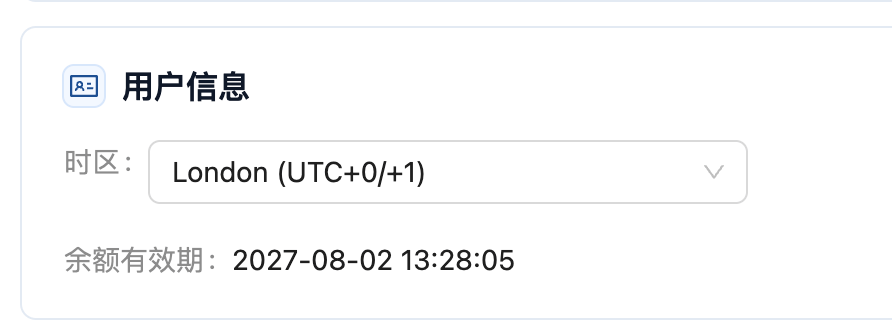
The default `London (UTC+0/+1)` is the correct setting — **do not change it**. Logs are stored in UTC, so UTC+0 matches the data source
When the console detects a different device timezone it shows a "本地设置建议" (Local Settings Suggestion) dialog — **choose 暂时忽略 (Dismiss)** on the left, not the switch button
Both the 导出 (Export) and 汇总账单 (Billing Summary) buttons emit files in UTC+0, regardless of the account timezone. Times shown *on the page* follow the account timezone instead
**If you already switched, just set it back to `London (UTC+0/+1)`.** The timezone only affects how data is displayed — **no call data is modified or lost**, and export files are unaffected because they are always UTC+0. Once it is set back, the page and the export files are on the same basis again.
**The rule in one line**: anything you **export** — export files, the Billing Summary, and `created_at` from the [Log Query API](/en/api-capabilities/log-query) — is **UTC+0**. Anything you **read on the page** — the detail list and the charts — follows your **account timezone**.
## Where to check your account timezone
The current account timezone is shown in the 用户信息 (User Info) section of the console. It should read `London (UTC+0/+1)`, which is UTC+0.
 ## Choose "暂时忽略" (Dismiss) when the suggestion dialog appears
When your account timezone (UTC) differs from your current device timezone (for example `Asia/Shanghai`), the console opens a "本地设置建议" (Local Settings Suggestion) dialog offering to switch.
## Choose "暂时忽略" (Dismiss) when the suggestion dialog appears
When your account timezone (UTC) differs from your current device timezone (for example `Asia/Shanghai`), the console opens a "本地设置建议" (Local Settings Suggestion) dialog offering to switch.
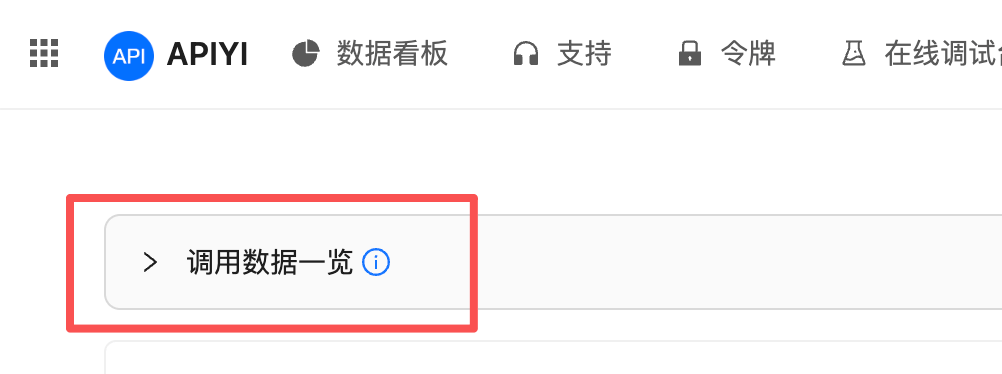
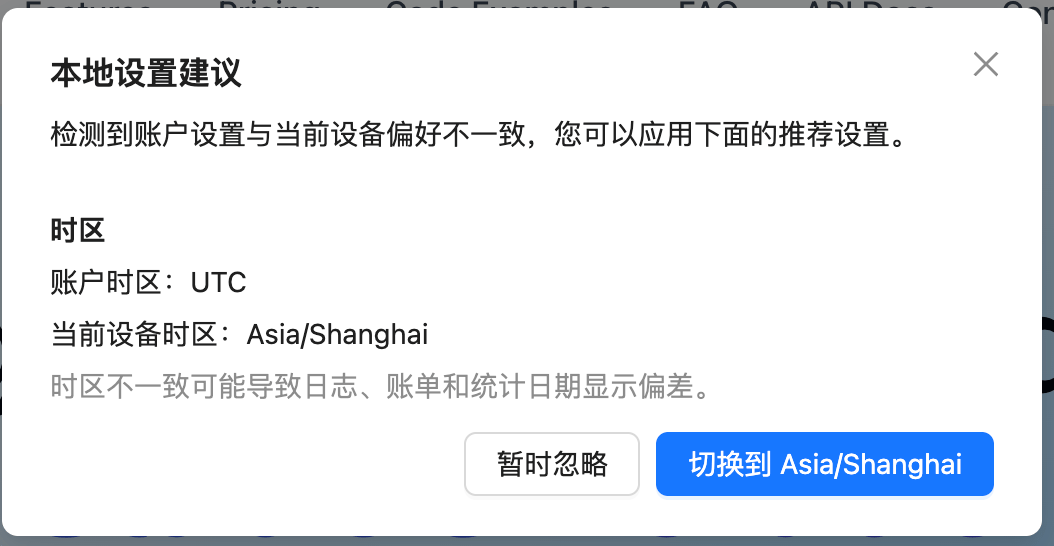 **Choose 暂时忽略 (Dismiss) — do not switch.** After switching, the **调用数据一览 (Call Data Overview)** chart at the top of the Logs page renders incorrectly: the time buckets no longer line up with the chart range, so the data looks missing or shifted as a whole.
This is the section that is affected:
**Choose 暂时忽略 (Dismiss) — do not switch.** After switching, the **调用数据一览 (Call Data Overview)** chart at the top of the Logs page renders incorrectly: the time buckets no longer line up with the chart range, so the data looks missing or shifted as a whole.
This is the section that is affected:
 Timestamps in the log detail list also follow the account timezone. **Export files do not — they are always UTC+0.** Keeping the account at UTC+0 is what aligns the detail list, the chart and the export files on a single basis, so you only ever apply one fixed offset.
## Which export should you use?
The Logs page has two buttons in the top-right corner, 导出 (Export) and 汇总账单 (Billing Summary).
Timestamps in the log detail list also follow the account timezone. **Export files do not — they are always UTC+0.** Keeping the account at UTC+0 is what aligns the detail list, the chart and the export files on a single basis, so you only ever apply one fixed offset.
## Which export should you use?
The Logs page has two buttons in the top-right corner, 导出 (Export) and 汇总账单 (Billing Summary).
 | | 导出 (Export) | 汇总账单 (Billing Summary) |
| -------------- | ------------------------------------------- | ---------------------------------------- |
| Timezone basis | **Always UTC+0** | **Always UTC+0** |
| Granularity | Individual call records (selectable fields) | Spend aggregated by date |
| Volume | Large batches, can run asynchronously | Small, downloads directly |
| Best for | Reconciliation, audit, custom analysis | A quick look at total spend for a period |
Both buttons use the **same timezone basis, UTC+0**, independent of the account timezone setting; they differ only in granularity and volume. Pick whichever matches what you need — individual records or a daily total.
### The page and the export file disagree — that is expected
This is the easiest thing to get wrong when reconciling: **the page follows your account timezone, the export file is UTC+0.**
If the account timezone has been changed to UTC+8, a call made at **2026-08-14 00:30 (UTC+8)** appears as:
* `2026-08-14 00:30` in the **page detail list** — attributed to August 14
* `2026-08-13 16:30` (UTC+0) in the **export file** — attributed to August 13
Hence "calls between 00:00 and 08:00 (UTC+8) are missing from today's totals" — nothing is lost, the two views are simply 8 hours apart.
**Setting the account timezone back to `London (UTC+0/+1)` puts both on the same basis** and is the simplest fix.
If you must keep a local timezone for other reasons, treat the export file as authoritative and convert consistently in your own spreadsheet or script (see below).
### Export → background async export (recommended)
When you need line-by-line spend records, use the 导出 (Export) button and pick **后台异步导出 (background async export)** in the dialog.
| | 导出 (Export) | 汇总账单 (Billing Summary) |
| -------------- | ------------------------------------------- | ---------------------------------------- |
| Timezone basis | **Always UTC+0** | **Always UTC+0** |
| Granularity | Individual call records (selectable fields) | Spend aggregated by date |
| Volume | Large batches, can run asynchronously | Small, downloads directly |
| Best for | Reconciliation, audit, custom analysis | A quick look at total spend for a period |
Both buttons use the **same timezone basis, UTC+0**, independent of the account timezone setting; they differ only in granularity and volume. Pick whichever matches what you need — individual records or a daily total.
### The page and the export file disagree — that is expected
This is the easiest thing to get wrong when reconciling: **the page follows your account timezone, the export file is UTC+0.**
If the account timezone has been changed to UTC+8, a call made at **2026-08-14 00:30 (UTC+8)** appears as:
* `2026-08-14 00:30` in the **page detail list** — attributed to August 14
* `2026-08-13 16:30` (UTC+0) in the **export file** — attributed to August 13
Hence "calls between 00:00 and 08:00 (UTC+8) are missing from today's totals" — nothing is lost, the two views are simply 8 hours apart.
**Setting the account timezone back to `London (UTC+0/+1)` puts both on the same basis** and is the simplest fix.
If you must keep a local timezone for other reasons, treat the export file as authoritative and convert consistently in your own spreadsheet or script (see below).
### Export → background async export (recommended)
When you need line-by-line spend records, use the 导出 (Export) button and pick **后台异步导出 (background async export)** in the dialog.
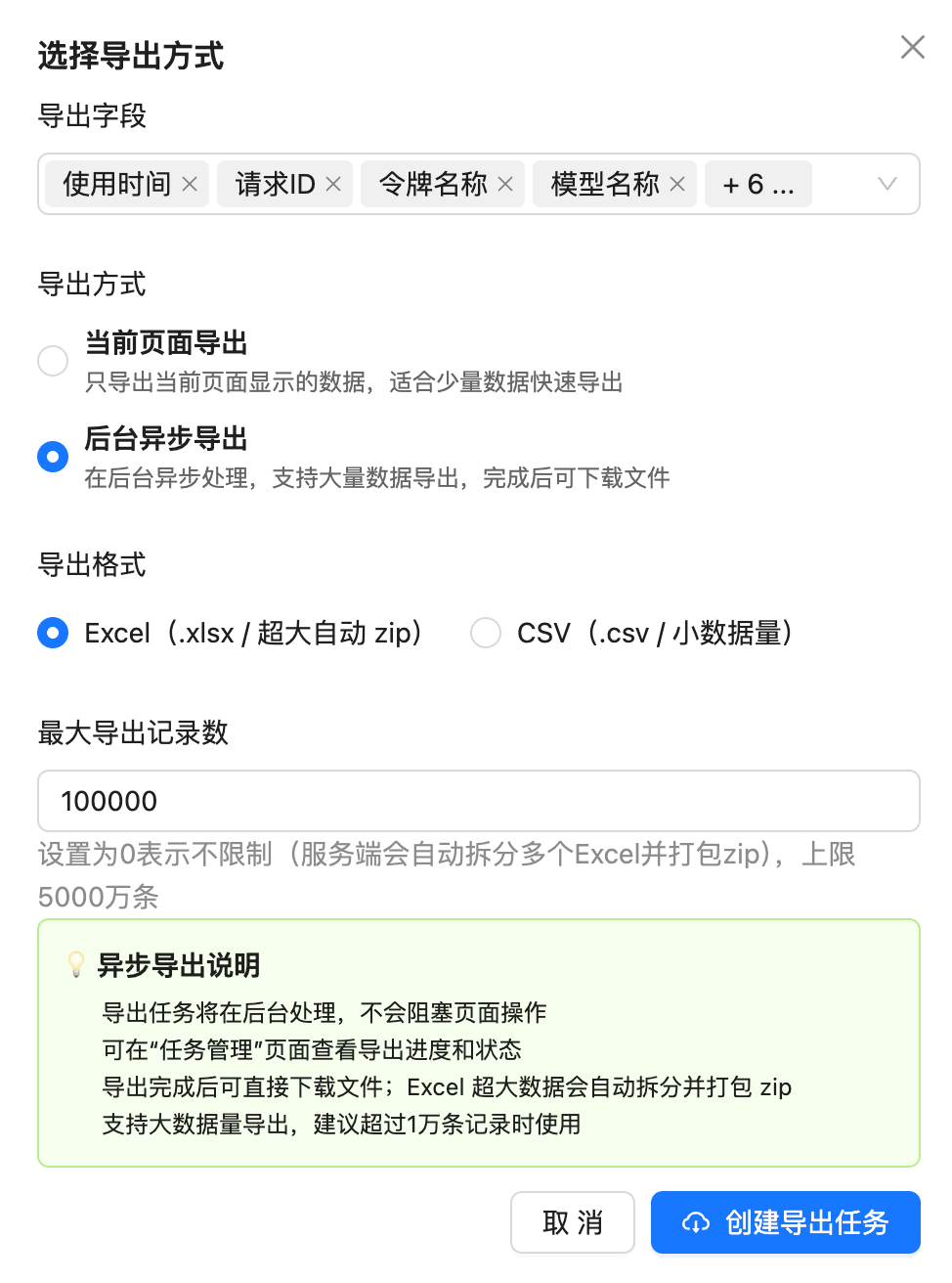 Key points:
* **The timezone is always UTC+0**, regardless of the account setting, because this exports the stored logs themselves. Convert to local time yourself (UTC+8 users add 8 hours)
* **Selectable fields**: usage time, request ID, token name, model name and more — pick what your reconciliation needs
* **Export mode**: for large volumes choose background async export; the job runs in the background without blocking the page, and it is recommended above 10,000 records
* **Format**: Excel (`.xlsx`, very large exports are split and zipped automatically) or CSV (`.csv`, for small volumes)
* **Maximum record count**: `0` means unlimited (the server splits into multiple Excel files and zips them), with a ceiling of 50 million records
* **Progress**: once the job is created, track its progress and status on the 任务管理 (Task Management) page, then download the file
For the full export walkthrough and archiving advice, see [How long are call logs kept?](/en/faq/log-retention-policy).
## Reconciliation in practice
* **Readable timestamps**: add 8 hours to get Beijing time. `2026-08-14 00:30:00 UTC+0` becomes `2026-08-14 08:30:00 (UTC+8)`
* **Unix seconds** (`created_at` from the [Log Query API](/en/api-capabilities/log-query)): add **28800** (8 × 3600) to the value
In Excel or your own script, shift every timestamp first, **then** bucket by `YYYY-MM-DD`.
**Do not reconcile straight off the date column in the export** — that is the most common cause of the page and the file disagreeing.
Support searches the logs in UTC+0; Beijing time is what your business colleagues will recognise. Giving both saves a round trip.
For reconciliation or audit work that has to be split by *business day*, prefer the [Log Query API](/en/api-capabilities/log-query) and your own script over the CSV export — adding 28800 seconds in code is more reliable than maintaining Excel formulas.
## Common questions
Because the backend call logs are database logs recorded in UTC. Keeping the account at UTC+0 puts the page display, the chart and the export files on the same basis, so you apply one fixed offset everywhere. Once it is set to a local timezone, the conversion rules differ between places, which makes misreading more likely, not less.
No. The timezone only affects the page display; no call record or charge is modified, and export files are unaffected. Set the account timezone back to `London (UTC+0/+1)` and the page and the export files are on the same basis again.
**Add 8 hours** to the times in the export file. For example `2026-08-09 08:00` in the file corresponds to **2026/8/9 16:00 (UTC+8)**. Watch that 8-hour shift when reconciling across day boundaries.
They use different bases: the detail list follows your **account timezone**, the export file is always **UTC+0**. With the account set to UTC+8, calls between midnight and 08:00 belong to "today" on the page but land on "yesterday" in the file. This is expected, not a data error — setting the account back to UTC+0 removes the difference.
No. Exports are always UTC+0 because they emit the stored database logs as-is. If your business timezone is not UTC+8 you will need to convert as well.
No. The API only accepts and returns Unix second timestamps, which are UTC by definition. Convert client-side as needed.
No. The exported fields match what the console shows — time, request ID, token name, model, token counts, amount, status — with no prompts or model output. See [How long are call logs kept?](/en/faq/log-retention-policy).
Yes, see the [Log Query API](/en/api-capabilities/log-query). Its `start_timestamp`, `end_timestamp` and `created_at` are all **Unix second timestamps**, independent of the console timezone setting, so your code converts them as needed — a good fit for automated reconciliation.
First check the job status on the 任务管理 (Task Management) page. For very large volumes (millions of records) the server needs time to split and package the files; narrow the time range or set a sensible maximum record count and export in batches.
## Related documents
* [How do I view my call records?](/en/faq/call-logs)
* [How do I read the billing amounts in the logs?](/en/faq/log-billing-explained)
* [How long are call logs kept?](/en/faq/log-retention-policy)
* [Log Query API](/en/api-capabilities/log-query)
* [Live update: dismiss the console's timezone switch suggestion](/en/live/2026-08/timezone-switch-prompt-ignore)
Key points:
* **The timezone is always UTC+0**, regardless of the account setting, because this exports the stored logs themselves. Convert to local time yourself (UTC+8 users add 8 hours)
* **Selectable fields**: usage time, request ID, token name, model name and more — pick what your reconciliation needs
* **Export mode**: for large volumes choose background async export; the job runs in the background without blocking the page, and it is recommended above 10,000 records
* **Format**: Excel (`.xlsx`, very large exports are split and zipped automatically) or CSV (`.csv`, for small volumes)
* **Maximum record count**: `0` means unlimited (the server splits into multiple Excel files and zips them), with a ceiling of 50 million records
* **Progress**: once the job is created, track its progress and status on the 任务管理 (Task Management) page, then download the file
For the full export walkthrough and archiving advice, see [How long are call logs kept?](/en/faq/log-retention-policy).
## Reconciliation in practice
* **Readable timestamps**: add 8 hours to get Beijing time. `2026-08-14 00:30:00 UTC+0` becomes `2026-08-14 08:30:00 (UTC+8)`
* **Unix seconds** (`created_at` from the [Log Query API](/en/api-capabilities/log-query)): add **28800** (8 × 3600) to the value
In Excel or your own script, shift every timestamp first, **then** bucket by `YYYY-MM-DD`.
**Do not reconcile straight off the date column in the export** — that is the most common cause of the page and the file disagreeing.
Support searches the logs in UTC+0; Beijing time is what your business colleagues will recognise. Giving both saves a round trip.
For reconciliation or audit work that has to be split by *business day*, prefer the [Log Query API](/en/api-capabilities/log-query) and your own script over the CSV export — adding 28800 seconds in code is more reliable than maintaining Excel formulas.
## Common questions
Because the backend call logs are database logs recorded in UTC. Keeping the account at UTC+0 puts the page display, the chart and the export files on the same basis, so you apply one fixed offset everywhere. Once it is set to a local timezone, the conversion rules differ between places, which makes misreading more likely, not less.
No. The timezone only affects the page display; no call record or charge is modified, and export files are unaffected. Set the account timezone back to `London (UTC+0/+1)` and the page and the export files are on the same basis again.
**Add 8 hours** to the times in the export file. For example `2026-08-09 08:00` in the file corresponds to **2026/8/9 16:00 (UTC+8)**. Watch that 8-hour shift when reconciling across day boundaries.
They use different bases: the detail list follows your **account timezone**, the export file is always **UTC+0**. With the account set to UTC+8, calls between midnight and 08:00 belong to "today" on the page but land on "yesterday" in the file. This is expected, not a data error — setting the account back to UTC+0 removes the difference.
No. Exports are always UTC+0 because they emit the stored database logs as-is. If your business timezone is not UTC+8 you will need to convert as well.
No. The API only accepts and returns Unix second timestamps, which are UTC by definition. Convert client-side as needed.
No. The exported fields match what the console shows — time, request ID, token name, model, token counts, amount, status — with no prompts or model output. See [How long are call logs kept?](/en/faq/log-retention-policy).
Yes, see the [Log Query API](/en/api-capabilities/log-query). Its `start_timestamp`, `end_timestamp` and `created_at` are all **Unix second timestamps**, independent of the console timezone setting, so your code converts them as needed — a good fit for automated reconciliation.
First check the job status on the 任务管理 (Task Management) page. For very large volumes (millions of records) the server needs time to split and package the files; narrow the time range or set a sensible maximum record count and export in batches.
## Related documents
* [How do I view my call records?](/en/faq/call-logs)
* [How do I read the billing amounts in the logs?](/en/faq/log-billing-explained)
* [How long are call logs kept?](/en/faq/log-retention-policy)
* [Log Query API](/en/api-capabilities/log-query)
* [Live update: dismiss the console's timezone switch suggestion](/en/live/2026-08/timezone-switch-prompt-ignore)