> ## Documentation Index
> Fetch the complete documentation index at: https://docs.apiyi.com/llms.txt
> Use this file to discover all available pages before exploring further.
# What's the Difference Between Token Billing Modes?
> Detailed explanation of API.YI token's 5 billing modes, usage scenarios, and best practices
## Quick Answer
**Recommended Setting**: When creating a token, choose **"Pay-per-Use Priority"** billing mode, which suits most scenarios.
Although the system provides 5 billing types, using **"Pay-per-Use Priority" by default** covers all model calling needs.
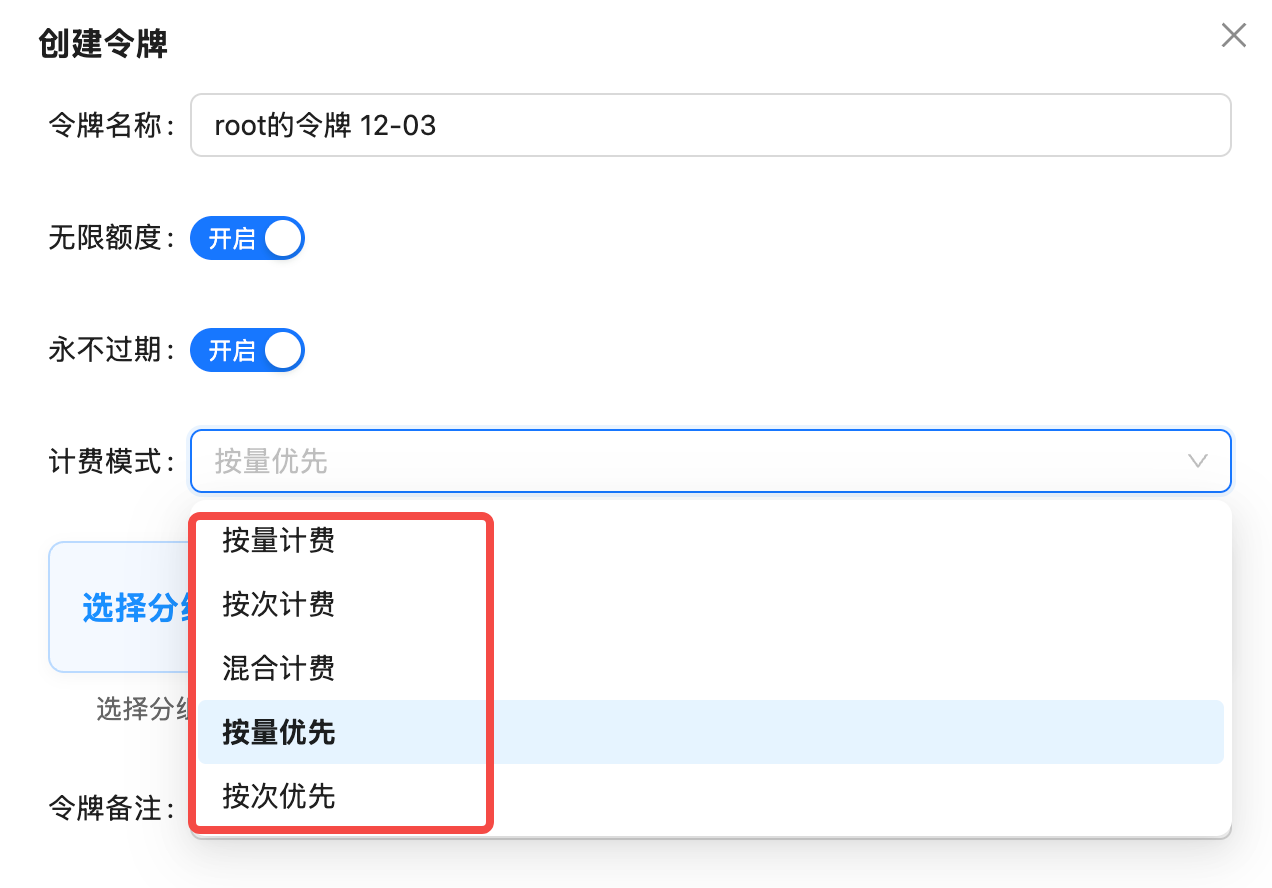 ## 5 Billing Modes Explained
### 1. Pay-per-Use (Token-based)
**Definition**: Charges based on the number of **Tokens** for input and output, pay for what you use.
**Applicable Models**:
* **Text Generation Models**: GPT-4, Claude, Gemini, DeepSeek, etc.
* **Multimodal Understanding Models**: Models supporting image/audio input
* **Special Image Models**: `gpt-image-1` (charged by Tokens)
**Billing Formula**:
```
Total Cost = (Input Tokens × Input Price) + (Output Tokens × Output Price)
```
**Examples**:
* `gpt-4o`: Input \$5/million tokens, Output \$15/million tokens
* `claude-3-5-sonnet-20241022`: Input \$3/million tokens, Output \$15/million tokens
**gpt-image-1 Special Note**: Although it's an image generation model, it charges by Tokens. Factors affecting Tokens include:
* Image resolution (1024x1024, 1792x1024, etc.)
* Image quality (standard, hd)
OpenAI provides a detailed billing table with different Token consumption for different resolutions and qualities.
***
### 2. Pay-per-Call
**Definition**: **Fixed charge** per call, unaffected by input and output Tokens.
**Applicable Models**:
* **Image Generation Models**: DALL-E, Flux, Sora Image, etc. (except gpt-image-1)
* **Video Generation Models**: Sora Video, VEO, etc.
**Billing Formula**:
```
Total Cost = Number of Calls × Price per Call
```
**Examples**:
* `gemini-3-pro-image-preview` (alias `nano-banana-pro`): \$0.09/call
* `sora_video2`: \$0.15/call (10-second video)
* `flux-1.1-pro`: \$0.04/call
**Advantages of Pay-per-Call**:
* Transparent pricing, fixed cost per generation
* No need to calculate Token consumption
* Suitable for fixed output scenarios like images/videos
***
### 3. Hybrid Billing
**Definition**: Supports both pay-per-use and pay-per-call billing, automatically selected based on the model.
**Status**: ⚠️ **Not Applicable**
Currently, API.YI platform **does not recommend using "Hybrid Billing" mode**, as it may cause billing confusion. Use "Pay-per-Use Priority" instead.
***
### 4. Pay-per-Use Priority (Recommended)
**Definition**: **Smart billing mode** that **prioritizes pay-per-use billing** when a model supports both; automatically switches to pay-per-call if the model only supports that.
**Why Recommended?**
* ✅ **Includes Pay-per-Call**: Can call image/video models charged per call
* ✅ **Includes Pay-per-Use**: Can call text/multimodal models charged per use
* ✅ **Auto-Adapts**: System automatically selects the most appropriate billing method
* ✅ **Covers All Scenarios**: All 400+ models supported
**Billing Logic**:
```
If model supports pay-per-use → Use pay-per-use billing
If model only supports pay-per-call → Use pay-per-call billing
```
**Example Scenarios**:
| Model | Billing Method | Description |
| ---------------------------- | -------------- | ---------------------------------------- |
| `gpt-4o` | Pay-per-Use | Text model, prioritize pay-per-use |
| `gpt-image-1` | Pay-per-Use | Image model but charged by Tokens |
| `gemini-3-pro-image-preview` | Pay-per-Call | Image model, auto-switch to pay-per-call |
| `sora_video2` | Pay-per-Call | Video model, auto-switch to pay-per-call |
**Recommendation Reason**: Using "Pay-per-Use Priority" token allows calling all models without creating different tokens for different billing modes.
***
### 5. Pay-per-Call Priority
**Definition**: **Prioritizes pay-per-call billing** when a model supports both; automatically switches to pay-per-use if the model only supports that.
**Applicable Scenarios**:
* Scenarios requiring fixed costs
* Mainly using image/video generation models
**Billing Logic**:
```
If model supports pay-per-call → Use pay-per-call billing
If model only supports pay-per-use → Use pay-per-use billing
```
**Usage Suggestion**: Unless there's a clear cost control requirement, use "Pay-per-Use Priority" as text models are usually more cost-effective with pay-per-use billing.
***
## How to Choose Billing Mode?
### Recommended Solution (Suitable for 95% of Users)
**Applicable Scenarios**:
* Using text, image, and video models simultaneously
* Don't want to create different tokens for different models
* Need maximum flexibility
**Advantages**:
* Covers all 400+ models
* System automatically selects optimal billing method
* No additional configuration needed
### Special Scenarios
**Scenario**: Only using GPT, Claude, Gemini and other text models
**Recommended Billing Mode**: Pay-per-Use Priority or Pay-per-Use
**Reason**: Text models all use pay-per-use billing, both modes have the same effect
**Scenario**: Only using DALL-E, Flux, Sora and other generation models
**Recommended Billing Mode**: Pay-per-Use Priority or Pay-per-Call Priority
**Reason**: Most image/video models use pay-per-call billing, but "Pay-per-Use Priority" can auto-adapt
**Note**: If using `gpt-image-1`, must use "Pay-per-Use Priority" or "Pay-per-Use"
**Scenario**: Strict budget control, want fixed cost per call
**Recommended Billing Mode**: Pay-per-Call or Pay-per-Call Priority
**Reason**: Pay-per-call billing has fixed prices, easy for cost forecasting
**Limitation**: Cannot call text models (like GPT-4, Claude)
***
## FAQ
`gpt-image-1` is OpenAI's official image generation model. Although it generates images, its billing method is similar to text models, **charged by Tokens**.
**Billing Factors**:
* Image resolution (1024x1024 consumes \~5000 tokens, 1792x1024 consumes \~8500 tokens)
* Image quality (HD quality increases Token consumption)
**Solution**:
* Use "Pay-per-Use Priority" or "Pay-per-Use" token
* Using "Pay-per-Call" token will prevent calling `gpt-image-1`
**Yes, you can modify it**. Steps:
1. Log in to [API.YI Token Management Page](https://api.apiyi.com/token)
2. Find the corresponding token, click the "Edit" button on the right
3. Select "Pay-per-Use Priority" in the "Billing Mode" dropdown menu
4. Save configuration
**Note**: Changes take effect immediately without affecting existing balance.
**Different priorities**:
| Billing Mode | When model supports both pay-per-use and pay-per-call | Applicable Scenarios |
| --------------------- | ----------------------------------------------------- | ---------------------------------------------- |
| Pay-per-Use Priority | Prioritize pay-per-use billing | Mainly text models, occasionally images/videos |
| Pay-per-Call Priority | Prioritize pay-per-call billing | Mainly images/videos, occasionally text models |
**Recommendation**: Use "Pay-per-Use Priority" in most cases.
**Won't fail immediately, but may not be able to call certain models**.
**Example Scenarios**:
* If token is "Pay-per-Call", calling `gpt-4o` will fail (because gpt-4o only supports pay-per-use billing)
* If token is "Pay-per-Use", calling `gemini-3-pro-image-preview` may fail (because this model only supports pay-per-call billing)
**Solution**: Use "Pay-per-Use Priority" to avoid this issue.
**Hybrid billing** theoretically supports both pay-per-use and pay-per-call, but in practice may cause:
* Unclear billing logic
* Difficult cost prediction
* System compatibility issues
**Alternative**: Use "Pay-per-Use Priority" to achieve the same effect with better stability and reliability.
***
## Summary Recommendations
| Billing Mode | Recommendation | Applicable Scenarios | Model Coverage |
| ------------------------ | -------------- | ----------------------------------- | --------------------------------------- |
| **Pay-per-Use Priority** | ⭐⭐⭐⭐⭐ | All scenarios (default recommended) | All 400+ models |
| Pay-per-Use | ⭐⭐⭐ | Pure text/multimodal applications | Text models + gpt-image-1 |
| Pay-per-Call | ⭐⭐⭐ | Pure image/video applications | Image/video models (except gpt-image-1) |
| Pay-per-Call Priority | ⭐⭐ | Mainly using images/videos | All 400+ models |
| Hybrid Billing | ❌ | Not recommended | May cause billing confusion |
**Best Practice**: When creating a token, choose "**Pay-per-Use Priority**" billing mode to cover all usage scenarios without creating different tokens for different models.
## Related Documentation
* [How to Create KEY?](/faq/token-management)
* [Do I Need to Set Available Models for Tokens?](/faq/token-model-whitelist)
* [Pricing](/pricing)
* [Model List](/api-capabilities/model-info)
## 5 Billing Modes Explained
### 1. Pay-per-Use (Token-based)
**Definition**: Charges based on the number of **Tokens** for input and output, pay for what you use.
**Applicable Models**:
* **Text Generation Models**: GPT-4, Claude, Gemini, DeepSeek, etc.
* **Multimodal Understanding Models**: Models supporting image/audio input
* **Special Image Models**: `gpt-image-1` (charged by Tokens)
**Billing Formula**:
```
Total Cost = (Input Tokens × Input Price) + (Output Tokens × Output Price)
```
**Examples**:
* `gpt-4o`: Input \$5/million tokens, Output \$15/million tokens
* `claude-3-5-sonnet-20241022`: Input \$3/million tokens, Output \$15/million tokens
**gpt-image-1 Special Note**: Although it's an image generation model, it charges by Tokens. Factors affecting Tokens include:
* Image resolution (1024x1024, 1792x1024, etc.)
* Image quality (standard, hd)
OpenAI provides a detailed billing table with different Token consumption for different resolutions and qualities.
***
### 2. Pay-per-Call
**Definition**: **Fixed charge** per call, unaffected by input and output Tokens.
**Applicable Models**:
* **Image Generation Models**: DALL-E, Flux, Sora Image, etc. (except gpt-image-1)
* **Video Generation Models**: Sora Video, VEO, etc.
**Billing Formula**:
```
Total Cost = Number of Calls × Price per Call
```
**Examples**:
* `gemini-3-pro-image-preview` (alias `nano-banana-pro`): \$0.09/call
* `sora_video2`: \$0.15/call (10-second video)
* `flux-1.1-pro`: \$0.04/call
**Advantages of Pay-per-Call**:
* Transparent pricing, fixed cost per generation
* No need to calculate Token consumption
* Suitable for fixed output scenarios like images/videos
***
### 3. Hybrid Billing
**Definition**: Supports both pay-per-use and pay-per-call billing, automatically selected based on the model.
**Status**: ⚠️ **Not Applicable**
Currently, API.YI platform **does not recommend using "Hybrid Billing" mode**, as it may cause billing confusion. Use "Pay-per-Use Priority" instead.
***
### 4. Pay-per-Use Priority (Recommended)
**Definition**: **Smart billing mode** that **prioritizes pay-per-use billing** when a model supports both; automatically switches to pay-per-call if the model only supports that.
**Why Recommended?**
* ✅ **Includes Pay-per-Call**: Can call image/video models charged per call
* ✅ **Includes Pay-per-Use**: Can call text/multimodal models charged per use
* ✅ **Auto-Adapts**: System automatically selects the most appropriate billing method
* ✅ **Covers All Scenarios**: All 400+ models supported
**Billing Logic**:
```
If model supports pay-per-use → Use pay-per-use billing
If model only supports pay-per-call → Use pay-per-call billing
```
**Example Scenarios**:
| Model | Billing Method | Description |
| ---------------------------- | -------------- | ---------------------------------------- |
| `gpt-4o` | Pay-per-Use | Text model, prioritize pay-per-use |
| `gpt-image-1` | Pay-per-Use | Image model but charged by Tokens |
| `gemini-3-pro-image-preview` | Pay-per-Call | Image model, auto-switch to pay-per-call |
| `sora_video2` | Pay-per-Call | Video model, auto-switch to pay-per-call |
**Recommendation Reason**: Using "Pay-per-Use Priority" token allows calling all models without creating different tokens for different billing modes.
***
### 5. Pay-per-Call Priority
**Definition**: **Prioritizes pay-per-call billing** when a model supports both; automatically switches to pay-per-use if the model only supports that.
**Applicable Scenarios**:
* Scenarios requiring fixed costs
* Mainly using image/video generation models
**Billing Logic**:
```
If model supports pay-per-call → Use pay-per-call billing
If model only supports pay-per-use → Use pay-per-use billing
```
**Usage Suggestion**: Unless there's a clear cost control requirement, use "Pay-per-Use Priority" as text models are usually more cost-effective with pay-per-use billing.
***
## How to Choose Billing Mode?
### Recommended Solution (Suitable for 95% of Users)
**Applicable Scenarios**:
* Using text, image, and video models simultaneously
* Don't want to create different tokens for different models
* Need maximum flexibility
**Advantages**:
* Covers all 400+ models
* System automatically selects optimal billing method
* No additional configuration needed
### Special Scenarios
**Scenario**: Only using GPT, Claude, Gemini and other text models
**Recommended Billing Mode**: Pay-per-Use Priority or Pay-per-Use
**Reason**: Text models all use pay-per-use billing, both modes have the same effect
**Scenario**: Only using DALL-E, Flux, Sora and other generation models
**Recommended Billing Mode**: Pay-per-Use Priority or Pay-per-Call Priority
**Reason**: Most image/video models use pay-per-call billing, but "Pay-per-Use Priority" can auto-adapt
**Note**: If using `gpt-image-1`, must use "Pay-per-Use Priority" or "Pay-per-Use"
**Scenario**: Strict budget control, want fixed cost per call
**Recommended Billing Mode**: Pay-per-Call or Pay-per-Call Priority
**Reason**: Pay-per-call billing has fixed prices, easy for cost forecasting
**Limitation**: Cannot call text models (like GPT-4, Claude)
***
## FAQ
`gpt-image-1` is OpenAI's official image generation model. Although it generates images, its billing method is similar to text models, **charged by Tokens**.
**Billing Factors**:
* Image resolution (1024x1024 consumes \~5000 tokens, 1792x1024 consumes \~8500 tokens)
* Image quality (HD quality increases Token consumption)
**Solution**:
* Use "Pay-per-Use Priority" or "Pay-per-Use" token
* Using "Pay-per-Call" token will prevent calling `gpt-image-1`
**Yes, you can modify it**. Steps:
1. Log in to [API.YI Token Management Page](https://api.apiyi.com/token)
2. Find the corresponding token, click the "Edit" button on the right
3. Select "Pay-per-Use Priority" in the "Billing Mode" dropdown menu
4. Save configuration
**Note**: Changes take effect immediately without affecting existing balance.
**Different priorities**:
| Billing Mode | When model supports both pay-per-use and pay-per-call | Applicable Scenarios |
| --------------------- | ----------------------------------------------------- | ---------------------------------------------- |
| Pay-per-Use Priority | Prioritize pay-per-use billing | Mainly text models, occasionally images/videos |
| Pay-per-Call Priority | Prioritize pay-per-call billing | Mainly images/videos, occasionally text models |
**Recommendation**: Use "Pay-per-Use Priority" in most cases.
**Won't fail immediately, but may not be able to call certain models**.
**Example Scenarios**:
* If token is "Pay-per-Call", calling `gpt-4o` will fail (because gpt-4o only supports pay-per-use billing)
* If token is "Pay-per-Use", calling `gemini-3-pro-image-preview` may fail (because this model only supports pay-per-call billing)
**Solution**: Use "Pay-per-Use Priority" to avoid this issue.
**Hybrid billing** theoretically supports both pay-per-use and pay-per-call, but in practice may cause:
* Unclear billing logic
* Difficult cost prediction
* System compatibility issues
**Alternative**: Use "Pay-per-Use Priority" to achieve the same effect with better stability and reliability.
***
## Summary Recommendations
| Billing Mode | Recommendation | Applicable Scenarios | Model Coverage |
| ------------------------ | -------------- | ----------------------------------- | --------------------------------------- |
| **Pay-per-Use Priority** | ⭐⭐⭐⭐⭐ | All scenarios (default recommended) | All 400+ models |
| Pay-per-Use | ⭐⭐⭐ | Pure text/multimodal applications | Text models + gpt-image-1 |
| Pay-per-Call | ⭐⭐⭐ | Pure image/video applications | Image/video models (except gpt-image-1) |
| Pay-per-Call Priority | ⭐⭐ | Mainly using images/videos | All 400+ models |
| Hybrid Billing | ❌ | Not recommended | May cause billing confusion |
**Best Practice**: When creating a token, choose "**Pay-per-Use Priority**" billing mode to cover all usage scenarios without creating different tokens for different models.
## Related Documentation
* [How to Create KEY?](/faq/token-management)
* [Do I Need to Set Available Models for Tokens?](/faq/token-model-whitelist)
* [Pricing](/pricing)
* [Model List](/api-capabilities/model-info)