> ## Documentation Index
> Fetch the complete documentation index at: https://docs.apiyi.com/llms.txt
> Use this file to discover all available pages before exploring further.
# Dify
> Visual AI application development platform integration guide
Dify is an open-source LLM application development platform that enables you to quickly build AI applications. Through APIYI, you can use various mainstream AI models in Dify.
## Quick Integration
### 1. Get API Key
Visit [APIYI Console](https://vip.apiyi.com) to get your API key.
### 2. Configure Model Provider
1. Log in to Dify platform
2. Click username > Settings
3. Select "Model Provider" - choose OpenAI-API-compatible
4. Select configuration method based on model type
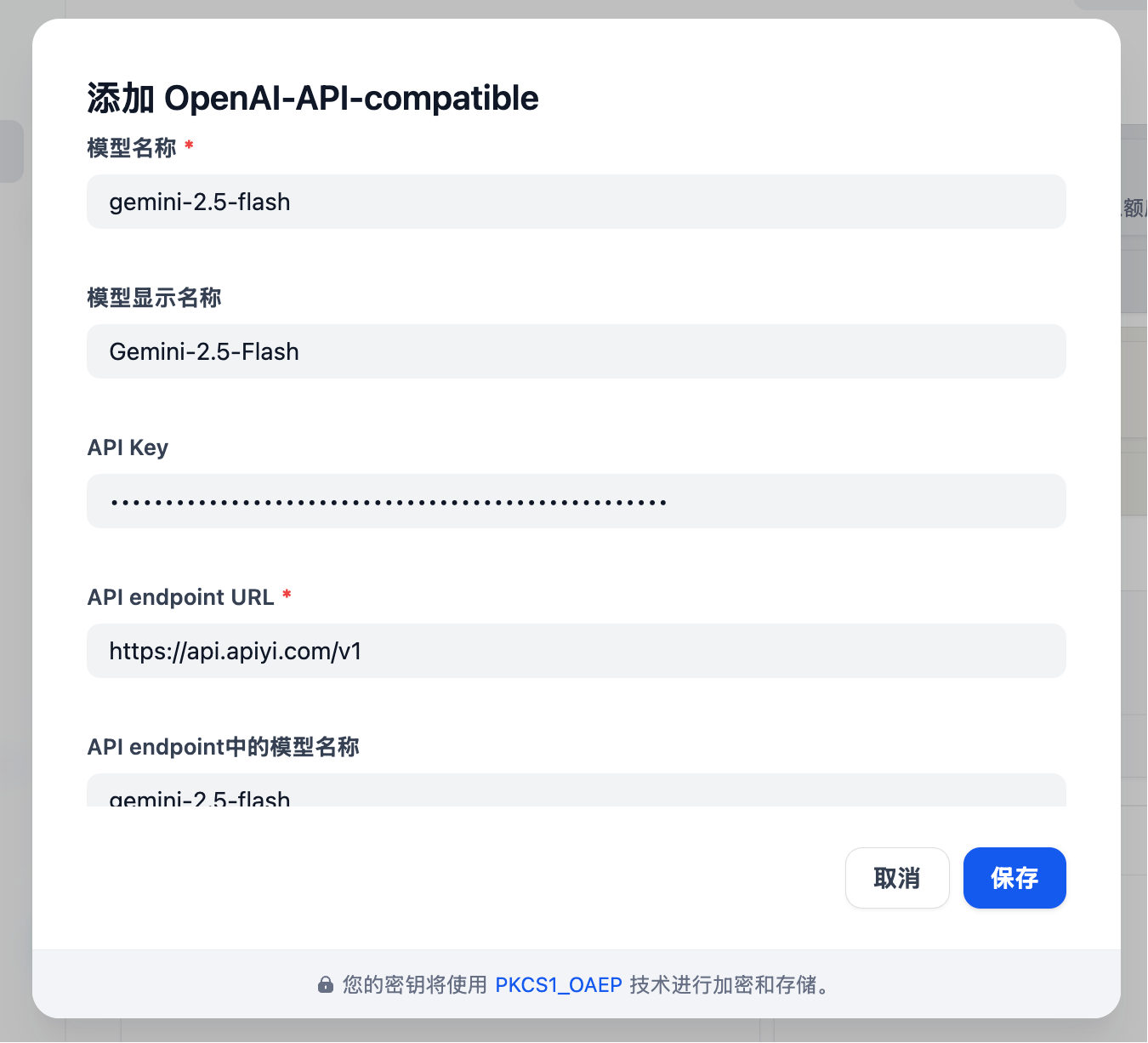
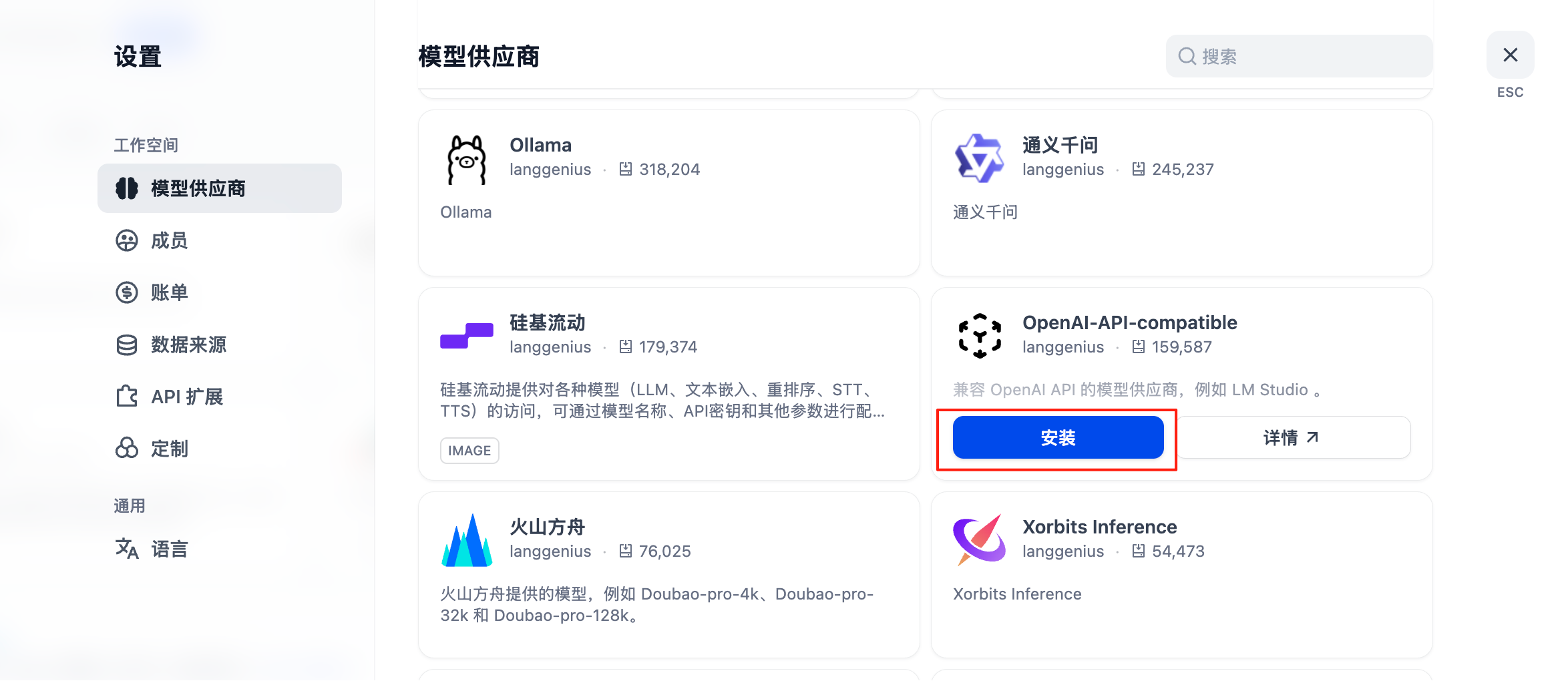 #### Configuration for All Models Including GPT, Claude, Gemini
* Model Type: Select LLM type (first column, image omitted)
* Model Name: Must enter the **standard model name**, not arbitrary
* Example: Enter gemini-2.5-flash instead of Gemini 2.5 Flash
* Model Display Name: Can be anything for easy identification, such as Gemini 2.5 Flash
* **API Key**: Enter [APIYI key](https://api.apiyi.com/token)
* **API endpoint URL**: `https://api.apiyi.com/v1`
* Model name in API endpoint: Use standard name like gemini-2.5-flash
#### Configuration for All Models Including GPT, Claude, Gemini
* Model Type: Select LLM type (first column, image omitted)
* Model Name: Must enter the **standard model name**, not arbitrary
* Example: Enter gemini-2.5-flash instead of Gemini 2.5 Flash
* Model Display Name: Can be anything for easy identification, such as Gemini 2.5 Flash
* **API Key**: Enter [APIYI key](https://api.apiyi.com/token)
* **API endpoint URL**: `https://api.apiyi.com/v1`
* Model name in API endpoint: Use standard name like gemini-2.5-flash
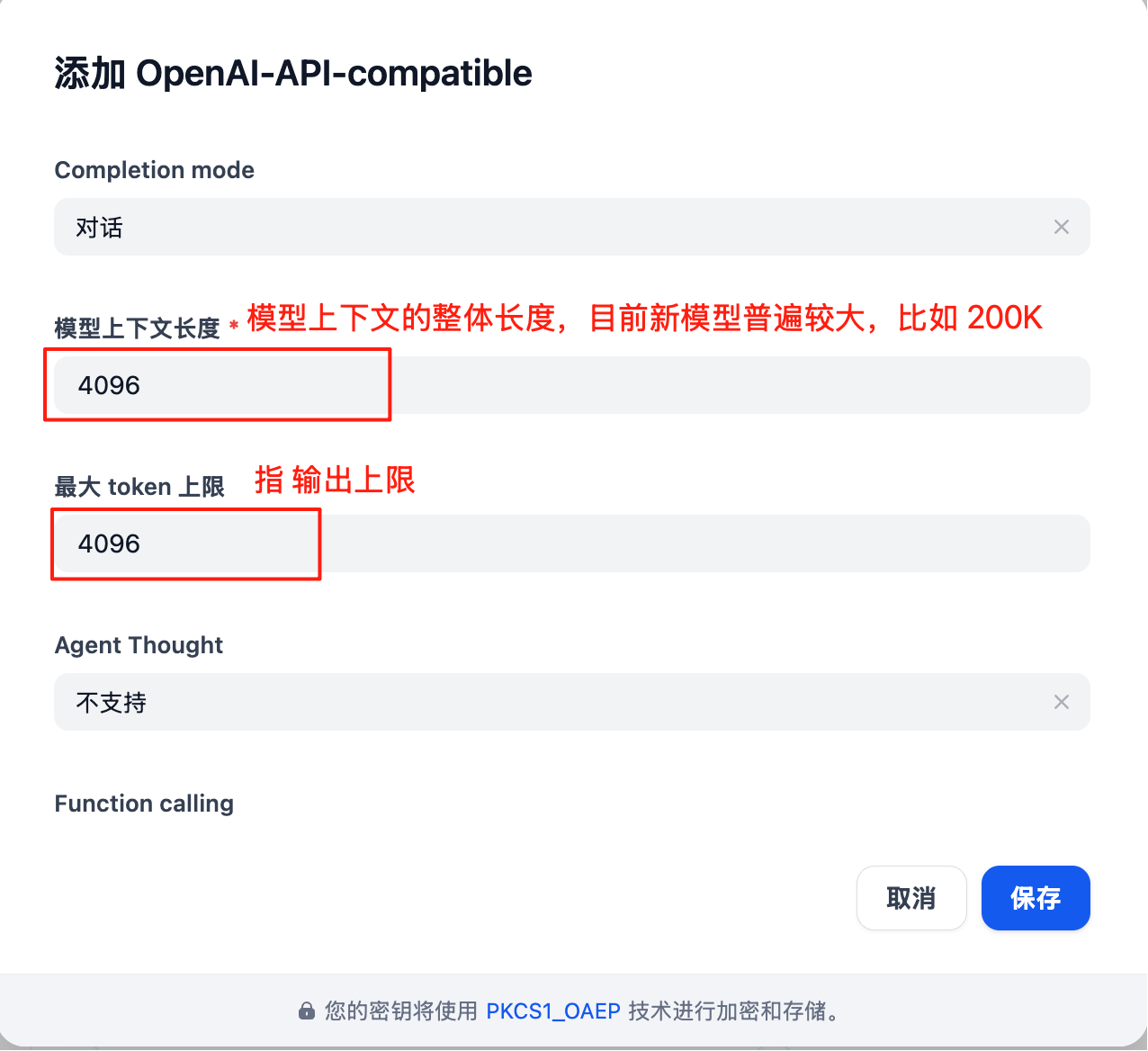
 Model configuration has many parameters to update based on **actual situation**:
Note: Dify's model configuration interface is **not up to date**, for example, the default context length of 4096 is quite small.
For specific context length of each large model, refer to official documentation (Resource Navigation section in this documentation center)
Model configuration has many parameters to update based on **actual situation**:
Note: Dify's model configuration interface is **not up to date**, for example, the default context length of 4096 is quite small.
For specific context length of each large model, refer to official documentation (Resource Navigation section in this documentation center)
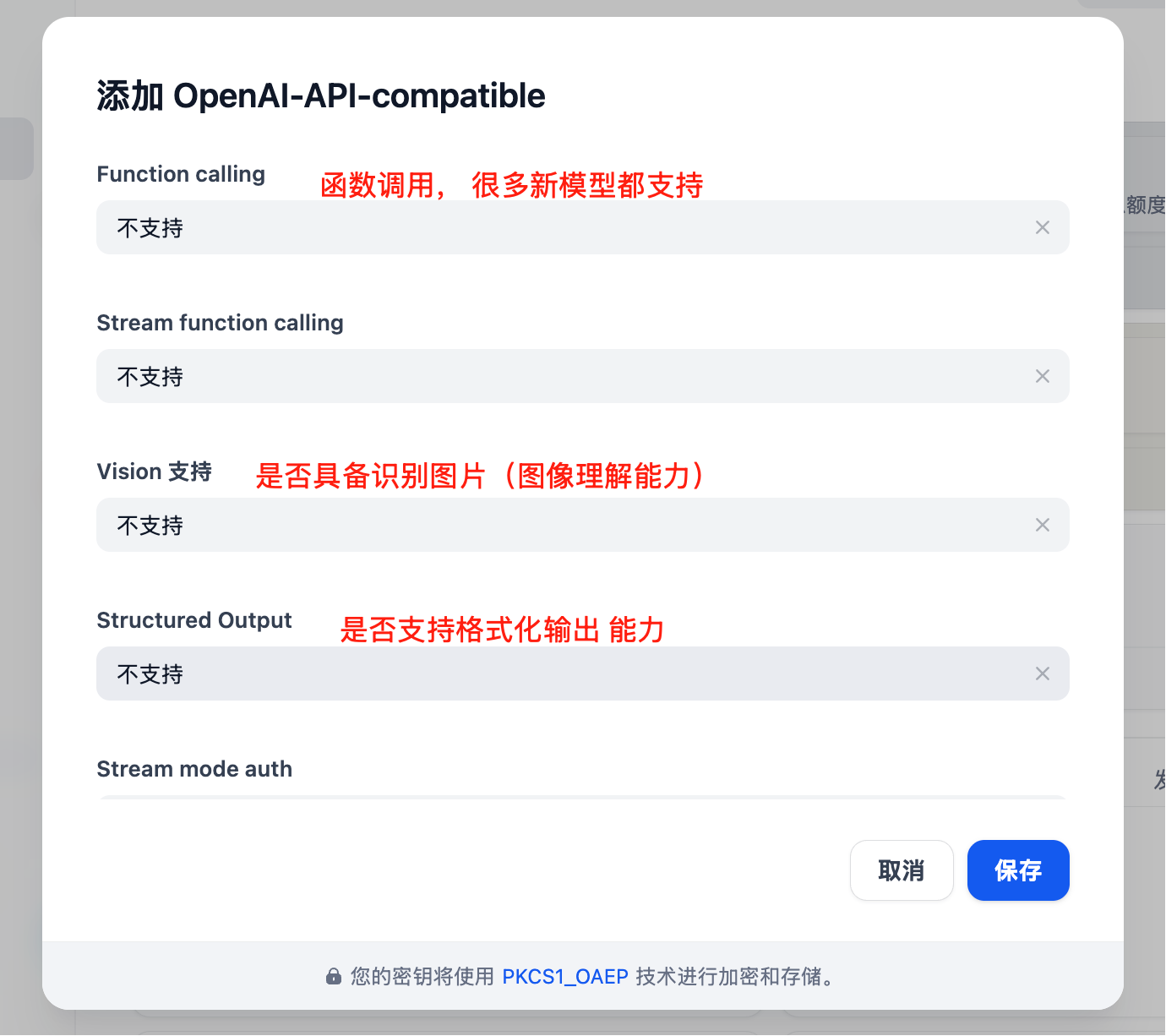
 More parameters available
 ## Core Features
### Chat Assistant
Create intelligent chat assistants:
1. Select "Chat Assistant" template
2. Configure system prompt:
```text theme={null}
You are a professional customer service assistant responsible for:
- Answering user questions
- Providing product information
- Handling after-sales service
Please maintain a friendly and professional attitude.
```
3. Select appropriate model (e.g., GPT-4)
4. Adjust parameters:
* Temperature: 0.7 (balance creativity and accuracy)
* Max Output: 2000 tokens
### Workflow Application
Build complex AI workflows:
```mermaid theme={null}
graph LR
A[User Input] --> B[Intent Recognition]
B --> C{Determine Type}
C -->|Q&A| D[Knowledge Base Retrieval]
C -->|Creation| E[Creative Generation]
C -->|Analysis| F[Data Analysis]
D --> G[Generate Answer]
E --> G
F --> G
G --> H[Output Result]
```
### Knowledge Base Q\&A
Integrate document knowledge base:
1. Create knowledge base
2. Upload documents (PDF, Word, Markdown)
3. Select embedding model: `text-embedding-ada-002`
4. Reference knowledge base in application
5. Configure retrieval parameters:
* Retrieval count: 3-5 segments
* Similarity threshold: 0.7
* Reranking: Enabled
## Application Types
### 1. Chat Assistant
```yaml theme={null}
Application Type: Chat Assistant
Model: gpt-4
System Prompt: |
You are a professional AI assistant with the following capabilities:
- Answering various questions
- Assisting in problem-solving
- Providing advice and guidance
Please always maintain a friendly, accurate, and helpful attitude.
Temperature: 0.7
Max Length: 2000
```
### 2. Document Analysis
```yaml theme={null}
Application Type: Workflow
Input: Document Upload
Processing Flow:
1. Document Parsing
2. Content Extraction
3. Structured Analysis
4. Generate Summary
Output: Analysis Report
```
### 3. Code Assistant
```yaml theme={null}
Application Type: Chat Assistant
Model: gpt-4
System Prompt: |
You are a professional programming assistant specializing in:
- Code writing and optimization
- Error debugging
- Architecture design
- Best practice recommendations
Please provide clear and practical code solutions.
```
## Advanced Features
### API Integration
Dify applications can be called via API:
```python theme={null}
import requests
url = "https://your-dify-instance/v1/chat-messages"
headers = {
"Authorization": "Bearer YOUR_APP_API_KEY",
"Content-Type": "application/json"
}
data = {
"inputs": {},
"query": "Hello, please introduce yourself",
"response_mode": "streaming",
"user": "user_123"
}
response = requests.post(url, headers=headers, json=data)
```
### Batch Processing
Process large amounts of data:
1. Prepare CSV file
2. Create batch task
3. Configure processing template
4. Execute batch task
5. Export results
### Multimodal Application
Supports mixed text and image processing:
```python theme={null}
# Multimodal input example
{
"inputs": {
"image": "data:image/jpeg;base64,...",
"text": "Analyze the content in this image"
},
"query": "Please describe the image content in detail and provide analysis"
}
```
## Model Selection Strategy
### Selection by Scenario
| Application Scenario | Recommended Model | Reason |
| -------------------- | ----------------- | ---------------------------- |
| Customer Service | GPT-3.5-Turbo | Fast response, low cost |
| Content Creation | Claude 3 Sonnet | Strong creativity |
| Code Assistant | GPT-4 | Accurate logic |
| Document Analysis | Claude 3 Opus | Good long text understanding |
| Data Analysis | GPT-4 | Strong reasoning ability |
### Cost Optimization
```yaml theme={null}
Development Environment:
Model: gpt-3.5-turbo
Max Length: 1000
Temperature: 0.7
Production Environment:
Model: gpt-4
Max Length: 2000
Temperature: 0.5
```
## Best Practices
### 1. Prompt Optimization
```text theme={null}
# Structured Prompt
## Role Definition
You are a professional [specific role]
## Task Description
Please help users with [specific task]
## Output Format
Please output in the following format:
1. Overview
2. Detailed Analysis
3. Recommendations
## Constraints
- Answers must be accurate
- Language should be clear
- Keep length within 500 words
```
### 2. Workflow Design
```mermaid theme={null}
graph TD
A[User Input] --> B[Input Validation]
B --> C[Intent Classification]
C --> D{Select Processing Path}
D -->|Simple Question| E[Quick Answer]
D -->|Complex Question| F[In-depth Analysis]
D -->|Need Search| G[Knowledge Base Retrieval]
E --> H[Output Result]
F --> H
G --> I[Combine Search Results] --> H
```
### 3. Monitoring and Optimization
Regular checks:
* User satisfaction feedback
* Response time statistics
* Cost usage
* Error rate analysis
### 4. Version Management
* Regularly backup application configuration
* Test new versions before release
* Keep multiple versions for rollback
## Troubleshooting
### Common Issues
#### Model Call Failure
* Check API key correctness
* Confirm sufficient account balance
* Verify network connection
#### Poor Response Quality
* Optimize prompt design
* Adjust model parameters
* Add context information
#### Performance Issues
* Select faster models
* Reduce output length limits
* Enable caching
### Performance Optimization
```yaml theme={null}
Cache Settings:
Enabled: true
Expiration: 3600 seconds
Cache Condition: Same Input
Concurrency Control:
Max Concurrency: 10
Queue Size: 100
Timeout: 30 seconds
Resource Limits:
Memory Limit: 2GB
CPU Limit: 80%
```
## Deployment Recommendations
### Production Environment
```yaml theme={null}
# docker-compose.yml
version: '3.8'
services:
dify-api:
image: langgenius/dify-api:latest
environment:
- SECRET_KEY=your-secret-key
- DB_HOST=postgres
- REDIS_HOST=redis
- OPENAI_API_KEY=your-apiyi-key
- OPENAI_API_BASE=https://api.apiyi.com/v1
depends_on:
- postgres
- redis
dify-web:
image: langgenius/dify-web:latest
ports:
- "3000:3000"
depends_on:
- dify-api
postgres:
image: postgres:14
environment:
- POSTGRES_DB=dify
- POSTGRES_USER=dify
- POSTGRES_PASSWORD=password
redis:
image: redis:alpine
```
### Security Configuration
* Use environment variables to store sensitive information
* Enable HTTPS access
* Set access control
* Regularly update dependencies
### Monitoring Setup
```python theme={null}
# Monitoring script example
import requests
import time
def monitor_dify_health():
try:
response = requests.get("http://your-dify-instance/health")
if response.status_code == 200:
print("Dify running normally")
else:
print(f"Dify abnormal, status code: {response.status_code}")
except Exception as e:
print(f"Monitoring failed: {e}")
# Check every minute
while True:
monitor_dify_health()
time.sleep(60)
```
Need more help? Please check the [Detailed Integration Documentation](/en/scenarios/engineering/dify).
## Core Features
### Chat Assistant
Create intelligent chat assistants:
1. Select "Chat Assistant" template
2. Configure system prompt:
```text theme={null}
You are a professional customer service assistant responsible for:
- Answering user questions
- Providing product information
- Handling after-sales service
Please maintain a friendly and professional attitude.
```
3. Select appropriate model (e.g., GPT-4)
4. Adjust parameters:
* Temperature: 0.7 (balance creativity and accuracy)
* Max Output: 2000 tokens
### Workflow Application
Build complex AI workflows:
```mermaid theme={null}
graph LR
A[User Input] --> B[Intent Recognition]
B --> C{Determine Type}
C -->|Q&A| D[Knowledge Base Retrieval]
C -->|Creation| E[Creative Generation]
C -->|Analysis| F[Data Analysis]
D --> G[Generate Answer]
E --> G
F --> G
G --> H[Output Result]
```
### Knowledge Base Q\&A
Integrate document knowledge base:
1. Create knowledge base
2. Upload documents (PDF, Word, Markdown)
3. Select embedding model: `text-embedding-ada-002`
4. Reference knowledge base in application
5. Configure retrieval parameters:
* Retrieval count: 3-5 segments
* Similarity threshold: 0.7
* Reranking: Enabled
## Application Types
### 1. Chat Assistant
```yaml theme={null}
Application Type: Chat Assistant
Model: gpt-4
System Prompt: |
You are a professional AI assistant with the following capabilities:
- Answering various questions
- Assisting in problem-solving
- Providing advice and guidance
Please always maintain a friendly, accurate, and helpful attitude.
Temperature: 0.7
Max Length: 2000
```
### 2. Document Analysis
```yaml theme={null}
Application Type: Workflow
Input: Document Upload
Processing Flow:
1. Document Parsing
2. Content Extraction
3. Structured Analysis
4. Generate Summary
Output: Analysis Report
```
### 3. Code Assistant
```yaml theme={null}
Application Type: Chat Assistant
Model: gpt-4
System Prompt: |
You are a professional programming assistant specializing in:
- Code writing and optimization
- Error debugging
- Architecture design
- Best practice recommendations
Please provide clear and practical code solutions.
```
## Advanced Features
### API Integration
Dify applications can be called via API:
```python theme={null}
import requests
url = "https://your-dify-instance/v1/chat-messages"
headers = {
"Authorization": "Bearer YOUR_APP_API_KEY",
"Content-Type": "application/json"
}
data = {
"inputs": {},
"query": "Hello, please introduce yourself",
"response_mode": "streaming",
"user": "user_123"
}
response = requests.post(url, headers=headers, json=data)
```
### Batch Processing
Process large amounts of data:
1. Prepare CSV file
2. Create batch task
3. Configure processing template
4. Execute batch task
5. Export results
### Multimodal Application
Supports mixed text and image processing:
```python theme={null}
# Multimodal input example
{
"inputs": {
"image": "data:image/jpeg;base64,...",
"text": "Analyze the content in this image"
},
"query": "Please describe the image content in detail and provide analysis"
}
```
## Model Selection Strategy
### Selection by Scenario
| Application Scenario | Recommended Model | Reason |
| -------------------- | ----------------- | ---------------------------- |
| Customer Service | GPT-3.5-Turbo | Fast response, low cost |
| Content Creation | Claude 3 Sonnet | Strong creativity |
| Code Assistant | GPT-4 | Accurate logic |
| Document Analysis | Claude 3 Opus | Good long text understanding |
| Data Analysis | GPT-4 | Strong reasoning ability |
### Cost Optimization
```yaml theme={null}
Development Environment:
Model: gpt-3.5-turbo
Max Length: 1000
Temperature: 0.7
Production Environment:
Model: gpt-4
Max Length: 2000
Temperature: 0.5
```
## Best Practices
### 1. Prompt Optimization
```text theme={null}
# Structured Prompt
## Role Definition
You are a professional [specific role]
## Task Description
Please help users with [specific task]
## Output Format
Please output in the following format:
1. Overview
2. Detailed Analysis
3. Recommendations
## Constraints
- Answers must be accurate
- Language should be clear
- Keep length within 500 words
```
### 2. Workflow Design
```mermaid theme={null}
graph TD
A[User Input] --> B[Input Validation]
B --> C[Intent Classification]
C --> D{Select Processing Path}
D -->|Simple Question| E[Quick Answer]
D -->|Complex Question| F[In-depth Analysis]
D -->|Need Search| G[Knowledge Base Retrieval]
E --> H[Output Result]
F --> H
G --> I[Combine Search Results] --> H
```
### 3. Monitoring and Optimization
Regular checks:
* User satisfaction feedback
* Response time statistics
* Cost usage
* Error rate analysis
### 4. Version Management
* Regularly backup application configuration
* Test new versions before release
* Keep multiple versions for rollback
## Troubleshooting
### Common Issues
#### Model Call Failure
* Check API key correctness
* Confirm sufficient account balance
* Verify network connection
#### Poor Response Quality
* Optimize prompt design
* Adjust model parameters
* Add context information
#### Performance Issues
* Select faster models
* Reduce output length limits
* Enable caching
### Performance Optimization
```yaml theme={null}
Cache Settings:
Enabled: true
Expiration: 3600 seconds
Cache Condition: Same Input
Concurrency Control:
Max Concurrency: 10
Queue Size: 100
Timeout: 30 seconds
Resource Limits:
Memory Limit: 2GB
CPU Limit: 80%
```
## Deployment Recommendations
### Production Environment
```yaml theme={null}
# docker-compose.yml
version: '3.8'
services:
dify-api:
image: langgenius/dify-api:latest
environment:
- SECRET_KEY=your-secret-key
- DB_HOST=postgres
- REDIS_HOST=redis
- OPENAI_API_KEY=your-apiyi-key
- OPENAI_API_BASE=https://api.apiyi.com/v1
depends_on:
- postgres
- redis
dify-web:
image: langgenius/dify-web:latest
ports:
- "3000:3000"
depends_on:
- dify-api
postgres:
image: postgres:14
environment:
- POSTGRES_DB=dify
- POSTGRES_USER=dify
- POSTGRES_PASSWORD=password
redis:
image: redis:alpine
```
### Security Configuration
* Use environment variables to store sensitive information
* Enable HTTPS access
* Set access control
* Regularly update dependencies
### Monitoring Setup
```python theme={null}
# Monitoring script example
import requests
import time
def monitor_dify_health():
try:
response = requests.get("http://your-dify-instance/health")
if response.status_code == 200:
print("Dify running normally")
else:
print(f"Dify abnormal, status code: {response.status_code}")
except Exception as e:
print(f"Monitoring failed: {e}")
# Check every minute
while True:
monitor_dify_health()
time.sleep(60)
```
Need more help? Please check the [Detailed Integration Documentation](/en/scenarios/engineering/dify).