> ## Documentation Index
> Fetch the complete documentation index at: https://docs.apiyi.com/llms.txt
> Use this file to discover all available pages before exploring further.
# CC Switch
> Unified desktop app for managing Claude Code and 4 other AI CLI tools — one-click provider switching, model configuration, and more
## Overview
CC Switch is a desktop application built with Tauri 2 that unifies management of five AI CLI tools: Claude Code, Codex CLI, Gemini CLI, OpenCode, and OpenClaw. No more manual config file editing — switch API providers, models, and keys through a graphical interface.
By configuring APIYI as your provider, you get:
Manage all CLI tool configs through a GUI, no more manual editing
Create tokens with the ClaudeCode group for 88% pricing
Built-in Usage Dashboard for real-time spending, requests, and token tracking
Local proxy with hot-switching, auto-failover, and circuit breaker
**Project Info**
* 🔗 Repository: `github.com/farion1231/cc-switch`
* 📜 License: MIT
* 👤 Author: Jason Young (farion1231)
* 🏷️ Latest Version: v3.12.0
## Core Features
### Provider Management
* 50+ built-in presets including AWS Bedrock and NVIDIA NIM
* One-click switching, drag-and-drop sorting, import/export
* System tray quick access
### MCP Server Management
* Unified MCP server configuration across all CLI tools
* Bidirectional sync — changes propagate to all applications
### More Features
* **Prompts Management**: Markdown editor + cross-app synchronization
* **Skills Installation**: Install skills from GitHub repos or ZIP files
* **Session Browser**: View and restore conversation history
* **Cloud Sync**: Dropbox, OneDrive, iCloud, and WebDAV support
* **Deep Link**: `ccswitch://` protocol for one-click config imports
## Quick Start
### Step 1: Install CC Switch
Install via Homebrew:
```bash theme={null}
brew install --cask cc-switch
```
Or download the DMG installer from GitHub Releases.
Download the MSI installer or Portable ZIP from GitHub Releases.
Choose the installation method for your distribution:
```bash theme={null}
# Debian/Ubuntu
sudo dpkg -i cc-switch_*.deb
# Fedora/RHEL
sudo rpm -i cc-switch_*.rpm
# Arch Linux
paru -S cc-switch-bin
```
AppImage and Flatpak are also available.
**System Requirements**: Windows 10+, macOS 10.15 (Catalina)+, Ubuntu 22.04+ / Debian 11+ / Fedora 34+
### Step 2: Get Your APIYI API Key
1. Visit [APIYI Console - Token Page](https://api.apiyi.com/token)
2. Click to create a new token
3. **Important**: Select the **【ClaudeCode】group** for **88% discount**
4. Copy the generated key (starts with `sk-`)
**Save Money**: Make sure to select the【ClaudeCode】group when creating tokens to enjoy 88% discounted pricing.
### Step 3: Configure APIYI in CC Switch
1. Open CC Switch
2. Go to the **Provider** management page, click add, and select "Custom Gateway":
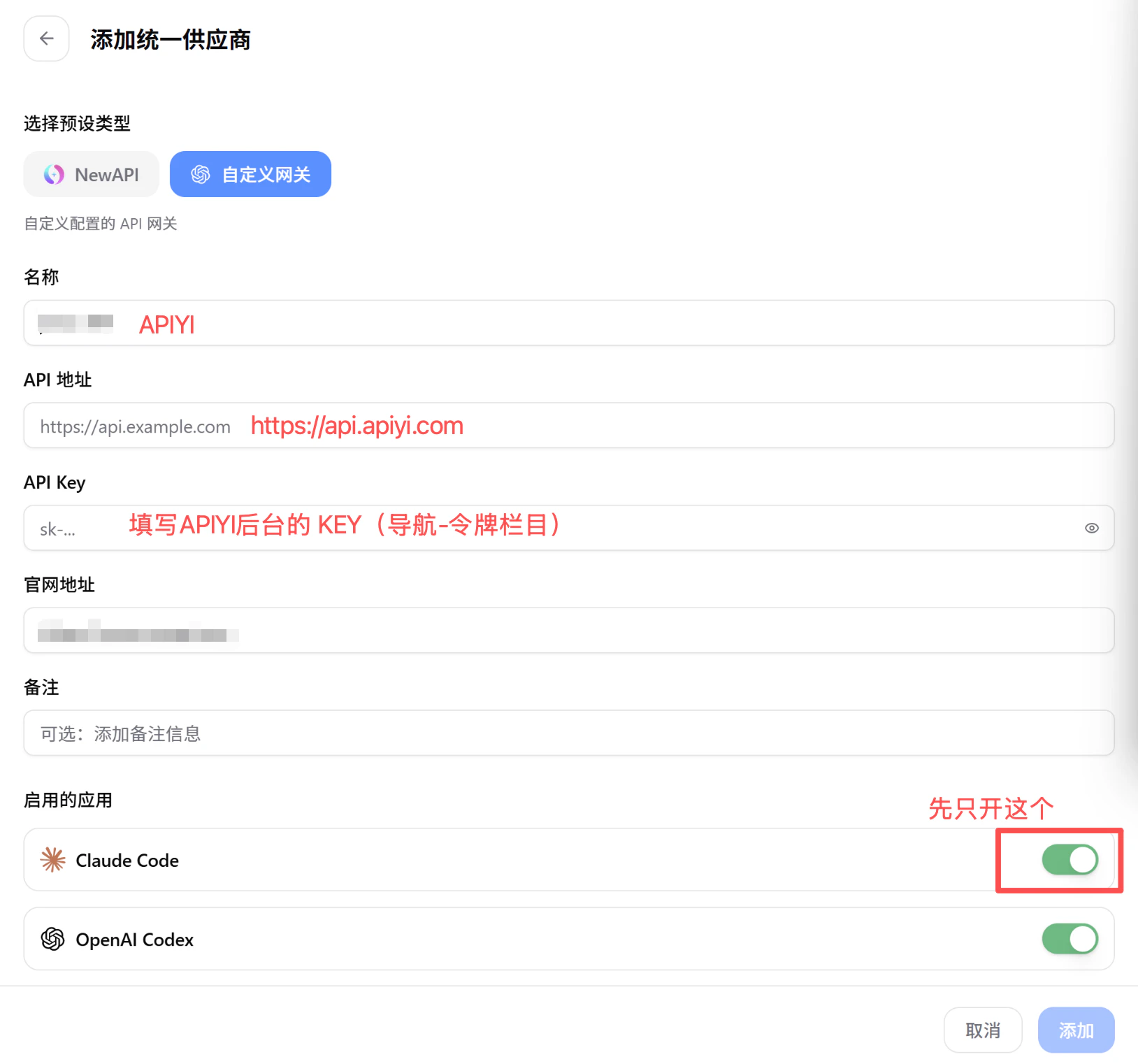 3. Fill in the following information as shown above:
* **Name**: `APIYI`
* **API Address**: `https://api.apiyi.com`
* **API Key**: Paste the key from the previous step
* **Enabled Apps**: Enable Claude Code (enable others as needed)
4. Click "Add" to save the configuration
### Step 4: Add Models
Add the following models in your Provider configuration:
**Standard Models**:
| Model Name | Model ID | Description |
| ----------------- | --------------------------- | -------------------------------------- |
| Claude Opus 4.6 | `claude-opus-4-6` | Top flagship, best for complex tasks |
| Claude Sonnet 4.6 | `claude-sonnet-4-6` | Strong coding, best value |
| Claude Haiku 4.5 | `claude-haiku-4-5-20251001` | Lightweight and fast, for simple tasks |
**Reasoning Models** (forced chain-of-thought):
| Model Name | Model ID | Description |
| -------------------------- | ------------------------------------ | -------------------------------------- |
| Claude Opus 4.6 Thinking | `claude-opus-4-6-thinking` | Deep reasoning, complex logic analysis |
| Claude Sonnet 4.6 Thinking | `claude-sonnet-4-6-thinking` | Reasoning-enhanced coding, balanced |
| Claude Haiku 4.5 Thinking | `claude-haiku-4-5-20251001-thinking` | Lightweight reasoning, quick thinking |
**Model Selection Tips**: Use `claude-sonnet-4-6` for daily coding, `claude-opus-4-6` for complex architecture design, and `claude-haiku-4-5-20251001` for quick Q\&A. Use the thinking variants when deep reasoning is needed.
### Step 5: One-Click Switch
Once configured, select APIYI as the active Provider in CC Switch. All linked CLI tools (Claude Code, Codex CLI, etc.) will automatically switch to the APIYI configuration.
## Usage Guide
### Managing Multiple CLI Tools
CC Switch supports managing these 5 AI CLI tools simultaneously:
* **Claude Code** — Anthropic's official CLI programming assistant
* **Codex CLI** — OpenAI's command-line programming tool
* **Gemini CLI** — Google's command-line AI assistant
* **OpenCode** — Open-source CLI programming tool
* **OpenClaw** — Open-source local AI Agent
All tools share Provider configuration — switch once, apply everywhere.
### Local Proxy
CC Switch includes a built-in local proxy server with:
* **Hot-switching**: Switch providers without restarting
* **Auto-failover**: Automatically switch to backup when current provider is down
* **Circuit breaker**: Stops requests on persistent failures to prevent resource waste
### Configuration Backup
* Auto-backup system retains the 10 most recent versions
* Import/export complete configurations
* Cloud sync via Dropbox, OneDrive, iCloud, WebDAV
## Model Recommendations
Besides the Claude series, APIYI supports 400+ mainstream AI models. Check out the complete programming model recommendations, performance comparisons, and scenario-based suggestions.
## FAQ
Windows 10+, macOS 10.15 (Catalina)+, and major Linux distributions (Ubuntu 22.04+, Debian 11+, Fedora 34+, Arch Linux).
Some groups (e.g. the ClaudeCode group) offer discounted pricing when creating a token at [APIYI Console](https://api.apiyi.com/token) — check the console for the current rate. Stack it with a recharge bonus for an even lower effective cost.
Please check:
1. API Key is correct (starts with `sk-`)
2. Base URL is set to `https://api.apiyi.com`
3. APIYI account balance is sufficient
4. CC Switch has synced the configuration to Claude Code
Thinking (reasoning) models force chain-of-thought mode, performing deep reasoning analysis before responding. They're ideal for complex logic, architecture design, and deep thinking scenarios. Standard models respond faster and are suitable for daily coding and simple tasks.
CC Switch supports import functionality and can automatically detect existing environment variables and config files. After installation, open the app and it will auto-detect installed CLI tools and their existing configurations.
CC Switch itself is completely free and open source (MIT License). Only API calls incur costs — using the ClaudeCode group through APIYI gives you 88% discounted pricing.
## Best Practices
**Tips for Efficient Use**:
1. **Create tokens with the right group**: Always select【ClaudeCode】group for 88% discount
2. **Leverage hot-switching**: Quickly switch providers and models between tasks
3. **Enable auto-failover**: Configure multiple providers as backups for service continuity
4. **Regular backups**: Use cloud sync to regularly back up your configuration
## Related Resources
Detailed Claude Code configuration tutorial
Latest AI model recommendations
Manage API keys and view usage
Explore other tools like Cursor
3. Fill in the following information as shown above:
* **Name**: `APIYI`
* **API Address**: `https://api.apiyi.com`
* **API Key**: Paste the key from the previous step
* **Enabled Apps**: Enable Claude Code (enable others as needed)
4. Click "Add" to save the configuration
### Step 4: Add Models
Add the following models in your Provider configuration:
**Standard Models**:
| Model Name | Model ID | Description |
| ----------------- | --------------------------- | -------------------------------------- |
| Claude Opus 4.6 | `claude-opus-4-6` | Top flagship, best for complex tasks |
| Claude Sonnet 4.6 | `claude-sonnet-4-6` | Strong coding, best value |
| Claude Haiku 4.5 | `claude-haiku-4-5-20251001` | Lightweight and fast, for simple tasks |
**Reasoning Models** (forced chain-of-thought):
| Model Name | Model ID | Description |
| -------------------------- | ------------------------------------ | -------------------------------------- |
| Claude Opus 4.6 Thinking | `claude-opus-4-6-thinking` | Deep reasoning, complex logic analysis |
| Claude Sonnet 4.6 Thinking | `claude-sonnet-4-6-thinking` | Reasoning-enhanced coding, balanced |
| Claude Haiku 4.5 Thinking | `claude-haiku-4-5-20251001-thinking` | Lightweight reasoning, quick thinking |
**Model Selection Tips**: Use `claude-sonnet-4-6` for daily coding, `claude-opus-4-6` for complex architecture design, and `claude-haiku-4-5-20251001` for quick Q\&A. Use the thinking variants when deep reasoning is needed.
### Step 5: One-Click Switch
Once configured, select APIYI as the active Provider in CC Switch. All linked CLI tools (Claude Code, Codex CLI, etc.) will automatically switch to the APIYI configuration.
## Usage Guide
### Managing Multiple CLI Tools
CC Switch supports managing these 5 AI CLI tools simultaneously:
* **Claude Code** — Anthropic's official CLI programming assistant
* **Codex CLI** — OpenAI's command-line programming tool
* **Gemini CLI** — Google's command-line AI assistant
* **OpenCode** — Open-source CLI programming tool
* **OpenClaw** — Open-source local AI Agent
All tools share Provider configuration — switch once, apply everywhere.
### Local Proxy
CC Switch includes a built-in local proxy server with:
* **Hot-switching**: Switch providers without restarting
* **Auto-failover**: Automatically switch to backup when current provider is down
* **Circuit breaker**: Stops requests on persistent failures to prevent resource waste
### Configuration Backup
* Auto-backup system retains the 10 most recent versions
* Import/export complete configurations
* Cloud sync via Dropbox, OneDrive, iCloud, WebDAV
## Model Recommendations
Besides the Claude series, APIYI supports 400+ mainstream AI models. Check out the complete programming model recommendations, performance comparisons, and scenario-based suggestions.
## FAQ
Windows 10+, macOS 10.15 (Catalina)+, and major Linux distributions (Ubuntu 22.04+, Debian 11+, Fedora 34+, Arch Linux).
Some groups (e.g. the ClaudeCode group) offer discounted pricing when creating a token at [APIYI Console](https://api.apiyi.com/token) — check the console for the current rate. Stack it with a recharge bonus for an even lower effective cost.
Please check:
1. API Key is correct (starts with `sk-`)
2. Base URL is set to `https://api.apiyi.com`
3. APIYI account balance is sufficient
4. CC Switch has synced the configuration to Claude Code
Thinking (reasoning) models force chain-of-thought mode, performing deep reasoning analysis before responding. They're ideal for complex logic, architecture design, and deep thinking scenarios. Standard models respond faster and are suitable for daily coding and simple tasks.
CC Switch supports import functionality and can automatically detect existing environment variables and config files. After installation, open the app and it will auto-detect installed CLI tools and their existing configurations.
CC Switch itself is completely free and open source (MIT License). Only API calls incur costs — using the ClaudeCode group through APIYI gives you 88% discounted pricing.
## Best Practices
**Tips for Efficient Use**:
1. **Create tokens with the right group**: Always select【ClaudeCode】group for 88% discount
2. **Leverage hot-switching**: Quickly switch providers and models between tasks
3. **Enable auto-failover**: Configure multiple providers as backups for service continuity
4. **Regular backups**: Use cloud sync to regularly back up your configuration
## Related Resources
Detailed Claude Code configuration tutorial
Latest AI model recommendations
Manage API keys and view usage
Explore other tools like Cursor