> ## Documentation Index
> Fetch the complete documentation index at: https://docs.apiyi.com/llms.txt
> Use this file to discover all available pages before exploring further.
# Cursor
> AI-driven code editor integration guide
Cursor is an AI-driven code editor. By integrating APIYI, you can get powerful AI assistance while writing code.
## Quick Configuration
### 1. Open Settings
Click the gear icon ⚙️ in the upper right corner, select **Models** option
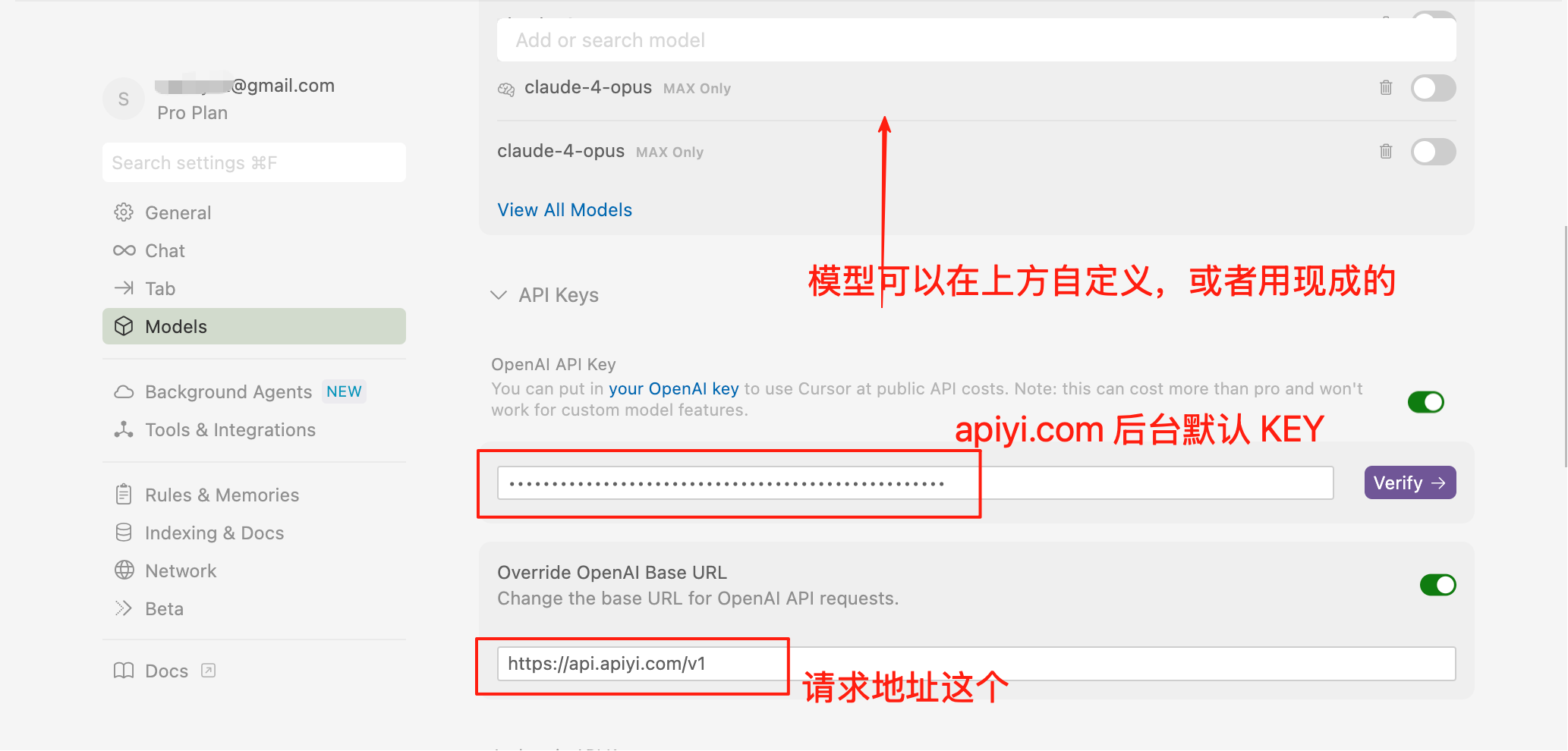
### 2. Configure API
* **OpenAI API Key**: Enter your APIYI key (can use default token directly)
* **Override OpenAI Base URL**: Check and enter `https://api.apiyi.com/v1`
* Click **Verify** to validate configuration
 ### 3. Model Configuration
**Important Note**: Cursor currently **does not support Agent mode**, only Chat conversation mode is available. You can have AI generate code in conversation, then manually apply it to actual code.
If you're a beginner and heavily rely on Agent mode for Vibe Coding, recommend:
* Purchase Cursor official membership to use their native service
* Or use alternatives: VS Code's **RooCode** or **Cline** plugins (support Agent mode)
#### Recommended Model Configuration
Based on current latest model performance and cost-effectiveness, recommend the following:
**Programming First Choice Models**:
* `claude-sonnet-4-20250514` - Claude 4 Sonnet, strongest programming
* `gpt-4.1` - Fast speed, strong overall capability
* `deepseek-v3` - Excellent Chinese programming, high cost-performance
**Cost Optimization Models**:
* `gpt-4.1-mini` - Lightweight but capable
* `claude-3-haiku` - Cheapest in Claude series
* `gemini-2.5-flash` - Google's fast response model
**Reasoning Enhanced Models**:
* `o4-mini` - First choice reasoning model for programming tasks
* `o3` - Complex reasoning and algorithmic problems
#### Add Custom Models
Add the following model IDs in Cursor settings:
```
claude-sonnet-4-20250514
gpt-4.1
deepseek-v3
o4-mini
gemini-2.5-pro
```
## Usage Mode Explanation
### Chat Mode Workflow
Since Cursor doesn't support Agent mode, recommend the following workflow:
1. **Dialogue to Generate Code**
* Use `Ctrl/Cmd + L` to open chat
* Describe your requirements, have AI generate code
* View generated code snippets
2. **Manually Apply Code**
* Copy code from chat window
* Paste to target file
* Or use "Apply" button (if available)
3. **Iterate and Optimize**
* Continue conversation to request modifications
* Repeat application process
### Alternative Comparison
| Tool | Agent Mode | Advantages | Disadvantages |
| ---------------------- | ---------- | ----------------------------------------------- | ------------------------------ |
| **Cursor** | ❌ | Elegant interface, good completion experience | No Agent mode |
| **Cline (VS Code)** | ✅ | Full Agent functionality, can auto-modify files | Requires VS Code |
| **RooCode (VS Code)** | ✅ | Agent mode, supports multi-file editing | Newer, features being improved |
| **Continue (VS Code)** | ✅ | Open source, highly customizable | More complex configuration |
## Core Features
### Smart Code Completion
* **Tab Completion**: Press Tab to accept AI suggestions
* **Multi-line Completion**: Supports function-level code generation
* **Context Aware**: Provides suggestions based on project structure
### AI Conversation
* **Ctrl/Cmd + K**: Open command palette
* **Ctrl/Cmd + L**: Sidebar conversation
* **Code Explanation**: Select code and ask AI
### Code Editing
* **Generate Code**: Describe requirements, AI auto-generates
* **Refactoring Suggestions**: Get optimization recommendations
* **Error Fixing**: AI assists in locating and fixing errors
## Keyboard Shortcuts
| Shortcut | Function |
| -------------- | ---------------------- |
| `Ctrl/Cmd + K` | AI command palette |
| `Ctrl/Cmd + L` | AI conversation |
| `Tab` | Accept code suggestion |
| `Esc` | Cancel suggestion |
## Usage Tips
### 1. Provide Clear Context
```javascript theme={null}
// @context: React component for user authentication
// @requirements: Need to support OAuth2 login
// @constraints: Compatible with NextJS 13+
// AI will generate more accurate code based on this information
```
### 2. Optimize Prompts
```
// Bad prompt
"Fix this function"
// Good prompt
"Fix floating point precision issue in calculateTotal function, ensure amount calculation accurate to 2 decimal places"
```
### 3. Fully Utilize Chat Mode
Although there's no Agent mode, you can:
* Have AI generate complete file content
* Request AI to provide detailed modification instructions
* Use AI for code review and refactoring suggestions
## Troubleshooting
### Connection Timeout
1. Check network connection
2. Confirm API address: `https://api.apiyi.com/v1`
3. Verify API key validity
### Model Not Responding
1. Check account balance
2. Try switching models
3. Restart Cursor
### Poor Code Suggestions
1. Provide more project context
2. Use more specific prompts
3. Try different models
## Best Practices
### Project-Level Configuration
Create `.cursor-settings.json` in project root:
```json theme={null}
{
"model": "gpt-4.1",
"temperature": 0.7,
"contextFiles": ["README.md", "package.json"],
"rules": [
"Use TypeScript strict mode",
"Follow ESLint standards",
"Add appropriate comments"
]
}
```
### Code Standards
Clearly specify code standards in prompts:
* Use TypeScript
* Follow Airbnb standards
* Add JSDoc comments
* Use functional style
### Security Awareness
* Don't include sensitive information in code
* Review AI-generated code
* Verify third-party dependency security
## Integration Workflow
### Git Integration
```bash theme={null}
# AI generates commit message
git add .
# Use Cursor AI to generate descriptive commit message
```
### Test-Driven Development
1. Write test cases first
2. Have AI generate implementation code
3. Run tests to verify
4. Iterate and optimize
### Code Review
Use AI for code review:
```
Please review this code, focusing on:
1. Performance issues
2. Security vulnerabilities
3. Code standards
4. Best practices
```
## Need Agent Mode?
If you need AI to automatically modify multiple files and perform complex refactoring tasks, recommend checking out:
Full-featured AI Agent in VS Code, supports auto-modifying files
Emerging VS Code AI Agent plugin, supports multi-file editing
**Tip**: If you're a Vibe Coding enthusiast and need AI to autonomously complete complex programming tasks, recommend using tools that support Agent mode, or consider purchasing Cursor official membership for full experience.
Need more help? Please visit [APIYI Official Website](https://api.apiyi.com) for support.
### 3. Model Configuration
**Important Note**: Cursor currently **does not support Agent mode**, only Chat conversation mode is available. You can have AI generate code in conversation, then manually apply it to actual code.
If you're a beginner and heavily rely on Agent mode for Vibe Coding, recommend:
* Purchase Cursor official membership to use their native service
* Or use alternatives: VS Code's **RooCode** or **Cline** plugins (support Agent mode)
#### Recommended Model Configuration
Based on current latest model performance and cost-effectiveness, recommend the following:
**Programming First Choice Models**:
* `claude-sonnet-4-20250514` - Claude 4 Sonnet, strongest programming
* `gpt-4.1` - Fast speed, strong overall capability
* `deepseek-v3` - Excellent Chinese programming, high cost-performance
**Cost Optimization Models**:
* `gpt-4.1-mini` - Lightweight but capable
* `claude-3-haiku` - Cheapest in Claude series
* `gemini-2.5-flash` - Google's fast response model
**Reasoning Enhanced Models**:
* `o4-mini` - First choice reasoning model for programming tasks
* `o3` - Complex reasoning and algorithmic problems
#### Add Custom Models
Add the following model IDs in Cursor settings:
```
claude-sonnet-4-20250514
gpt-4.1
deepseek-v3
o4-mini
gemini-2.5-pro
```
## Usage Mode Explanation
### Chat Mode Workflow
Since Cursor doesn't support Agent mode, recommend the following workflow:
1. **Dialogue to Generate Code**
* Use `Ctrl/Cmd + L` to open chat
* Describe your requirements, have AI generate code
* View generated code snippets
2. **Manually Apply Code**
* Copy code from chat window
* Paste to target file
* Or use "Apply" button (if available)
3. **Iterate and Optimize**
* Continue conversation to request modifications
* Repeat application process
### Alternative Comparison
| Tool | Agent Mode | Advantages | Disadvantages |
| ---------------------- | ---------- | ----------------------------------------------- | ------------------------------ |
| **Cursor** | ❌ | Elegant interface, good completion experience | No Agent mode |
| **Cline (VS Code)** | ✅ | Full Agent functionality, can auto-modify files | Requires VS Code |
| **RooCode (VS Code)** | ✅ | Agent mode, supports multi-file editing | Newer, features being improved |
| **Continue (VS Code)** | ✅ | Open source, highly customizable | More complex configuration |
## Core Features
### Smart Code Completion
* **Tab Completion**: Press Tab to accept AI suggestions
* **Multi-line Completion**: Supports function-level code generation
* **Context Aware**: Provides suggestions based on project structure
### AI Conversation
* **Ctrl/Cmd + K**: Open command palette
* **Ctrl/Cmd + L**: Sidebar conversation
* **Code Explanation**: Select code and ask AI
### Code Editing
* **Generate Code**: Describe requirements, AI auto-generates
* **Refactoring Suggestions**: Get optimization recommendations
* **Error Fixing**: AI assists in locating and fixing errors
## Keyboard Shortcuts
| Shortcut | Function |
| -------------- | ---------------------- |
| `Ctrl/Cmd + K` | AI command palette |
| `Ctrl/Cmd + L` | AI conversation |
| `Tab` | Accept code suggestion |
| `Esc` | Cancel suggestion |
## Usage Tips
### 1. Provide Clear Context
```javascript theme={null}
// @context: React component for user authentication
// @requirements: Need to support OAuth2 login
// @constraints: Compatible with NextJS 13+
// AI will generate more accurate code based on this information
```
### 2. Optimize Prompts
```
// Bad prompt
"Fix this function"
// Good prompt
"Fix floating point precision issue in calculateTotal function, ensure amount calculation accurate to 2 decimal places"
```
### 3. Fully Utilize Chat Mode
Although there's no Agent mode, you can:
* Have AI generate complete file content
* Request AI to provide detailed modification instructions
* Use AI for code review and refactoring suggestions
## Troubleshooting
### Connection Timeout
1. Check network connection
2. Confirm API address: `https://api.apiyi.com/v1`
3. Verify API key validity
### Model Not Responding
1. Check account balance
2. Try switching models
3. Restart Cursor
### Poor Code Suggestions
1. Provide more project context
2. Use more specific prompts
3. Try different models
## Best Practices
### Project-Level Configuration
Create `.cursor-settings.json` in project root:
```json theme={null}
{
"model": "gpt-4.1",
"temperature": 0.7,
"contextFiles": ["README.md", "package.json"],
"rules": [
"Use TypeScript strict mode",
"Follow ESLint standards",
"Add appropriate comments"
]
}
```
### Code Standards
Clearly specify code standards in prompts:
* Use TypeScript
* Follow Airbnb standards
* Add JSDoc comments
* Use functional style
### Security Awareness
* Don't include sensitive information in code
* Review AI-generated code
* Verify third-party dependency security
## Integration Workflow
### Git Integration
```bash theme={null}
# AI generates commit message
git add .
# Use Cursor AI to generate descriptive commit message
```
### Test-Driven Development
1. Write test cases first
2. Have AI generate implementation code
3. Run tests to verify
4. Iterate and optimize
### Code Review
Use AI for code review:
```
Please review this code, focusing on:
1. Performance issues
2. Security vulnerabilities
3. Code standards
4. Best practices
```
## Need Agent Mode?
If you need AI to automatically modify multiple files and perform complex refactoring tasks, recommend checking out:
Full-featured AI Agent in VS Code, supports auto-modifying files
Emerging VS Code AI Agent plugin, supports multi-file editing
**Tip**: If you're a Vibe Coding enthusiast and need AI to autonomously complete complex programming tasks, recommend using tools that support Agent mode, or consider purchasing Cursor official membership for full experience.
Need more help? Please visit [APIYI Official Website](https://api.apiyi.com) for support.