> ## Documentation Index
> Fetch the complete documentation index at: https://docs.apiyi.com/llms.txt
> Use this file to discover all available pages before exploring further.
# Roo Code (VS Code)
> Your AI Development Team in VS Code - Smart Programming Assistant with Multi-Mode Configuration
## Overview
Roo Code is a powerful VS Code AI programming assistant that provides you with a complete AI development team. Its standout feature is **multi-mode configuration**, allowing you to use different AI models for different development tasks to achieve optimal development efficiency.
**Core Advantages**
* 🎯 **Multi-Mode Configuration**: Assign specialized models for architecture, coding, debugging, and other tasks
* 🤖 **Agent Intelligence**: Automatically plan and execute complex development tasks
* 🔄 **Multi-File Operations**: Understand project structure and intelligently modify multiple files
* 💰 **Completely Free**: Open source and free, only pay for AI model usage
* 🌐 **Wide Compatibility**: Supports 400+ mainstream AI models
* 🔌 **MCP Support**: Connect external tools via Model Context Protocol
**Roo Code vs Cline**
Roo Code is a fork of Cline, retaining Cline's core functionality while adding a unique multi-mode configuration system. If you need to use different models for different development stages, Roo Code is the better choice.
## Maintenance Status and Responses Endpoint Support
### Officially discontinued (2026)
The Roo Code team has shipped its **final release** and announced a pivot to Roomote, its cloud agent platform: the extension will keep working indefinitely, but **there will be no more bug fixes, new features, or model updates**. The team recommends the community-maintained fork `ZooCode`, or [Cline](/en/scenarios/programming/cline) — the project Roo Code originally forked from — for anyone who wants to stay on the extension form factor.
 The practical impact of the freeze: the "OpenAI" provider's **preset model list stops at `gpt-5.4`** — gpt-5.5 / gpt-5.6 and later models never appear in the dropdown. Existing functionality is unaffected.
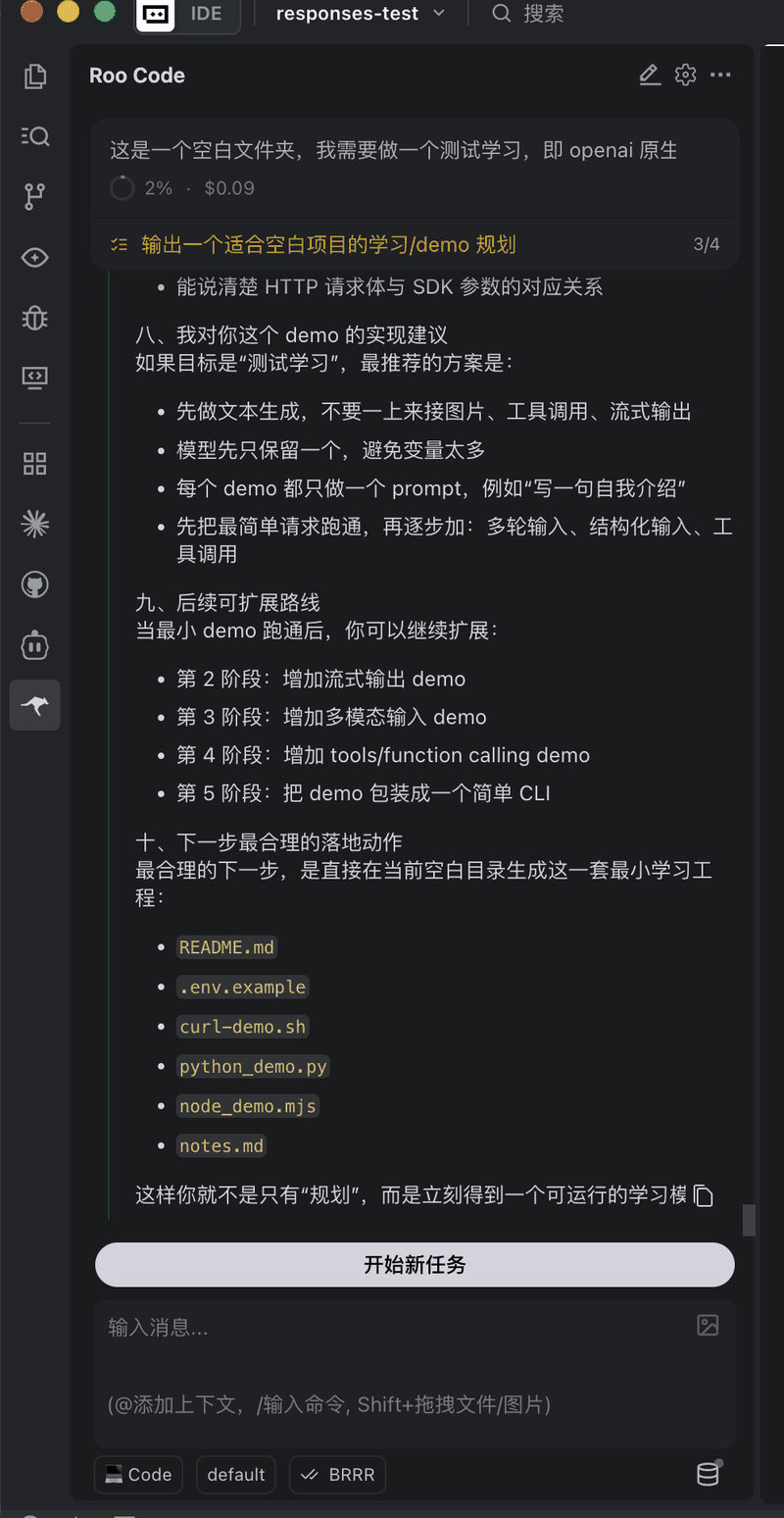
### One of the few IDE plugins that speak /v1/responses (verified)
Roo Code's "OpenAI" provider uses the `/v1/responses` endpoint (distinct from the "OpenAI Compatible" provider, which uses `/v1/chat/completions`) and accepts a custom Base URL. That makes it one of the few plugins that can run **GPT-5.4 "reasoning plus tool calling"** inside an IDE — on chat/completions, OpenAI blocks tools and reasoning together for GPT-5.4 and later (see the [Responses API Native Guide](/en/api-capabilities/openai/native)), while responses has no such limit.
Setup: pick **OpenAI** as the API Provider (not OpenAI Compatible), set the Base URL to `https://api.apiyi.com/v1`, and choose `gpt-5.4` as the model.
### Installing inside Trae and other VS Code-family IDEs
VS Code-based IDEs such as Trae can install the Roo Code plugin too. We verified that Roo Code installed inside Trae, configured with the OpenAI provider as above, runs tool calls and tasks over the Responses endpoint normally — effectively adding a Responses channel to [Trae](/en/scenarios/programming/trae), whose own custom models only support chat/completions (with the same `gpt-5.4` model ceiling).
The practical impact of the freeze: the "OpenAI" provider's **preset model list stops at `gpt-5.4`** — gpt-5.5 / gpt-5.6 and later models never appear in the dropdown. Existing functionality is unaffected.
### One of the few IDE plugins that speak /v1/responses (verified)
Roo Code's "OpenAI" provider uses the `/v1/responses` endpoint (distinct from the "OpenAI Compatible" provider, which uses `/v1/chat/completions`) and accepts a custom Base URL. That makes it one of the few plugins that can run **GPT-5.4 "reasoning plus tool calling"** inside an IDE — on chat/completions, OpenAI blocks tools and reasoning together for GPT-5.4 and later (see the [Responses API Native Guide](/en/api-capabilities/openai/native)), while responses has no such limit.
Setup: pick **OpenAI** as the API Provider (not OpenAI Compatible), set the Base URL to `https://api.apiyi.com/v1`, and choose `gpt-5.4` as the model.
### Installing inside Trae and other VS Code-family IDEs
VS Code-based IDEs such as Trae can install the Roo Code plugin too. We verified that Roo Code installed inside Trae, configured with the OpenAI provider as above, runs tool calls and tasks over the Responses endpoint normally — effectively adding a Responses channel to [Trae](/en/scenarios/programming/trae), whose own custom models only support chat/completions (with the same `gpt-5.4` model ceiling).
 ## Quick Installation
### Method 1: VS Code Marketplace (Recommended)
Press `Ctrl+Shift+X` (Windows/Linux) or `Cmd+Shift+X` (macOS) in VS Code
Search for "Roo Code" and click Install
**Extension ID**: `RooVeterinaryInc.roo-cline`
After installation, click the Roo Code icon in the left activity bar
### Method 2: Open VSX Registry
Visit [Open VSX Registry](https://open-vsx.org/) and search for Roo Code to install.
## Configure APIYI
### Basic Configuration
Click the **gear icon** (settings button) in the Roo Code sidebar
Choose **OpenAI Compatible** from the API Provider dropdown
**Base URL**: `https://api.apiyi.com/v1`
**API Key**: Your APIYI key (format: `sk-***`)
**Model Name**: Enter the model name you want to use
Click save, and Roo Code will automatically verify the connection
**Base URL Configuration Requirements**:
* Must use `https://api.apiyi.com/v1` (includes `/v1` path)
* Do not use `https://api.apiyi.com` (missing `/v1` will cause connection failure)
### Get APIYI Key
Login to `api.apiyi.com`
Go to the "Token Management" page (`api.apiyi.com/token`) and click "Create New Token"
Copy the generated API Key (format: `sk-***`) and paste it into Roo Code configuration
## Multi-Mode Configuration (Core Feature)
Roo Code's unique feature is the ability to assign different AI models to different development modes for specialized division of labor.
### Five Development Modes
**Architecture Mode** - For system design and architectural planning
**Recommended Models**:
* Claude Sonnet (strong reasoning, excels at architecture design)
* GPT-4o (comprehensive technical knowledge)
* DeepSeek V3 (deep thinking, cost-effective)
**Typical Tasks**:
```text theme={null}
Design a microservices architecture for an e-commerce system:
- User service
- Product service
- Order service
- Payment service
Deploy using Docker + Kubernetes
```
**Coding Mode** - For actual code generation and writing
**Recommended Models**:
* Claude Sonnet (high code quality)
* DeepSeek Coder (professional programming model)
* Qwen Coder (Chinese-friendly comments)
**Typical Tasks**:
```text theme={null}
Implement user authentication module:
- JWT token generation and validation
- Password encryption (bcrypt)
- Login/registration endpoints
- Permission middleware
```
**Q\&A Mode** - For technical consultation and implementation planning
**Recommended Models**:
* GPT-4o-mini (fast response, low cost)
* Gemini Flash (high speed)
* DeepSeek Chat (cost-effective)
**Typical Tasks**:
```text theme={null}
Q: How to optimize React component rendering performance?
Q: What's the difference between Redux and Zustand?
Q: How to handle memory leaks in Node.js?
```
**Debugging Mode** - For error troubleshooting and bug fixing
**Recommended Models**:
* GPT-4o (understands complex errors)
* Claude Sonnet (strong code analysis)
* DeepSeek V3 (deep analysis)
**Typical Tasks**:
```text theme={null}
Debug this error:
TypeError: Cannot read property 'map' of undefined
Help me find the memory leak in this code
Analyze why this async function isn't executing correctly
```
**Orchestration Mode** - For decomposing and coordinating complex tasks
**Recommended Models**:
* Claude Opus (handles complex tasks)
* GPT-4o (strong global planning)
* DeepSeek V3 (logical reasoning)
**Typical Tasks**:
```text theme={null}
Migrate entire project from JavaScript to TypeScript:
1. Analyze existing code structure
2. Create type definition files
3. Gradually convert modules
4. Update configuration files
5. Run tests for validation
```
### Configure Multi-Mode
Find the **Mode Configuration** section in Roo Code settings
Configure separately for each mode:
* API Provider
* Model Name
* Temperature (creativity parameter)
* Max Tokens
In the Roo Code interface, use the mode selector to switch the current mode
**Recommended Configuration Strategy**:
* **Architect/Orchestrator** → Use high-quality models (Claude Sonnet, GPT-4o)
* **Code** → Use professional programming models (DeepSeek Coder, Claude Sonnet)
* **Ask** → Use fast, economical models (GPT-4o-mini, Gemini Flash)
* **Debug** → Use models with strong analytical capabilities (Claude Sonnet, GPT-4o)
## Recommended Models
Roo Code supports 400+ mainstream AI models through APIYI, including OpenAI, Google Gemini, Claude, DeepSeek, and domestic models.
View the latest programming model recommendations, performance comparisons, and usage suggestions. Includes detailed classifications like top performance models, cost-effective models, reasoning-enhanced models, and more.
**Why Not List Specific Models Here?**
AI models update and iterate very quickly. To ensure you get the most accurate model recommendations, we maintain the latest model list, performance data, and usage suggestions on the [Model Recommendations page](/en/api-capabilities/model-info).
## Core Features
### Agent Intelligence Mode
Roo Code's most powerful feature is **Agent Mode**, where AI can autonomously plan and execute complex tasks:
```text theme={null}
Task: Create a complete user authentication system
Roo Code will automatically:
1. Analyze requirements and create implementation plan
2. Create necessary file and directory structure
3. Write backend API code
4. Create frontend login/registration pages
5. Add error handling and validation
6. Generate unit tests
7. Update relevant documentation
```
### Smart Multi-File Editing
Understands project structure and automatically modifies multiple related files:
```text theme={null}
"Convert all API calls from axios to fetch and update error handling logic"
Roo Code will:
- Find all files using axios
- Convert to fetch API
- Unify error handling patterns
- Update type definitions (if using TypeScript)
```
### Code Generation
```python Python theme={null}
# Input description
"""
Create a FastAPI endpoint for user registration:
- Accept email and password
- Validate email format
- Encrypt and store password
- Return JWT token
"""
# Roo Code auto-generates complete implementation
from fastapi import APIRouter, HTTPException
from passlib.hash import bcrypt
import jwt
# ... complete code implementation
```
```javascript JavaScript theme={null}
// Input requirement
// Create a React Hook for form state management
// Support validation, error messages, submit handling
// Roo Code generates
import { useState, useCallback } from 'react';
export function useForm(initialValues, validationRules) {
// ... complete Hook implementation
}
```
```go Go theme={null}
// Requirement: Implement a concurrent-safe cache
// Support Set, Get, Delete, clear expired data
// Roo Code generates complete Go code
package cache
import (
"sync"
"time"
)
type Cache struct {
// ... complete implementation
}
```
### Code Review and Optimization
```text theme={null}
Review this PR, focusing on:
- Code standards
- Performance issues
- Security vulnerabilities
- Potential bugs
- Readability improvements
```
Roo Code will provide a detailed review report with improvement suggestions.
### Smart Refactoring
```text theme={null}
Refactor this function, requirements:
- Improve readability
- Optimize performance
- Add error handling
- Improve type safety
```
### Test Generation
```text theme={null}
Generate comprehensive unit tests for UserService class, including:
- Normal flow tests
- Boundary condition tests
- Error handling tests
- Mock external dependencies
```
## Common Commands
Roo Code provides rich command palette commands:
| Command | Shortcut | Function |
| ----------------------- | ---------------- | ----------------------- |
| Roo Code: New Task | `Ctrl+Shift+L` | Start new task |
| Roo Code: Continue | `Enter` | Continue current task |
| Roo Code: Approve | `Ctrl+Enter` | Approve AI changes |
| Roo Code: Reject | `Ctrl+Backspace` | Reject changes |
| Roo Code: Clear History | - | Clear chat history |
| Roo Code: Switch Mode | - | Switch development mode |
**Shortcut Tip**: You can customize Roo Code shortcuts in VS Code's keyboard shortcuts settings.
## Advanced Features
### API Configuration Profiles
Create different API configuration profiles for different projects or teams:
```json theme={null}
{
"roocode.apiProfiles": {
"production": {
"provider": "OpenAI Compatible",
"baseUrl": "https://api.apiyi.com/v1",
"apiKey": "sk-prod-key",
"defaultModel": "claude-sonnet-4"
},
"development": {
"provider": "OpenAI Compatible",
"baseUrl": "https://api.apiyi.com/v1",
"apiKey": "sk-dev-key",
"defaultModel": "deepseek-chat"
}
}
}
```
### Codebase Indexing
Roo Code automatically indexes your codebase to understand project structure:
* Auto-discover file relationships
* Understand code dependencies
* Intelligent context awareness
* Cross-file reference tracking
### MCP Integration
Connect external tools via Model Context Protocol:
* Database queries
* API calls
* File system operations
* Git operations
* Custom tool integration
### Custom Prompt Templates
Configure common prompt templates in settings:
```json theme={null}
{
"roocode.customTemplates": {
"codeReview": "Detailed code review, focus on performance, security, maintainability",
"optimize": "Optimize code performance and readability, add necessary comments",
"test": "Generate comprehensive unit tests, cover edge cases",
"refactor": "Refactor code following SOLID principles and design patterns"
}
}
```
## Usage Tips
### 1. Provide Clear Context
"Optimize this function"
"Optimize this function's performance, focus on loop efficiency and memory usage, add appropriate comments explaining the optimization approach"
### 2. Execute Complex Tasks Step-by-Step
For complex tasks, recommend breaking them into multiple steps:
Use **Architect Mode** to design overall architecture
Switch to **Code Mode** to implement modules
Use **Debug Mode** to troubleshoot issues
Use **Orchestrator Mode** to coordinate integration
### 3. Leverage Mode Switching
Switch to the most appropriate mode for different task types:
* Need architecture design? → Architect Mode
* Writing code implementation? → Code Mode
* Quick consultation? → Ask Mode
* Encountered a bug? → Debug Mode
* Complex refactoring? → Orchestrator Mode
### 4. Review and Approve Changes
**Important Habit**:
* Always review AI-generated code before approving
* Understand the purpose of each change
* Test modified functionality
* Maintain codebase consistency
## FAQ
**Main Differences**:
1. **Multi-Mode Configuration**: Roo Code's core feature, not supported by Cline
2. **Codebase**: Roo Code is a fork of Cline, but developed independently
3. **Update Frequency**: Roo Code updates more frequently with faster feature iteration
4. **Community**: Both have active communities but with different focuses
**How to Choose**:
* Need multi-mode? → Roo Code
* Need stability? → Cline
* Both are free to try, choose what fits you best
**Common Causes and Solutions**:
1. **Base URL Error**:
* ✅ Correct: `https://api.apiyi.com/v1`
* ❌ Wrong: `https://api.apiyi.com`
2. **Invalid API Key**:
* Check if key is copied correctly (watch for leading/trailing spaces)
* Confirm sufficient account balance
* Verify key status is "Enabled"
3. **Wrong Model Name**:
* Ensure correct model name is used
* Refer to [Model List](/en/api-capabilities/model-info)
4. **Network Issues**:
* Check network connection
* Try restarting VS Code
**Configuration Steps**:
1. Open Roo Code settings (gear icon)
2. Find **Mode Configuration** section
3. Configure separately for each mode:
* Architect Mode → `claude-sonnet-4`
* Code Mode → `deepseek-coder`
* Ask Mode → `gpt-4o-mini`
* Debug Mode → `claude-sonnet-4`
* Orchestrator Mode → `gpt-4o`
4. Save configuration
When using, switch via the mode selector.
**No automatic modification**, requires your approval:
1. Roo Code first displays suggested changes
2. You can:
* View Diff (comparison)
* Approve (Apply) changes
* Reject changes
* Modify then approve
3. All changes are under your control
Recommend enabling version control (Git) so you can revert unsatisfactory changes anytime.
**Cost-Saving Strategies**:
1. **Smart Model Selection**:
* Use cheaper models for simple tasks (GPT-4o-mini, DeepSeek)
* Use premium models only for complex tasks (Claude Opus, GPT-4o)
2. **Leverage Multi-Mode Configuration**:
* Ask Mode → Use cheapest models
* Code/Debug Mode → Use mid-tier professional models
* Architect Mode → Use premium models only when needed
3. **Recharge Bonuses**:
* APIYI offers recharge bonuses (10%-22%)
* View [Recharge Promotions](/en/faq/recharge-promotions)
4. **Control Context Length**:
* Clear unnecessary chat history
* Focus on current task, reduce irrelevant context
**Almost all mainstream programming languages**, including but not limited to:
* **Web**: JavaScript, TypeScript, HTML, CSS, React, Vue, Angular
* **Backend**: Python, Java, Go, Rust, C++, C#, PHP, Ruby
* **Mobile**: Swift, Kotlin, Dart (Flutter), React Native
* **Data**: SQL, R, Julia
* **Other**: Shell, YAML, JSON, Markdown
Effectiveness depends on:
* Selected AI model
* Model's training data
* Language popularity
## Compare to Other Tools
| Feature | Roo Code | Cline | Cursor | GitHub Copilot |
| ---------------------------- | -------- | ------ | ------- | ---------------- |
| **Multi-Mode Configuration** | ✅ | ❌ | ❌ | ❌ |
| **Agent Mode** | ✅ | ✅ | ❌ | ❌ |
| **Multi-File Editing** | ✅ | ✅ | Partial | ❌ |
| **Custom API** | ✅ | ✅ | ✅ | ❌ |
| **Free & Open Source** | ✅ | ✅ | ❌ | ❌ |
| **Model Selection** | 400+ | 400+ | Limited | GitHub Exclusive |
| **Learning Curve** | Medium | Medium | Low | Low |
**Selection Guide**:
* **Need multi-mode configuration** → Roo Code
* **Need stability and maturity** → Cline
* **Need simplicity** → Cursor
* **GitHub deep integration** → GitHub Copilot
## Pricing
Roo Code plugin is **completely free**. You only pay for AI model usage fees.
The cost of using AI models through APIYI depends on the models you choose and usage volume.
View detailed pricing and cost-effectiveness comparison for all models
APIYI offers recharge bonuses: the more you recharge, the higher the bonus (10%-22%). First-time recharge gets extra bonus. View [Recharge Promotion Details](/en/faq/recharge-promotions).
## Related Resources
* [Roo Code Official Website](https://roo-code.net/)
* [Roo Code Official Documentation](https://docs.roocode.com/)
* [GitHub Repository](https://github.com/RooCodeInc/Roo-Code)
* [VS Code Marketplace](https://marketplace.visualstudio.com/items?itemName=RooVeterinaryInc.roo-cline)
* [APIYI Quick Start](/en/getting-started)
* [Model Recommendations and Pricing](/en/api-capabilities/model-info)
## Get Help
## Quick Installation
### Method 1: VS Code Marketplace (Recommended)
Press `Ctrl+Shift+X` (Windows/Linux) or `Cmd+Shift+X` (macOS) in VS Code
Search for "Roo Code" and click Install
**Extension ID**: `RooVeterinaryInc.roo-cline`
After installation, click the Roo Code icon in the left activity bar
### Method 2: Open VSX Registry
Visit [Open VSX Registry](https://open-vsx.org/) and search for Roo Code to install.
## Configure APIYI
### Basic Configuration
Click the **gear icon** (settings button) in the Roo Code sidebar
Choose **OpenAI Compatible** from the API Provider dropdown
**Base URL**: `https://api.apiyi.com/v1`
**API Key**: Your APIYI key (format: `sk-***`)
**Model Name**: Enter the model name you want to use
Click save, and Roo Code will automatically verify the connection
**Base URL Configuration Requirements**:
* Must use `https://api.apiyi.com/v1` (includes `/v1` path)
* Do not use `https://api.apiyi.com` (missing `/v1` will cause connection failure)
### Get APIYI Key
Login to `api.apiyi.com`
Go to the "Token Management" page (`api.apiyi.com/token`) and click "Create New Token"
Copy the generated API Key (format: `sk-***`) and paste it into Roo Code configuration
## Multi-Mode Configuration (Core Feature)
Roo Code's unique feature is the ability to assign different AI models to different development modes for specialized division of labor.
### Five Development Modes
**Architecture Mode** - For system design and architectural planning
**Recommended Models**:
* Claude Sonnet (strong reasoning, excels at architecture design)
* GPT-4o (comprehensive technical knowledge)
* DeepSeek V3 (deep thinking, cost-effective)
**Typical Tasks**:
```text theme={null}
Design a microservices architecture for an e-commerce system:
- User service
- Product service
- Order service
- Payment service
Deploy using Docker + Kubernetes
```
**Coding Mode** - For actual code generation and writing
**Recommended Models**:
* Claude Sonnet (high code quality)
* DeepSeek Coder (professional programming model)
* Qwen Coder (Chinese-friendly comments)
**Typical Tasks**:
```text theme={null}
Implement user authentication module:
- JWT token generation and validation
- Password encryption (bcrypt)
- Login/registration endpoints
- Permission middleware
```
**Q\&A Mode** - For technical consultation and implementation planning
**Recommended Models**:
* GPT-4o-mini (fast response, low cost)
* Gemini Flash (high speed)
* DeepSeek Chat (cost-effective)
**Typical Tasks**:
```text theme={null}
Q: How to optimize React component rendering performance?
Q: What's the difference between Redux and Zustand?
Q: How to handle memory leaks in Node.js?
```
**Debugging Mode** - For error troubleshooting and bug fixing
**Recommended Models**:
* GPT-4o (understands complex errors)
* Claude Sonnet (strong code analysis)
* DeepSeek V3 (deep analysis)
**Typical Tasks**:
```text theme={null}
Debug this error:
TypeError: Cannot read property 'map' of undefined
Help me find the memory leak in this code
Analyze why this async function isn't executing correctly
```
**Orchestration Mode** - For decomposing and coordinating complex tasks
**Recommended Models**:
* Claude Opus (handles complex tasks)
* GPT-4o (strong global planning)
* DeepSeek V3 (logical reasoning)
**Typical Tasks**:
```text theme={null}
Migrate entire project from JavaScript to TypeScript:
1. Analyze existing code structure
2. Create type definition files
3. Gradually convert modules
4. Update configuration files
5. Run tests for validation
```
### Configure Multi-Mode
Find the **Mode Configuration** section in Roo Code settings
Configure separately for each mode:
* API Provider
* Model Name
* Temperature (creativity parameter)
* Max Tokens
In the Roo Code interface, use the mode selector to switch the current mode
**Recommended Configuration Strategy**:
* **Architect/Orchestrator** → Use high-quality models (Claude Sonnet, GPT-4o)
* **Code** → Use professional programming models (DeepSeek Coder, Claude Sonnet)
* **Ask** → Use fast, economical models (GPT-4o-mini, Gemini Flash)
* **Debug** → Use models with strong analytical capabilities (Claude Sonnet, GPT-4o)
## Recommended Models
Roo Code supports 400+ mainstream AI models through APIYI, including OpenAI, Google Gemini, Claude, DeepSeek, and domestic models.
View the latest programming model recommendations, performance comparisons, and usage suggestions. Includes detailed classifications like top performance models, cost-effective models, reasoning-enhanced models, and more.
**Why Not List Specific Models Here?**
AI models update and iterate very quickly. To ensure you get the most accurate model recommendations, we maintain the latest model list, performance data, and usage suggestions on the [Model Recommendations page](/en/api-capabilities/model-info).
## Core Features
### Agent Intelligence Mode
Roo Code's most powerful feature is **Agent Mode**, where AI can autonomously plan and execute complex tasks:
```text theme={null}
Task: Create a complete user authentication system
Roo Code will automatically:
1. Analyze requirements and create implementation plan
2. Create necessary file and directory structure
3. Write backend API code
4. Create frontend login/registration pages
5. Add error handling and validation
6. Generate unit tests
7. Update relevant documentation
```
### Smart Multi-File Editing
Understands project structure and automatically modifies multiple related files:
```text theme={null}
"Convert all API calls from axios to fetch and update error handling logic"
Roo Code will:
- Find all files using axios
- Convert to fetch API
- Unify error handling patterns
- Update type definitions (if using TypeScript)
```
### Code Generation
```python Python theme={null}
# Input description
"""
Create a FastAPI endpoint for user registration:
- Accept email and password
- Validate email format
- Encrypt and store password
- Return JWT token
"""
# Roo Code auto-generates complete implementation
from fastapi import APIRouter, HTTPException
from passlib.hash import bcrypt
import jwt
# ... complete code implementation
```
```javascript JavaScript theme={null}
// Input requirement
// Create a React Hook for form state management
// Support validation, error messages, submit handling
// Roo Code generates
import { useState, useCallback } from 'react';
export function useForm(initialValues, validationRules) {
// ... complete Hook implementation
}
```
```go Go theme={null}
// Requirement: Implement a concurrent-safe cache
// Support Set, Get, Delete, clear expired data
// Roo Code generates complete Go code
package cache
import (
"sync"
"time"
)
type Cache struct {
// ... complete implementation
}
```
### Code Review and Optimization
```text theme={null}
Review this PR, focusing on:
- Code standards
- Performance issues
- Security vulnerabilities
- Potential bugs
- Readability improvements
```
Roo Code will provide a detailed review report with improvement suggestions.
### Smart Refactoring
```text theme={null}
Refactor this function, requirements:
- Improve readability
- Optimize performance
- Add error handling
- Improve type safety
```
### Test Generation
```text theme={null}
Generate comprehensive unit tests for UserService class, including:
- Normal flow tests
- Boundary condition tests
- Error handling tests
- Mock external dependencies
```
## Common Commands
Roo Code provides rich command palette commands:
| Command | Shortcut | Function |
| ----------------------- | ---------------- | ----------------------- |
| Roo Code: New Task | `Ctrl+Shift+L` | Start new task |
| Roo Code: Continue | `Enter` | Continue current task |
| Roo Code: Approve | `Ctrl+Enter` | Approve AI changes |
| Roo Code: Reject | `Ctrl+Backspace` | Reject changes |
| Roo Code: Clear History | - | Clear chat history |
| Roo Code: Switch Mode | - | Switch development mode |
**Shortcut Tip**: You can customize Roo Code shortcuts in VS Code's keyboard shortcuts settings.
## Advanced Features
### API Configuration Profiles
Create different API configuration profiles for different projects or teams:
```json theme={null}
{
"roocode.apiProfiles": {
"production": {
"provider": "OpenAI Compatible",
"baseUrl": "https://api.apiyi.com/v1",
"apiKey": "sk-prod-key",
"defaultModel": "claude-sonnet-4"
},
"development": {
"provider": "OpenAI Compatible",
"baseUrl": "https://api.apiyi.com/v1",
"apiKey": "sk-dev-key",
"defaultModel": "deepseek-chat"
}
}
}
```
### Codebase Indexing
Roo Code automatically indexes your codebase to understand project structure:
* Auto-discover file relationships
* Understand code dependencies
* Intelligent context awareness
* Cross-file reference tracking
### MCP Integration
Connect external tools via Model Context Protocol:
* Database queries
* API calls
* File system operations
* Git operations
* Custom tool integration
### Custom Prompt Templates
Configure common prompt templates in settings:
```json theme={null}
{
"roocode.customTemplates": {
"codeReview": "Detailed code review, focus on performance, security, maintainability",
"optimize": "Optimize code performance and readability, add necessary comments",
"test": "Generate comprehensive unit tests, cover edge cases",
"refactor": "Refactor code following SOLID principles and design patterns"
}
}
```
## Usage Tips
### 1. Provide Clear Context
"Optimize this function"
"Optimize this function's performance, focus on loop efficiency and memory usage, add appropriate comments explaining the optimization approach"
### 2. Execute Complex Tasks Step-by-Step
For complex tasks, recommend breaking them into multiple steps:
Use **Architect Mode** to design overall architecture
Switch to **Code Mode** to implement modules
Use **Debug Mode** to troubleshoot issues
Use **Orchestrator Mode** to coordinate integration
### 3. Leverage Mode Switching
Switch to the most appropriate mode for different task types:
* Need architecture design? → Architect Mode
* Writing code implementation? → Code Mode
* Quick consultation? → Ask Mode
* Encountered a bug? → Debug Mode
* Complex refactoring? → Orchestrator Mode
### 4. Review and Approve Changes
**Important Habit**:
* Always review AI-generated code before approving
* Understand the purpose of each change
* Test modified functionality
* Maintain codebase consistency
## FAQ
**Main Differences**:
1. **Multi-Mode Configuration**: Roo Code's core feature, not supported by Cline
2. **Codebase**: Roo Code is a fork of Cline, but developed independently
3. **Update Frequency**: Roo Code updates more frequently with faster feature iteration
4. **Community**: Both have active communities but with different focuses
**How to Choose**:
* Need multi-mode? → Roo Code
* Need stability? → Cline
* Both are free to try, choose what fits you best
**Common Causes and Solutions**:
1. **Base URL Error**:
* ✅ Correct: `https://api.apiyi.com/v1`
* ❌ Wrong: `https://api.apiyi.com`
2. **Invalid API Key**:
* Check if key is copied correctly (watch for leading/trailing spaces)
* Confirm sufficient account balance
* Verify key status is "Enabled"
3. **Wrong Model Name**:
* Ensure correct model name is used
* Refer to [Model List](/en/api-capabilities/model-info)
4. **Network Issues**:
* Check network connection
* Try restarting VS Code
**Configuration Steps**:
1. Open Roo Code settings (gear icon)
2. Find **Mode Configuration** section
3. Configure separately for each mode:
* Architect Mode → `claude-sonnet-4`
* Code Mode → `deepseek-coder`
* Ask Mode → `gpt-4o-mini`
* Debug Mode → `claude-sonnet-4`
* Orchestrator Mode → `gpt-4o`
4. Save configuration
When using, switch via the mode selector.
**No automatic modification**, requires your approval:
1. Roo Code first displays suggested changes
2. You can:
* View Diff (comparison)
* Approve (Apply) changes
* Reject changes
* Modify then approve
3. All changes are under your control
Recommend enabling version control (Git) so you can revert unsatisfactory changes anytime.
**Cost-Saving Strategies**:
1. **Smart Model Selection**:
* Use cheaper models for simple tasks (GPT-4o-mini, DeepSeek)
* Use premium models only for complex tasks (Claude Opus, GPT-4o)
2. **Leverage Multi-Mode Configuration**:
* Ask Mode → Use cheapest models
* Code/Debug Mode → Use mid-tier professional models
* Architect Mode → Use premium models only when needed
3. **Recharge Bonuses**:
* APIYI offers recharge bonuses (10%-22%)
* View [Recharge Promotions](/en/faq/recharge-promotions)
4. **Control Context Length**:
* Clear unnecessary chat history
* Focus on current task, reduce irrelevant context
**Almost all mainstream programming languages**, including but not limited to:
* **Web**: JavaScript, TypeScript, HTML, CSS, React, Vue, Angular
* **Backend**: Python, Java, Go, Rust, C++, C#, PHP, Ruby
* **Mobile**: Swift, Kotlin, Dart (Flutter), React Native
* **Data**: SQL, R, Julia
* **Other**: Shell, YAML, JSON, Markdown
Effectiveness depends on:
* Selected AI model
* Model's training data
* Language popularity
## Compare to Other Tools
| Feature | Roo Code | Cline | Cursor | GitHub Copilot |
| ---------------------------- | -------- | ------ | ------- | ---------------- |
| **Multi-Mode Configuration** | ✅ | ❌ | ❌ | ❌ |
| **Agent Mode** | ✅ | ✅ | ❌ | ❌ |
| **Multi-File Editing** | ✅ | ✅ | Partial | ❌ |
| **Custom API** | ✅ | ✅ | ✅ | ❌ |
| **Free & Open Source** | ✅ | ✅ | ❌ | ❌ |
| **Model Selection** | 400+ | 400+ | Limited | GitHub Exclusive |
| **Learning Curve** | Medium | Medium | Low | Low |
**Selection Guide**:
* **Need multi-mode configuration** → Roo Code
* **Need stability and maturity** → Cline
* **Need simplicity** → Cursor
* **GitHub deep integration** → GitHub Copilot
## Pricing
Roo Code plugin is **completely free**. You only pay for AI model usage fees.
The cost of using AI models through APIYI depends on the models you choose and usage volume.
View detailed pricing and cost-effectiveness comparison for all models
APIYI offers recharge bonuses: the more you recharge, the higher the bonus (10%-22%). First-time recharge gets extra bonus. View [Recharge Promotion Details](/en/faq/recharge-promotions).
## Related Resources
* [Roo Code Official Website](https://roo-code.net/)
* [Roo Code Official Documentation](https://docs.roocode.com/)
* [GitHub Repository](https://github.com/RooCodeInc/Roo-Code)
* [VS Code Marketplace](https://marketplace.visualstudio.com/items?itemName=RooVeterinaryInc.roo-cline)
* [APIYI Quick Start](/en/getting-started)
* [Model Recommendations and Pricing](/en/api-capabilities/model-info)
## Get Help
 Scan QR code or [Click to contact support](https://work.weixin.qq.com/kfid/kfc9adfd5810ece25ec)
Configuration issues, usage guidance
**Customer Service**: [support@apiyi.com](mailto:support@apiyi.com)
**Business**: [business@apiyi.com](mailto:business@apiyi.com)
**Quick Start**: Follow the "Quick Installation" and "Configure APIYI" sections above to start using Roo Code for AI-assisted programming in 5 minutes!
Scan QR code or [Click to contact support](https://work.weixin.qq.com/kfid/kfc9adfd5810ece25ec)
Configuration issues, usage guidance
**Customer Service**: [support@apiyi.com](mailto:support@apiyi.com)
**Business**: [business@apiyi.com](mailto:business@apiyi.com)
**Quick Start**: Follow the "Quick Installation" and "Configure APIYI" sections above to start using Roo Code for AI-assisted programming in 5 minutes!