

API Overview
The Balance Query API retrieves your account’s current quota usage, including total quota, used quota, remaining balance, and request count. This API helps you easily monitor your account balance, enabling proactive and flexible balance alert management.How to Get Authorization Token
This API authenticates with a personal access token (starting withnap_). It is different from the API Key you use to call models.
1
Open Personal Access Tokens
Go to your profile page at
api.apiyi.com/account/profile. Under Account Options, click Personal Access Tokens → Create Token.2
Select permissions
This API only needs Profile · Read. The default expiry is 30 days, so we recommend choosing a longer period.
3
Save the token
Copy the token right after it is created and put it in the
Authorization header.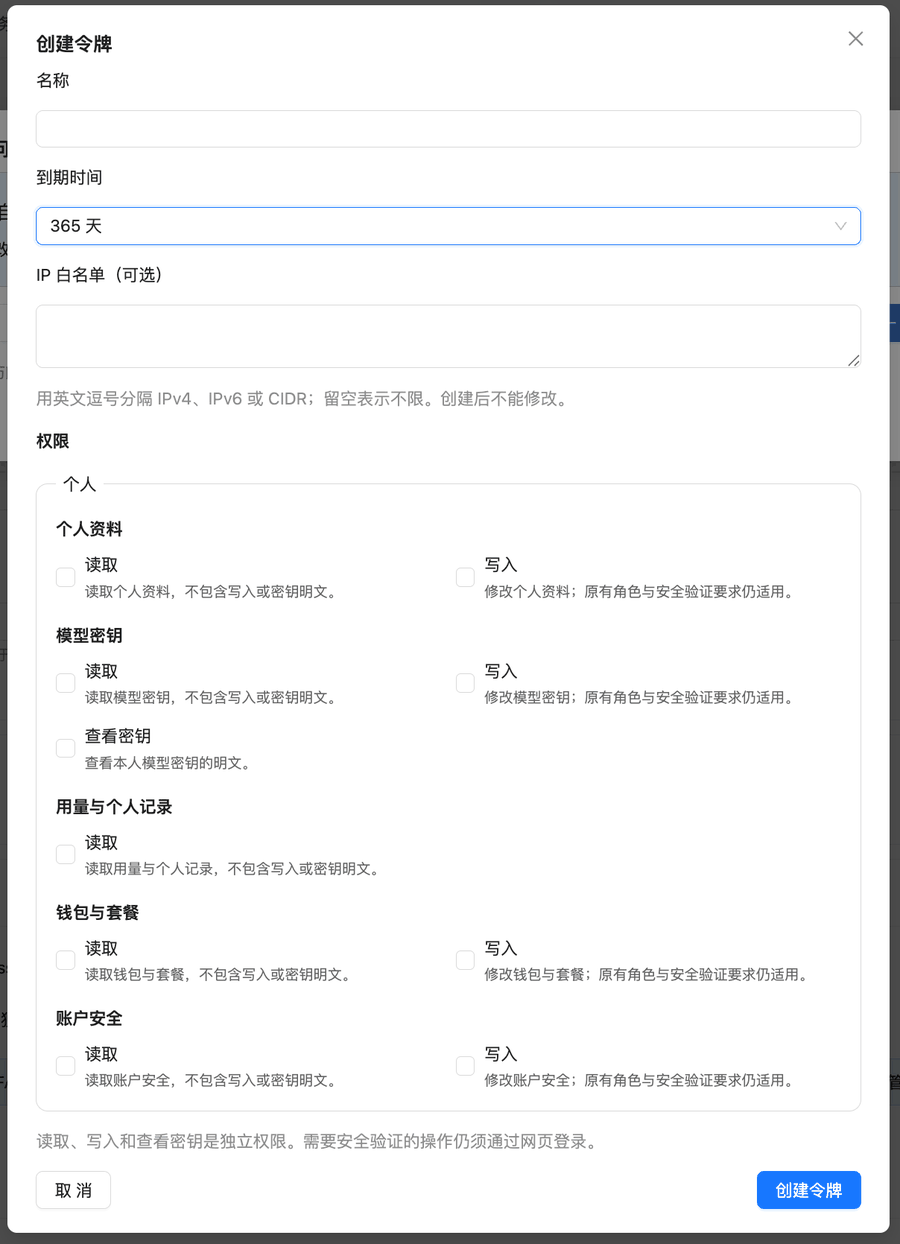
API Information
Request Details
Request Headers
Request Parameters
This is a GET request and does not require any request body parameters.
Response Details
Success Response Example
Key Response Fields
Quota Conversion
Conversion Rule
500,000 quota = $1.00 USD
- USD amount = quota ÷ 500,000
- Remaining quota = quota (quota represents current remaining balance)
- Remaining USD = quota ÷ 500,000
quota: 24997909→ $49.99 USD (current remaining balance)used_quota: 10027091→ $20.05 USD (used amount)
Error Responses
HTTP 401 - Authentication Failed
HTTP 403 - Permission Denied
Code Examples
cURL Example
Note: The
-s option hides progress bar, --compressed automatically decompresses gzip responsePython Example (Basic)
Python Example (Optimized)
This adds the following on top of the basic example:Error Handling
Complete exception handling and error capture
Environment Variables
Secure token management, avoid hardcoding
Formatted Output
Beautiful table display and number formatting
Auto Conversion
Automatic USD amount calculation
quota.py and it is ready to run:
FAQ
Does querying balance consume quota?
Does querying balance consume quota?
No, the balance query API does not consume your quota.
How often can I query the balance?
How often can I query the balance?
We recommend a query interval of at least 1 second to avoid triggering rate limits.
What is the ModelFixedPrice field for?
What is the ModelFixedPrice field for?
This field returns pricing information for various AI models. You can ignore it if you only need balance information.
What does the quota field represent?
What does the quota field represent?
The
quota field represents the current remaining balance. If quota is 0 or close to 0, your account balance is insufficient and needs recharging.Why does curl return garbled text or jq report errors?
Why does curl return garbled text or jq report errors?
Issue: Executing curl returns garbled text, or jq reports “Invalid numeric literal”Reason: The API returns gzip-compressed content (
Content-Encoding: gzip), and curl doesn’t automatically decompress it.Solution: Add the --compressed option to make curl decompress automatically:Important Notes
Request Limits
- Set reasonable request timeout (recommended: 10 seconds)
- Avoid excessively frequent query requests
Exception Handling Recommendations
- Always handle network exceptions, timeouts, and authentication failures
- Log errors for easier troubleshooting
Response Format Notes
- API returns gzip-compressed content; curl requires the
--compressedoption - Python’s requests library automatically handles gzip decompression without additional configuration