

Overview
HappyHorse (快马) is Alibaba’s video generation model series, focused on high-fidelity dynamic video generation — it precisely understands text semantics and outputs smooth, natural, detail-rich, high-quality videos that keep subjects stable. APIYI connects directly through the DashScope passthrough channel, so a single APIYI Key lets you call every HappyHorse capability. The current flagship version, HappyHorse-1.1 (Video Edit remains 1.0), covers four core use cases:model field. HappyHorse leans toward “high-fidelity dynamic video”; Reference-to-Video supports up to 9 reference images and Video Edit supports up to 5 reference images, with strong subject consistency. It shares the same endpoint as the Wan series and is directly interchangeable.Text-to-Video API
happyhorse-1.1-t2v, generate video from a pure text prompt.Image-to-Video API
happyhorse-1.1-i2v, generate video from a first-frame image (no audio-driven).Reference-to-Video API
happyhorse-1.1-r2v, up to 9 reference images to preserve the subject.Video Edit API
happyhorse-1.0-video-edit, edit video with up to 5 reference images.Let an AI Agent Do the Integration
Copy this prompt and paste it into Codex / Claude Code / Cursor
It first fetches the plain-text version of this page (append .md to any docs URL), then writes code in your project's own stack — async polling, why /v1/videos must not be used, the missing-X-DashScope-Async error and the integer duration rule are already baked into the requirements.
Integrate / troubleshoot HappyHorse video generation (text-to-video, image-to-video, reference-to-video, video editing) in this project.
Read the docs before you touch code: fetch https://docs.apiyi.com/en/api-capabilities/happyhorse/overview.md for the plain-text version of this page. Each of the four capabilities has its own page ( …
- Endpoint and async header (the two things most likely to block you immediately): submissions must go to …
10 requirements in total. Use the button below to copy the full prompt.
What this prompt saves you from
What this prompt saves you from
Why Choose APIYI for HappyHorse
One Key for all capabilities
Direct access, no VPN needed
api.apiyi.com, accessible from domestic data centers and home broadband.No charge on failure
failed state (unreachable media URL, sensitive prompt, etc.) are not billed, so retry with confidence.DashScope protocol passthrough
model name.Core Features
Four-in-one async endpoint
POST /wan/api/v1/...video-synthesis; after submission it returns a task_id, then you poll and download.High-fidelity subject preservation
Up to 9 reference images
happyhorse-1.1-r2v officially supports up to 9 reference_image entries, giving stronger subject consistency in multi-reference scenarios.Multiple resolutions and durations
prompt_extend smart rewriting to improve the quality of short prompts.Supported Models
⚠️ Endpoint Selection (Most Important)
APIYI mounts two paths simultaneously, and only the DashScope passthrough endpoint is fully usable for all HappyHorse capabilities:Async Call Flow
The whole flow is asynchronous, in three steps: create task → poll status → download video.Create task
POST /wan/api/v1/services/aigc/video-generation/video-synthesis, with the request header X-DashScope-Async: enable. It immediately returns a task_id.Poll status
GET /v1/tasks/{task_id} (with Authorization), querying every 5–10 seconds (not less than 3 seconds), until status becomes completed.Download video
result_url in the response, without the Authorization header (it’s a signed OSS direct link; including Auth will cause a 403).Task Status Reference
Complete Python Client
Key Parameters Explained
When submitting, the body uses the DashScope nested structure:{ model, input: { prompt, media[] }, parameters: {...} }.
media[] Types
parameters Fields
How to Choose HappyHorse vs. Wan
HappyHorse and Wan are both Alibaba video models that share the same endpoint and schema (interchangeable by just changing themodel name), but they emphasize different things:
Best Practices
Iterate first at 720P / 5 seconds
Always enable prompt_extend
prompt_extend: true noticeably improves quality for short prompts.Poll every 5-10 seconds
Set a 20-minute client timeout as a safety net
Download immediately once you get result_url
result_url expires in 24 hours by default, and it is a signed OSS direct link — do not include the Authorization header when downloading.Error Codes and Retries
failed task with [InvalidImageUrl] is retryable, while [InvalidParameter] / sensitive-word failures are not.FAQ
Is there any difference in how HappyHorse and Wan are integrated?
Is there any difference in how HappyHorse and Wan are integrated?
model field (e.g., wan2.7-t2v → happyhorse-1.1-t2v); the rest of the body stays identical.Why can't HappyHorse's i2v do lip-sync?
Why can't HappyHorse's i2v do lip-sync?
happyhorse-1.1-i2v does not support the driving_audio (audio-driven) field; i2v only accepts first_frame. For lip-sync / rap / digital-human voiceover, use Wan2.7-i2v.Can happyhorse-1.1-r2v really take 9 reference images?
Can happyhorse-1.1-r2v really take 9 reference images?
reference_image entries — just put them in the media array. More reference images give stronger consistency for the subject / clothing / scene.Why can't I submit via /v1/videos?
Why can't I submit via /v1/videos?
/v1/videos has incomplete support for the media field of i2v / r2v, causing the upstream to report [InvalidParameter] Field required: input.media. All create requests go through /wan/api/v1/services/aigc/video-generation/video-synthesis, and queries go through /v1/tasks/{task_id}.What if downloading result_url returns a 403?
What if downloading result_url returns a 403?
Authorization header. result_url is already a signed OSS direct link; adding your APIYI Key gets it rejected by OSS instead. result_url expires in 24 hours by default, so download it promptly.Are failed tasks billed?
Are failed tasks billed?
status=failed is not billed. But resubmitting the same task bills again, so handle idempotency.Group Setup
The HappyHorse and Wan series share a singleWan&HappyHorse group — one Token can call both series. Video models are billed per second, so the Token must meet two conditions to route successfully:
- Billing model: choose Pay-as-you-go Priority or Pay-as-you-go — video is billed per second, so Pay-per-request Tokens cannot route
- Group: select a group that includes
Wan&HappyHorse
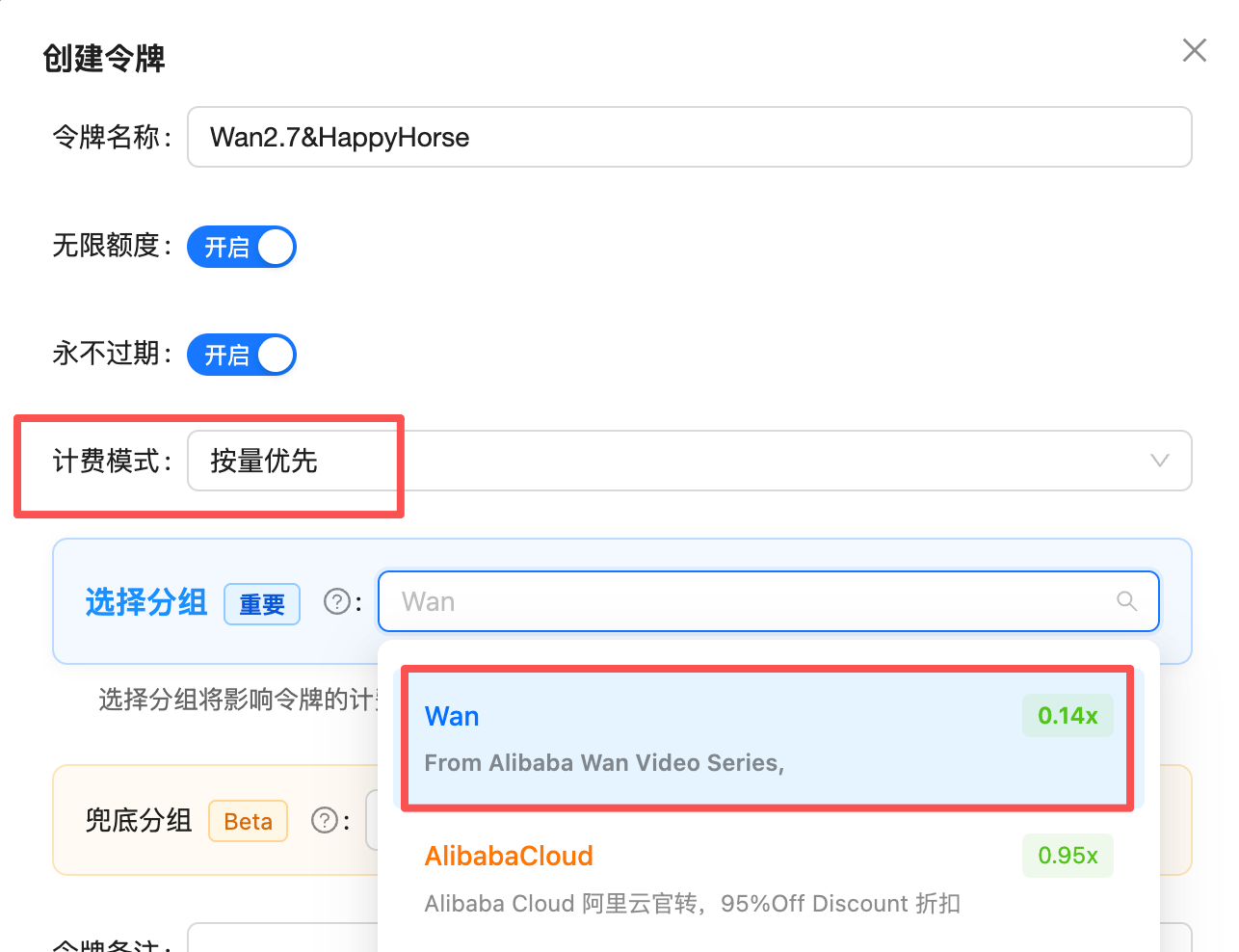
Create Token: set billing model to Pay-as-you-go Priority and group to Wan&HappyHorse (0.14x) to call every Wan2.7 and HappyHorse video model (the screenshot shows the group's former name Wan, since renamed to Wan&HappyHorse)
Pricing
Default price = 98% of Alibaba’s official price (simple to reason about)
HappyHorse model prices are built into the APIYI system — no manual configuration needed; the group discount applies automatically. In the console theWan&HappyHorse group shows a rate of 0.14x, which is denominated in the built-in RMB pricing unit. Because APIYI bills in USD at a fixed 1:7 exchange rate, the effective conversion is:
Conversion: USD price per second = official RMB price × 0.14 (i.e. × 0.98 ÷ 7).
Price detail (default price, billed per second)
HappyHorse-1.1 text-to-video / image-to-video / reference-to-video are priced the same, with two tiers —720P / 1080P (480P is not supported):
happyhorse-1.0-video-editoutput duration follows the source video and is billed by actual output seconds, not byduration.- Prices shown are the default (98% of official); with the maximum top-up bonus, the effective price is roughly the table value ÷ 1.2 (e.g. 1080P 5 s $1.12 → about $0.93).
Stack top-up bonuses for an even lower effective price
After joining the top-up bonus program, credited balance can be boosted up to ~1.2x, pushing the effective price lower still:- Billing dimension = resolution tier × duration (seconds); failed tasks are not billed.
- 1:7 is a fixed settlement exchange rate (not a preferential rate); it applies uniformly to all USD top-ups.
- For the highest bonus tiers and eligible channels, see top-up bonuses. The latest rate is authoritative in the console.
Related Documentation
Text-to-Video Playground
happyhorse-1.1-t2v online debuggingImage-to-Video Playground
happyhorse-1.1-i2v first-frame generationReference-to-Video Playground
happyhorse-1.1-r2v up to 9 reference imagesVideo Edit Playground
happyhorse-1.0-video-edit outfit swap / background swap