

Overview
Nano Banana 2 (codename) is Google’s latest image generation model released on February 26, 2026, with model IDgemini-3.1-flash-image. It redefines image generation cost-effectiveness with Pro-level quality at Flash-tier speed and cost, making it the latest flagship of the Nano Banana series.
-preview dropped): Google updated its official docs and released the stable model name gemini-3.1-flash-image (without -preview). APIYI already supports it.- These docs now use the stable name
gemini-3.1-flash-imagethroughout — use it for new integrations. - The old name still works:
gemini-3.1-flash-image-previewkeeps working as usual, pricing unchanged, no code changes needed.
gemini-nano-banana-2.1). Google recommends 2.1 for new projects: better quality, text rendering and multi-turn consistency, at $0.045 per request on APIYI (down from $0.05 since October 13). Nano Banana 2 remains available at the same price. See Nano Banana 2.1 Image Gen/Editing.Text-to-Image API
Image Editing API
Let an AI Agent Do the Integration
Copy this prompt and paste it into Codex / Claude Code / Cursor
It first fetches the plain-text version of this page (append .md to any docs URL), then writes code in your project's own stack — timeout, defensive parts parsing, upload compression and the resolution parameters are already baked into the requirements.
Integrate / troubleshoot Nano Banana 2 (
gemini-3.1-flash-image) text-to-image and image editing in this project.Read the docs before you touch code: fetch https://docs.apiyi.com/en/api-capabilities/nano-banana-2-image/overview.md for the plain-text version of this page. For finer parameter detail, append …
- Timeout: call the Gemini-native format at
POST https://api.apiyi.com/v1beta/models/gemini-3.1-flash-image:generateContentand raise the client timeou …
7 requirements in total. Use the button below to copy the full prompt.
What this prompt saves you from
What this prompt saves you from
Why APIYI’s Nano Banana 2?
Nano Banana Pro / 2 is the #1 model by usage volume on APIYI — stable, reliable, and fast. If you want to work with a professional team, APIYI is the right choice. A freshly released Google flagship still capacity-constrained at the source — APIYI deeply optimizes the experience across reliability, cost, and integration:Official Channel · Same as Gemini
/v1beta/models/.../generateContent) and the OpenAI SDK pattern — same request body, response fields, and error codes. Zero-code migration.No Concurrency Limits
28-36% of Google's List Price
Global Zero-Barrier Access
api.apiyi.com from mainland data centers, residential networks, or overseas nodes. Stable latency, no cross-border re-architecture.Full Model Lineup
Professional Enterprise Support
Core Features
Pro-Level Quality
4K Ultra-HD Output
14 Aspect Ratios
Image Search Grounding
Accurate Text Rendering
Multi-turn Editing
Thinking Mode
Subject Consistency
Version Comparison
Pricing
- Select Pay-as-you-go or Pay-as-you-go Priority → Token-based billing
- Select Pay-per-request or Pay-per-request Priority → Per-call billing (same as Nano Banana Pro)
- ⚠️ Do NOT select Hybrid billing
Per-call Billing
Token-based Billing (Nano Banana 2 Exclusive)
Token-based Billing Price Estimates
Three parameters that affect billing
The figures below come from live testing against the production gateway on 2026-08-27 (12–20 runs per condition, all based on actual charges recorded in the console rather than estimates). Their impact on your bill differs by two orders of magnitude, so optimise in the order shown.thinkingLevel: the default already is minimal, and high costs half as much again
gemini-3.1-flash-image supports thinking-level control (Pro does not). Same prompt, 20 runs each:
- The default is identical to
minimal— statistically indistinguishable (p=0.64), so passingminimalexplicitly gains nothing. - Only at
highdoesthoughtsTokenCountappear as its own field, and it is folded intocompletion_tokensand billed at the image rate. - Complex prompts only cost more once
highis on: at the default level, a 3-token prompt and a 98-token reasoning prompt produced no significant difference in output tokens (p=0.37); withhigh, the reasoning prompt used 126% more thinking tokens and cost 38% more per call.
Google Search grounding: works, but billed per search query
For images that need live information to be correct (weather cards, market charts, event posters), attach thegoogleSearch tool. Grounding triggered in 12/12 runs.
Image Search grounding: exclusive to Nano Banana 2, and currently free
searchTypes.imageSearch lets the model pull visual references from Google Image Search — useful for “make a collage from real photos” or “draw this from the actual object”.
- Confirmed by
imageSearchQueriesappearing ingroundingMetadata, with values like["current weather in Tokyo"]. - No extra charge at present — the per-call cost even came in slightly below the no-tool control.
- It triggered in 7 of 12 runs: the model decides whether to search, it does not query every time.
- Web search and image search can be enabled together, but the model chooses which to use, so the cost becomes unpredictable.
responseModalities: saves nothing, but removes unwanted text
responseModalities: ["IMAGE"] declares that you only want images. 20 runs each:
- All three are within 1% of each other, and
["TEXT","IMAGE"]is exactly equivalent to omitting the field (p=0.90). - With ordinary generation prompts, 60/60 responses already contained a single image part and no text at all, so the modality switch has nothing to act on. Only reasoning prompts (infographics, data charts) attach a summary paragraph roughly a third of the time; there
["IMAGE"]suppresses it and saves about 2.8% (p=0.09, not significant).
candidatesTokensDetails, yet it is billed at full rate and accounts for 28% of the per-call charge, and it does not vary with prompt length. The text is negligible next to it.So estimating per-image cost from 1120 tokens understates it by about 28% — reconcile against candidatesTokenCount or totalTokenCount instead.Group Setup
Nano Banana 2 ships with two groups on APIYI. Switch in dashboard → Token Settings:NanoBananaEnterprise to ride out the spike.
Recommended Billing model: pick Pay-as-you-go Priority — covers Nano Banana 2’s token-based billing AND Nano Banana Pro’s per-call billing, one Token for the whole series.
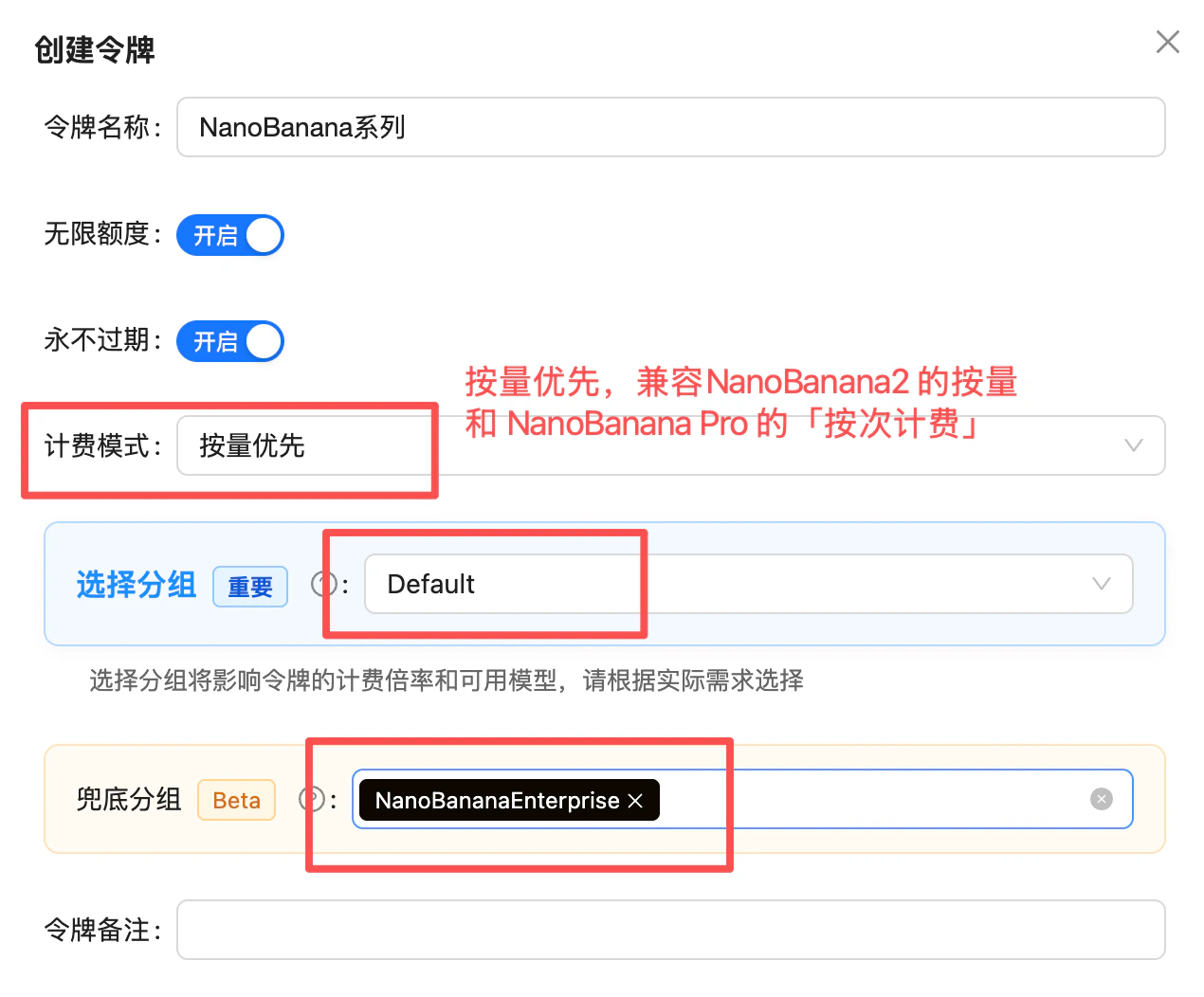
Token settings: Billing model = Pay-as-you-go Priority, primary group = Default, fallback group = NanoBananaEnterprise (1.4x)
Supported Resolutions & Aspect Ratios
Output Resolutions
Supported Aspect Ratios (14 total)
1:1, 1:4, 4:1, 1:8, 8:1, 2:3, 3:2, 3:4, 4:3, 4:5, 5:4, 9:16, 16:9, 21:9
Output Dimensions per Aspect Ratio (pixels)
The table below lists Nano Banana 2’s actual output dimensions for all 14 aspect ratios across the 512px / 1K / 2K / 4K resolution tiers (source: Google official docs). In your request, setaspect_ratio for the ratio and image_size (or resolution) for the tier:
1:4, 4:1, 1:8, 8:1 - ultra-tall/ultra-wide ratios ideal for long-form images and infographics. It is also the only model with a 512px low-resolution tier, great for thumbnails and quick previews.FAQ
What's the difference between Nano Banana 2 and Nano Banana Pro?
What's the difference between Nano Banana 2 and Nano Banana Pro?
gemini-3.1-flash-image) is based on Gemini 3.1 Flash, while Nano Banana Pro (gemini-3-pro-image) is based on Gemini 3 Pro. Key differences:- ✅ Speed: Nano Banana 2 is faster (Flash-tier speed)
- ✅ Price: Nano Banana 2 token-based billing is cheaper (from $0.025 vs $0.09)
- ✅ Aspect Ratios: Nano Banana 2 supports 14 (4 more)
- ✅ Image Search Grounding: Nano Banana 2 exclusive
- ⚠️ Ultimate Quality: Nano Banana Pro still slightly better
Should I switch from Nano Banana Pro to Nano Banana 2?
Should I switch from Nano Banana Pro to Nano Banana 2?
gemini-3-pro-image to gemini-3.1-flash-image.Should I use gemini-3.1-flash-image or the -4k suffix version?
Should I use gemini-3.1-flash-image or the -4k suffix version?
gemini-3.1-flash-image (without the -4k suffix), not gemini-3.1-flash-image-4k.- The official name has no
-4k: Google’s official model name isgemini-3.1-flash-image. This is also the general channel we invest the most resources in maintaining, so it offers the best stability and compatibility. - Where
-4kcomes from:gemini-3.1-flash-image-4kwas originally a configuration prepared for “chat-to-image” scenarios in conversational clients like Chatbox—generating images directly through chat in a messaging UI. - Code + Gemini native format favors the general name: If you’re calling via code using the Gemini native format (
/v1beta/models/.../generateContent), the regular model namegemini-3.1-flash-imageis more stable.
-4k model name—just specify the 4K resolution in your request parameters (see “Supported Resolutions and Aspect Ratios” above).What is Image Search Grounding?
What is Image Search Grounding?
What does Thinking Mode do?
What does Thinking Mode do?
high produces the best results but slightly increases generation time. Best for tasks requiring precise composition, text rendering, or complex scenes.How long does it take to generate an image?
How long does it take to generate an image?
- 1K resolution: ~5-10 seconds
- 2K resolution: ~10-15 seconds
- 4K resolution: ~15-25 seconds
- Enabling high thinking mode adds a few extra seconds
Is there a concurrency limit? Is the API serial? What if I need 20 users calling at once?
Is there a concurrency limit? Is the API serial? What if I need 20 users calling at once?
timeout: image generation (especially 4K or during peak congestion) can take a while per request, so set your client timeout to 360 seconds to avoid cutting off requests that are still being processed normally.What input image formats are supported?
What input image formats are supported?
image/png and image/jpeg formats. Pass them inline as base64, or pass a public image URL via fileData.fileUri. The platform does not support Files API uploads; see Does APIYI Support the Files API?.Do output images have watermarks?
Do output images have watermarks?
Why do I get connection reset by peer / write_response_body_failed (500)?
Why do I get connection reset by peer / write_response_body_failed (500)?
- Limit the image count: stay within the official rules (max 14 images per prompt) — don’t pile on reference images.
- Limit per-image size: keep each image under 5MB — the official per-image cap is 7MB, and base64 encoding inflates size by roughly 1/3, so leave headroom.
- Compress on the frontend before uploading: compress images on the frontend (or a server-side relay) before sending them to the API — common practice is capping the longest edge, converting to JPEG/WebP, and tuning the quality parameter.
- Switch to URL input: the Gemini native format supports passing an image URL via
fileData.fileUri, sidestepping oversized base64 request bodies entirely — see the Nano Banana Dev Guide.
Related Documentation
- Nano Banana Pro Image Generation - Previous flagship version
- Nano Banana Image Editing - Image editing features
- Image Generation Comparison Testing
- API Usage Manual