API Playground Interactive Testing Want to test the API online? Head to the API Playground, enter your API Key, and send requests and view responses directly.
OpenAI Compatible Mode
APIYI uses OpenAI-compatible format , allowing you to call 200+ mainstream large models with a unified interface:
Supported Model Providers:
🤖 OpenAI : gpt-4o, gpt-5-chat-latest, gpt-3.5-turbo, etc.
🧠 Anthropic : claude-sonnet-4-20250514, claude-opus-4-1-20250805, etc.
💎 Google : gemini-2.5-pro, gemini-2.5-flash, etc.
🚀 xAI : grok-4-0709, grok-3, etc.
🔍 DeepSeek : deepSeek-r1, deepSeek-v3, etc.
🌟 Alibaba : Qwen series models
💬 Moonshot : Kimi models, etc.
Feature Support Scope
✅ Supported Features:
💬 Chat Completions : Chat Completions interface
🖼️ Image Generation : gpt-image-1, flux-kontext-pro, flux-kontext-max, etc.
🔊 Audio Processing : Whisper transcription
📊 Embeddings : Text vectorization
⚡ Function Calling : Function Calling
📡 Streaming Output : Real-time response
🔧 OpenAI Parameters : temperature, top_p, max_tokens, etc.
🆕 Responses Endpoint : OpenAI latest features
❌ Unsupported Features:
🔧 Fine-tuning interface
📁 Files management interface
🏢 Organization management interface
💳 Billing management interface
Easy Model Switching
Core Advantage: One Codebase, Multiple Models
After getting your code working with OpenAI format, you only need to change the model name to switch to other models:
# Using GPT-4o
response = client.chat.completions.create(
model = "gpt-4o" , # OpenAI model
messages = [ ... ]
)
# Switch to Claude, everything else stays the same!
response = client.chat.completions.create(
model = "claude-3.5-sonnet" , # Only change model name
messages = [ ... ]
)
# Switch to Gemini
response = client.chat.completions.create(
model = "gemini-1.5-pro" , # Only change model name
messages = [ ... ]
)
This design allows you to easily compare different models’ performance, or flexibly switch models based on cost and performance needs, without rewriting code!
Quick Start
Get API Key
Visit APIYI Console
Login to your account
Click “New” in the token management page to create an API Key
Copy the generated API Key for API calls
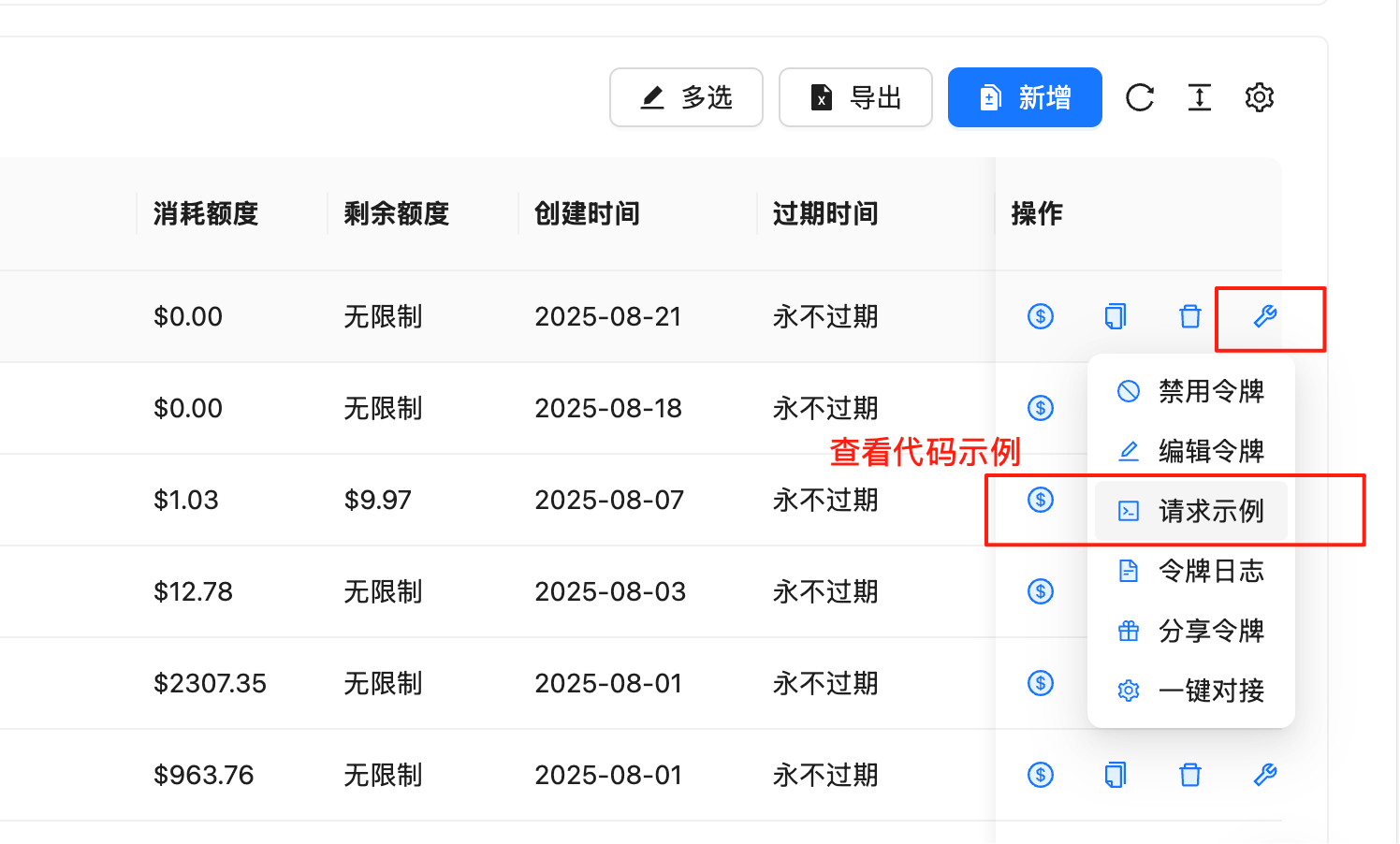
View Request Examples
In the token management page, you can quickly get code examples in various programming languages:
Steps:
Go to Token Management Page
Find the row with your API Key
Click the 🔧wrench icon (tool icon) in the “Actions” column
Select “Request Examples ” in the popup menu
View complete code examples including the following languages:
Supported Programming Languages:
cURL - Command line testing
Python (SDK) - Using official OpenAI library
Python (requests) - Using requests library
Node.js - JavaScript/TypeScript
Java - Java application development
C# - .NET application development
Go - Go language development
PHP - Web development
Ruby - Ruby application development
And more languages…
Code Example Features:
✅ Complete & Runnable : Copy and paste to use
✅ Parameter Descriptions : Detailed parameter configuration
✅ Error Handling : Includes exception handling logic
✅ Best Practices : Follows development standards of each language
We recommend developers to check the request examples in the backend first. These examples are updated in real-time according to the latest API version, ensuring code accuracy and availability.
API Endpoints
Primary Endpoint : https://api.apiyi.com/v1
Backup Endpoint : https://vip.apiyi.com/v1
Authentication
All API requests must include authentication information in the Header:
Authorization : Bearer YOUR_API_KEY
Content-Type : application/json
Encoding : UTF-8
Request Method : POST (most interfaces)
Core Interfaces
1. Chat Completions
Create a chat completion request, supports multi-turn conversations.
Request Endpoint
POST /v1/chat/completions
Request Parameters
Parameter Type Required Description model string Yes Model name, e.g. gpt-3.5-turbo messages array Yes Conversation message array temperature number No Sampling temperature, 0-2, default 1 max_tokens integer No Maximum generated tokens stream boolean No Whether to stream response, default false top_p number No Nucleus sampling parameter, 0-1 n integer No Number of generations, default 1 stop string/array No Stop sequences presence_penalty number No Presence penalty, -2 to 2 frequency_penalty number No Frequency penalty, -2 to 2
Message Format
{
"role" : "system|user|assistant" ,
"content" : "Message content"
}
Complete Code Examples
cURL
Python (SDK)
Python (requests)
Node.js
Java
C#
Go
PHP
Ruby
curl -X POST "https://api.apiyi.com/v1/chat/completions" \
-H "Authorization: Bearer YOUR_API_KEY" \
-H "Content-Type: application/json" \
-d '{
"model": "gpt-3.5-turbo",
"messages": [
{"role": "system", "content": "You are a helpful AI assistant."},
{"role": "user", "content": "Hello! Please introduce yourself."}
],
"temperature": 0.7,
"max_tokens": 1000
}'
from openai import OpenAI
# Initialize client
client = OpenAI(
api_key = "YOUR_API_KEY" ,
base_url = "https://api.apiyi.com/v1"
)
# Send chat request
response = client.chat.completions.create(
model = "gpt-3.5-turbo" ,
messages = [
{ "role" : "system" , "content" : "You are a helpful AI assistant." },
{ "role" : "user" , "content" : "Hello! Please introduce yourself." }
],
temperature = 0.7 ,
max_tokens = 1000
)
print (response.choices[ 0 ].message.content)
import requests
import json
url = "https://api.apiyi.com/v1/chat/completions"
headers = {
"Authorization" : "Bearer YOUR_API_KEY" ,
"Content-Type" : "application/json"
}
data = {
"model" : "gpt-3.5-turbo" ,
"messages" : [
{ "role" : "system" , "content" : "You are a helpful AI assistant." },
{ "role" : "user" , "content" : "Hello! Please introduce yourself." }
],
"temperature" : 0.7 ,
"max_tokens" : 1000
}
response = requests.post(url, headers = headers, json = data)
result = response.json()
if response.status_code == 200 :
print (result[ "choices" ][ 0 ][ "message" ][ "content" ])
else :
print ( f "Error: { result } " )
const OpenAI = require ( 'openai' );
const client = new OpenAI ({
apiKey: 'YOUR_API_KEY' ,
baseURL: 'https://api.apiyi.com/v1'
});
async function chatCompletion () {
try {
const response = await client . chat . completions . create ({
model: 'gpt-3.5-turbo' ,
messages: [
{ "role" : "system" , "content" : "You are a helpful AI assistant." },
{ "role" : "user" , "content" : "Hello! Please introduce yourself." }
],
temperature: 0.7 ,
max_tokens: 1000
});
console . log ( response . choices [ 0 ]. message . content );
} catch ( error ) {
console . error ( 'API call error:' , error );
}
}
chatCompletion ();
import okhttp3. * ;
import com.google.gson.Gson;
import java.io.IOException;
import java.util. * ;
public class APIYiExample {
private static final String API_KEY = "YOUR_API_KEY" ;
private static final String BASE_URL = "https://api.apiyi.com/v1" ;
public static void main ( String [] args ) throws IOException {
OkHttpClient client = new OkHttpClient ();
Gson gson = new Gson ();
// Build request body
Map < String , Object > requestBody = new HashMap <>();
requestBody . put ( "model" , "gpt-3.5-turbo" );
requestBody . put ( "temperature" , 0.7 );
requestBody . put ( "max_tokens" , 1000 );
List < Map < String , String >> messages = Arrays . asList (
Map . of ( "role" , "system" , "content" , "You are a helpful AI assistant." ),
Map . of ( "role" , "user" , "content" , "Hello! Please introduce yourself." )
);
requestBody . put ( "messages" , messages);
RequestBody body = RequestBody . create (
gson . toJson (requestBody),
MediaType . parse ( "application/json" )
);
Request request = new Request. Builder ()
. url (BASE_URL + "/chat/completions" )
. addHeader ( "Authorization" , "Bearer " + API_KEY)
. addHeader ( "Content-Type" , "application/json" )
. post (body)
. build ();
try ( Response response = client . newCall (request). execute ()) {
System . out . println ( response . body (). string ());
}
}
}
using System ;
using System . Net . Http ;
using System . Text ;
using System . Threading . Tasks ;
using Newtonsoft . Json ;
class Program
{
private static readonly string API_KEY = "YOUR_API_KEY" ;
private static readonly string BASE_URL = "https://api.apiyi.com/v1" ;
static async Task Main ( string [] args )
{
using var client = new HttpClient ();
client . DefaultRequestHeaders . Add ( "Authorization" , $"Bearer { API_KEY } " );
var requestBody = new
{
model = "gpt-3.5-turbo" ,
messages = new []
{
new { role = "system" , content = "You are a helpful AI assistant." },
new { role = "user" , content = "Hello! Please introduce yourself." }
},
temperature = 0.7 ,
max_tokens = 1000
};
var json = JsonConvert . SerializeObject ( requestBody );
var content = new StringContent ( json , Encoding . UTF8 , "application/json" );
try
{
var response = await client . PostAsync ( $" { BASE_URL } /chat/completions" , content );
var result = await response . Content . ReadAsStringAsync ();
Console . WriteLine ( result );
}
catch ( Exception ex )
{
Console . WriteLine ( $"Error: { ex . Message } " );
}
}
}
package main
import (
" bytes "
" encoding/json "
" fmt "
" io/ioutil "
" net/http "
)
type Message struct {
Role string `json:"role"`
Content string `json:"content"`
}
type ChatRequest struct {
Model string `json:"model"`
Messages [] Message `json:"messages"`
Temperature float64 `json:"temperature"`
MaxTokens int `json:"max_tokens"`
}
func main () {
apiKey := "YOUR_API_KEY"
baseURL := "https://api.apiyi.com/v1"
reqData := ChatRequest {
Model : "gpt-3.5-turbo" ,
Messages : [] Message {
{ Role : "system" , Content : "You are a helpful AI assistant." },
{ Role : "user" , Content : "Hello! Please introduce yourself." },
},
Temperature : 0.7 ,
MaxTokens : 1000 ,
}
jsonData , _ := json . Marshal ( reqData )
req , _ := http . NewRequest ( "POST" , baseURL + "/chat/completions" , bytes . NewBuffer ( jsonData ))
req . Header . Set ( "Authorization" , "Bearer " + apiKey )
req . Header . Set ( "Content-Type" , "application/json" )
client := & http . Client {}
resp , err := client . Do ( req )
if err != nil {
fmt . Printf ( "Request error: %v \n " , err )
return
}
defer resp . Body . Close ()
body , _ := ioutil . ReadAll ( resp . Body )
fmt . Println ( string ( body ))
}
<? php
$api_key = 'YOUR_API_KEY' ;
$base_url = 'https://api.apiyi.com/v1' ;
$data = array (
'model' => 'gpt-3.5-turbo' ,
'messages' => array (
array ( 'role' => 'system' , 'content' => 'You are a helpful AI assistant.' ),
array ( 'role' => 'user' , 'content' => 'Hello! Please introduce yourself.' )
),
'temperature' => 0.7 ,
'max_tokens' => 1000
);
$ch = curl_init ();
curl_setopt ( $ch , CURLOPT_URL , $base_url . '/chat/completions' );
curl_setopt ( $ch , CURLOPT_POST , 1 );
curl_setopt ( $ch , CURLOPT_POSTFIELDS , json_encode ( $data ));
curl_setopt ( $ch , CURLOPT_HTTPHEADER , array (
'Authorization: Bearer ' . $api_key ,
'Content-Type: application/json'
));
curl_setopt ( $ch , CURLOPT_RETURNTRANSFER , true );
$response = curl_exec ( $ch );
$http_code = curl_getinfo ( $ch , CURLINFO_HTTP_CODE );
curl_close ( $ch );
if ( $http_code == 200 ) {
$result = json_decode ( $response , true );
echo $result [ 'choices' ][ 0 ][ 'message' ][ 'content' ];
} else {
echo "Error: " . $response ;
}
?>
require 'net/http'
require 'json'
api_key = 'YOUR_API_KEY'
base_url = 'https://api.apiyi.com/v1'
uri = URI ( " #{ base_url } /chat/completions" )
http = Net :: HTTP . new (uri. host , uri. port )
http. use_ssl = true
request = Net :: HTTP :: Post . new (uri)
request[ 'Authorization' ] = "Bearer #{ api_key } "
request[ 'Content-Type' ] = 'application/json'
request. body = {
model: 'gpt-3.5-turbo' ,
messages: [
{ role: 'system' , content: 'You are a helpful AI assistant.' },
{ role: 'user' , content: 'Hello! Please introduce yourself.' }
],
temperature: 0.7 ,
max_tokens: 1000
}. to_json
response = http. request (request)
if response. code == '200'
result = JSON . parse (response. body )
puts result[ 'choices' ][ 0 ][ 'message' ][ 'content' ]
else
puts "Error: #{ response. body } "
end
Response Example
{
"id" : "chatcmpl-123" ,
"object" : "chat.completion" ,
"created" : 1699000000 ,
"model" : "gpt-3.5-turbo" ,
"choices" : [{
"index" : 0 ,
"message" : {
"role" : "assistant" ,
"content" : "Hello! How can I help you today?"
},
"finish_reason" : "stop"
}],
"usage" : {
"prompt_tokens" : 20 ,
"completion_tokens" : 10 ,
"total_tokens" : 30
}
}
2. Text Completions
Retained for backward compatibility, recommend using Chat Completions.
Request Endpoint
Request Parameters
Parameter Type Required Description model string Yes Model name prompt string/array Yes Prompt text max_tokens integer No Maximum generation length temperature number No Sampling temperature top_p number No Nucleus sampling parameter n integer No Number of generations stream boolean No Streaming output stop string/array No Stop sequences
3. Embeddings
Convert text to vector representation.
Request Endpoint
Request Parameters
Parameter Type Required Description model string Yes Model name, e.g. text-embedding-ada-002 input string/array Yes Input text encoding_format string No Encoding format, float or base64
Complete Code Examples
cURL
Python (SDK)
Python (requests)
Node.js
curl -X POST "https://api.apiyi.com/v1/embeddings" \
-H "Authorization: Bearer YOUR_API_KEY" \
-H "Content-Type: application/json" \
-d '{
"model": "text-embedding-ada-002",
"input": "This is a text example for vectorization"
}'
from openai import OpenAI
client = OpenAI(
api_key = "YOUR_API_KEY" ,
base_url = "https://api.apiyi.com/v1"
)
response = client.embeddings.create(
model = "text-embedding-ada-002" ,
input = "This is a text example for vectorization"
)
# Get vector
embedding = response.data[ 0 ].embedding
print ( f "Vector dimension: { len (embedding) } " )
print ( f "First 5 values: { embedding[: 5 ] } " )
import requests
import json
url = "https://api.apiyi.com/v1/embeddings"
headers = {
"Authorization" : "Bearer YOUR_API_KEY" ,
"Content-Type" : "application/json"
}
data = {
"model" : "text-embedding-ada-002" ,
"input" : "This is a text example for vectorization"
}
response = requests.post(url, headers = headers, json = data)
result = response.json()
if response.status_code == 200 :
embedding = result[ "data" ][ 0 ][ "embedding" ]
print ( f "Vector dimension: { len (embedding) } " )
print ( f "Vector values: { embedding[: 5 ] } " ) # Show first 5 values
else :
print ( f "Error: { result } " )
const OpenAI = require ( 'openai' );
const client = new OpenAI ({
apiKey: 'YOUR_API_KEY' ,
baseURL: 'https://api.apiyi.com/v1'
});
async function getEmbedding () {
try {
const response = await client . embeddings . create ({
model: 'text-embedding-ada-002' ,
input: 'This is a text example for vectorization'
});
const embedding = response . data [ 0 ]. embedding ;
console . log ( `Vector dimension: ${ embedding . length } ` );
console . log ( `First 5 values: ${ embedding . slice ( 0 , 5 ) } ` );
} catch ( error ) {
console . error ( 'API call error:' , error );
}
}
getEmbedding ();
4. Image Generation
Generate, edit, or transform images.
Generate Images
POST /v1/images/generations
Request Parameters
Parameter Type Required Description model string Yes Model name, recommend gpt-image-1 prompt string Yes Image description prompt n integer No Number to generate, default 1 size string No Image size: 1024x1024, 1792x1024, 1024x1792 quality string No Quality: standard or hd style string No Style: vivid or natural
Complete Code Examples
cURL
Python (SDK)
Node.js
curl -X POST "https://api.apiyi.com/v1/images/generations" \
-H "Authorization: Bearer YOUR_API_KEY" \
-H "Content-Type: application/json" \
-d '{
"model": "gpt-image-1",
"prompt": "A cute orange kitten sitting in a sunny garden",
"n": 1,
"size": "1024x1024",
"quality": "hd"
}'
from openai import OpenAI
client = OpenAI(
api_key = "YOUR_API_KEY" ,
base_url = "https://api.apiyi.com/v1"
)
response = client.images.generate(
model = "gpt-image-1" , # Recommend using gpt-image-1
prompt = "A cute orange kitten sitting in a sunny garden" ,
n = 1 ,
size = "1024x1024" ,
quality = "hd"
)
# Get image URL
image_url = response.data[ 0 ].url
print ( f "Generated image: { image_url } " )
# Download image
import requests
img_response = requests.get(image_url)
with open ( "generated_image.png" , "wb" ) as f:
f.write(img_response.content)
print ( "Image saved as generated_image.png" )
const OpenAI = require ( 'openai' );
const fs = require ( 'fs' );
const client = new OpenAI ({
apiKey: 'YOUR_API_KEY' ,
baseURL: 'https://api.apiyi.com/v1'
});
async function generateImage () {
try {
const response = await client . images . generate ({
model: 'gpt-image-1' , // Recommend using gpt-image-1
prompt: 'A cute orange kitten sitting in a sunny garden' ,
n: 1 ,
size: '1024x1024' ,
quality: 'hd'
});
const imageUrl = response . data [ 0 ]. url ;
console . log ( 'Generated image:' , imageUrl );
// Download image
const fetch = require ( 'node-fetch' );
const imgResponse = await fetch ( imageUrl );
const buffer = await imgResponse . buffer ();
fs . writeFileSync ( 'generated_image.png' , buffer );
console . log ( 'Image saved' );
} catch ( error ) {
console . error ( 'Image generation error:' , error );
}
}
generateImage ();
5. Audio Transcription
Speech recognition and transcription.
Transcribe Audio
POST /v1/audio/transcriptions
Request Parameters (Form-Data)
Parameter Type Required Description file file Yes Audio file model string Yes Model name, e.g. whisper-1 language string No Language code prompt string No Guidance prompt response_format string No Response format temperature number No Sampling temperature
6. Model List
Get available model list.
Request Endpoint
Response Example
{
"object" : "list" ,
"data" : [
{
"id" : "gpt-3.5-turbo" ,
"object" : "model" ,
"created" : 1677610602 ,
"owned_by" : "openai"
},
{
"id" : "gpt-4o" ,
"object" : "model" ,
"created" : 1687882411 ,
"owned_by" : "openai"
}
]
}
Streaming Response
Enable Streaming Output
Set stream: true in your request:
{
"model" : "gpt-3.5-turbo" ,
"messages" : [{ "role" : "user" , "content" : "Hello" }],
"stream" : true
}
Response will be returned in Server-Sent Events (SSE) format:
data: {"id":"chatcmpl-123","object":"chat.completion.chunk","created":1699000000,"model":"gpt-3.5-turbo","choices":[{"delta":{"content":"Hello"},"index":0}]}
data: {"id":"chatcmpl-123","object":"chat.completion.chunk","created":1699000000,"model":"gpt-3.5-turbo","choices":[{"delta":{"content":" there"},"index":0}]}
data: [DONE]
Handle Streaming Response
import requests
import json
response = requests.post(
'https://api.apiyi.com/v1/chat/completions' ,
headers = {
'Authorization' : f 'Bearer { api_key } ' ,
'Content-Type' : 'application/json'
},
json = {
'model' : 'gpt-3.5-turbo' ,
'messages' : [{ 'role' : 'user' , 'content' : 'Hello' }],
'stream' : True
},
stream = True
)
for line in response.iter_lines():
if line:
line = line.decode( 'utf-8' )
if line.startswith( 'data: ' ):
data = line[ 6 :]
if data != '[DONE]' :
chunk = json.loads(data)
content = chunk[ 'choices' ][ 0 ][ 'delta' ].get( 'content' , '' )
print (content, end = '' )
const response = await fetch ( 'https://api.apiyi.com/v1/chat/completions' , {
method: 'POST' ,
headers: {
'Authorization' : `Bearer ${ apiKey } ` ,
'Content-Type' : 'application/json'
},
body: JSON . stringify ({
model: 'gpt-3.5-turbo' ,
messages: [{ role: 'user' , content: 'Hello' }],
stream: true
})
});
const reader = response . body . getReader ();
const decoder = new TextDecoder ();
while ( true ) {
const { done , value } = await reader . read ();
if ( done ) break ;
const chunk = decoder . decode ( value );
const lines = chunk . split ( ' \n ' );
for ( const line of lines ) {
if ( line . startsWith ( 'data: ' )) {
const data = line . slice ( 6 );
if ( data !== '[DONE]' ) {
const json = JSON . parse ( data );
const content = json . choices [ 0 ]. delta . content || '' ;
process . stdout . write ( content );
}
}
}
}
Error Handling
{
"error" : {
"message" : "Invalid API key provided" ,
"type" : "invalid_request_error" ,
"param" : null ,
"code" : "invalid_api_key"
}
}
Common Error Codes
Error Code HTTP Status Description invalid_api_key 401 Invalid API key insufficient_quota 429 Insufficient quota model_not_found 404 Model not found invalid_request_error 400 Invalid request parameters server_error 500 Internal server error rate_limit_exceeded 429 Request rate too high
Error Handling Example
try :
response = client.chat.completions.create(
model = "gpt-3.5-turbo" ,
messages = [{ "role" : "user" , "content" : "Hello" }]
)
except Exception as e:
if hasattr (e, 'status_code' ):
if e.status_code == 401 :
print ( "Invalid API key" )
elif e.status_code == 429 :
print ( "Request too frequent or insufficient quota" )
elif e.status_code == 500 :
print ( "Server error, please try again later" )
else :
print ( f "Unknown error: { str (e) } " )
Best Practices
1. Request Optimization
Set max_tokens reasonably : Avoid unnecessarily long outputs
Use temperature : Control output randomness
Batch processing : Merge multiple requests to reduce calls
2. Error Retry
Implement exponential backoff retry mechanism:
import time
import random
def retry_with_backoff ( func , max_retries = 3 ):
for i in range (max_retries):
try :
return func()
except Exception as e:
if i == max_retries - 1 :
raise e
wait_time = ( 2 ** i) + random.uniform( 0 , 1 )
time.sleep(wait_time)
3. Security Recommendations
Protect API keys : Use environment variables for storage
Limit permissions : Create different keys for different applications
Monitor usage : Regularly check API usage logs
Use streaming output : Improve user experience
Cache responses : Cache results for identical requests
Concurrency control : Reasonably control concurrent request count
Rate Limits
APIYI implements the following rate limits:
Limit Type Limit Value Description RPM (Requests Per Minute) 3000 Per API key TPM (Tokens Per Minute) 1000000 Per API key Concurrent Requests 100 Simultaneous requests
When limits are exceeded, a 429 error will be returned. Please control request frequency reasonably.
Need Help?
This manual is continuously updated. Please follow the latest version for new features and improvements.