

Quick Answer
Recommended Setting: When creating a token, choose “Pay-per-Use Priority” billing mode, which suits most scenarios.
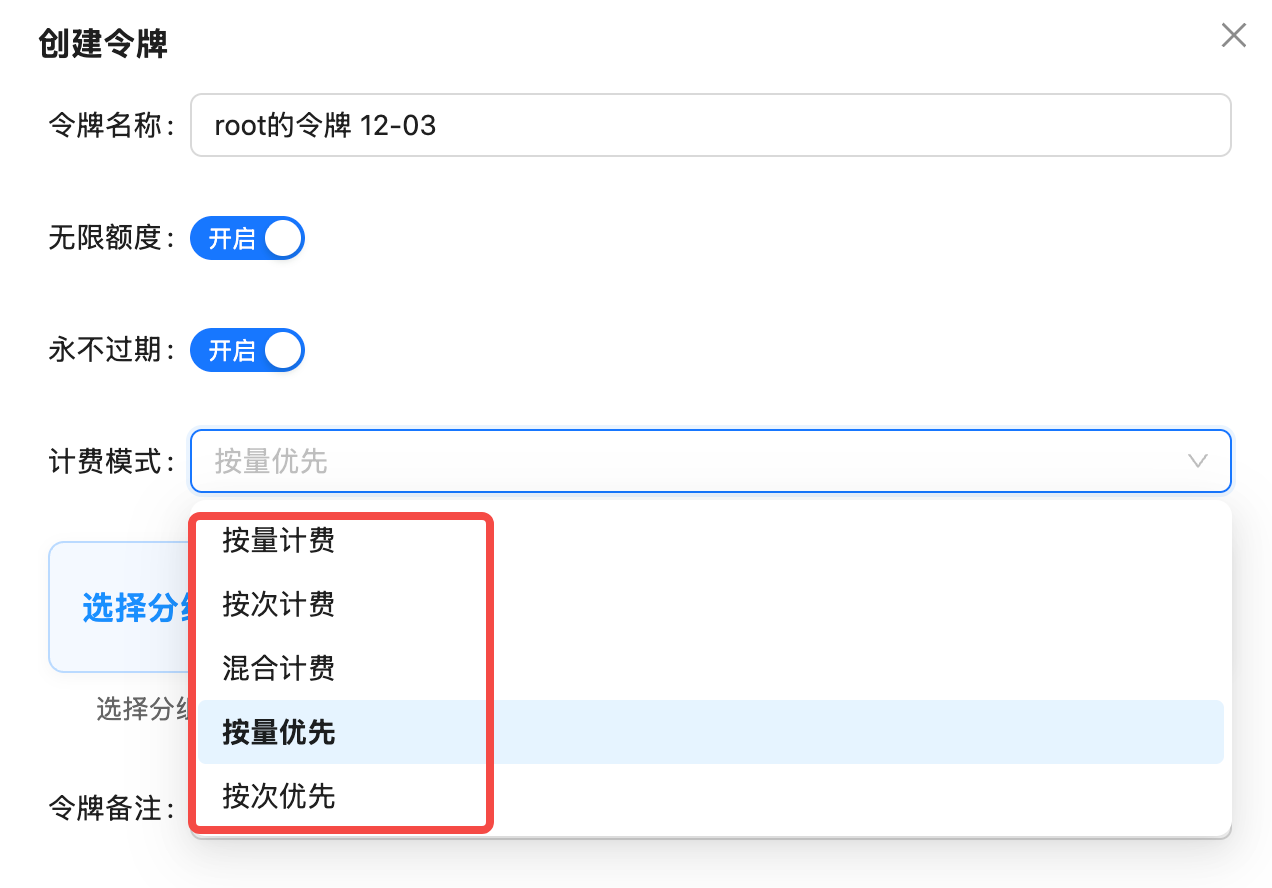
5 Billing Modes Explained
1. Pay-per-Use (Token-based)
Definition: Charges based on the number of Tokens for input and output, pay for what you use. Applicable Models:- Text Generation Models: GPT-4, Claude, Gemini, DeepSeek, etc.
- Multimodal Understanding Models: Models supporting image/audio input
- Special Image Models:
gpt-image-1(charged by Tokens)
gpt-4o: Input $5/million tokens, Output $15/million tokensclaude-3-5-sonnet-20241022: Input $3/million tokens, Output $15/million tokens
2. Pay-per-Call
Definition: Fixed charge per call, unaffected by input and output Tokens. Applicable Models:- Image Generation Models: DALL-E, Flux, Sora Image, etc. (except gpt-image-1)
- Video Generation Models: Sora Video, VEO, etc.
gemini-3-pro-image(aliasnano-banana-pro): $0.09/callsora_video2: $0.15/call (10-second video)flux-1.1-pro: $0.04/call
Advantages of Pay-per-Call:
- Transparent pricing, fixed cost per generation
- No need to calculate Token consumption
- Suitable for fixed output scenarios like images/videos
3. Hybrid Billing
Definition: Supports both pay-per-use and pay-per-call billing, automatically selected based on the model. Status: ⚠️ Not Applicable4. Pay-per-Use Priority (Recommended)
Definition: Smart billing mode that prioritizes pay-per-use billing when a model supports both; automatically switches to pay-per-call if the model only supports that. Why Recommended?- ✅ Includes Pay-per-Call: Can call image/video models charged per call
- ✅ Includes Pay-per-Use: Can call text/multimodal models charged per use
- ✅ Auto-Adapts: System automatically selects the most appropriate billing method
- ✅ Covers All Scenarios: All 400+ models supported
Recommendation Reason: Using “Pay-per-Use Priority” token allows calling all models without creating different tokens for different billing modes.
5. Pay-per-Call Priority
Definition: Prioritizes pay-per-call billing when a model supports both; automatically switches to pay-per-use if the model only supports that. Applicable Scenarios:- Scenarios requiring fixed costs
- Mainly using image/video generation models
Usage Suggestion: Unless there’s a clear cost control requirement, use “Pay-per-Use Priority” as text models are usually more cost-effective with pay-per-use billing.
How to Choose Billing Mode?
Recommended Solution (Suitable for 95% of Users)
Pay-per-Use Priority (Default Recommended)
Applicable Scenarios:
- Using text, image, and video models simultaneously
- Don’t want to create different tokens for different models
- Need maximum flexibility
- Covers all 400+ models
- System automatically selects optimal billing method
- No additional configuration needed
Special Scenarios
- Pure Text Application
- Pure Image/Video Application
- Cost Control
Scenario: Only using GPT, Claude, Gemini and other text modelsRecommended Billing Mode: Pay-per-Use Priority or Pay-per-UseReason: Text models all use pay-per-use billing, both modes have the same effect
FAQ
Why does gpt-image-1 require a pay-per-use token?
Why does gpt-image-1 require a pay-per-use token?
gpt-image-1 is OpenAI’s official image generation model. Although it generates images, its billing method is similar to text models, charged by Tokens.Billing Factors:- Image resolution (1024x1024 consumes ~5000 tokens, 1792x1024 consumes ~8500 tokens)
- Image quality (HD quality increases Token consumption)
- Use “Pay-per-Use Priority” or “Pay-per-Use” token
- Using “Pay-per-Call” token will prevent calling
gpt-image-1
I already created a pay-per-call token, can I change it to pay-per-use priority?
I already created a pay-per-call token, can I change it to pay-per-use priority?
Yes, you can modify it. Steps:
- Log in to API.YI Token Management Page
- Find the corresponding token, click the “Edit” button on the right
- Select “Pay-per-Use Priority” in the “Billing Mode” dropdown menu
- Save configuration
What's the difference between pay-per-use priority and pay-per-call priority?
What's the difference between pay-per-use priority and pay-per-call priority?
Different priorities:
Recommendation: Use “Pay-per-Use Priority” in most cases.
Can pay-per-call billing tell me the route or image quality?
Can pay-per-call billing tell me the route or image quality?
Not by itself. Pay-per-use and pay-per-call describe how charges are calculated; they do not indicate whether a route is official-forward or official-reverse, nor do they represent an image quality tier. Check the relevant model page and token group details for the billing modes and routes available to you.For example, the Nano Banana 2.1 pricing page lists both per-request and token-based billing. The Nano Banana integration guide describes dual AIStudio and Vertex channels. So pay-per-call billing alone is not evidence that a request uses an official-reverse route or that its image quality has changed.Different models, routes, or generation parameters may produce different results. When comparing outputs, check the model ID, token group, and generation parameters; to investigate a specific request, provide its
request_id.Will calling fail if I choose the wrong billing mode?
Will calling fail if I choose the wrong billing mode?
Won’t fail immediately, but may not be able to call certain models.Example Scenarios:
- If token is “Pay-per-Call”, calling
gpt-4owill fail (because gpt-4o only supports pay-per-use billing) - If token is “Pay-per-Use”, calling
gemini-3-pro-imagemay fail (because this model only supports pay-per-call billing)
Why is hybrid billing not applicable?
Why is hybrid billing not applicable?
Hybrid billing theoretically supports both pay-per-use and pay-per-call, but in practice may cause:
- Unclear billing logic
- Difficult cost prediction
- System compatibility issues
Summary Recommendations
Best Practice: When creating a token, choose “Pay-per-Use Priority” billing mode to cover all usage scenarios without creating different tokens for different models.