

size parameter is available again (updated 2026-07-22): passing size explicitly now locks the output dimensions as expected, and the 30-size reference table on this page is back in effect. Note: size only works on the /v1/images/generations and /v1/images/edits endpoints — the /v1/chat/completions chat endpoint does not support the size parameter, so chat-based image generation cannot lock dimensions. For the latest status, see the Live Updates section.Overview
gpt-image-2.5-vip (alias ofgpt-image-2.5-sunburst-vip), gpt-image-2.5-flare-vip and the previous-generation gpt-image-2-vip are APIYI’s GPT image generation reverse-engineered models on the Adobe line (Firefly) — a high-quality GPT-Image 2.5 reverse line, not low-quality upscaling. Priced at a flat $0.03/image, with a request/response format identical to gpt-image-2.5-all ($0.025/image) — the only meaningful difference is that vip accepts a size field with 30 common sizes (10 aspect ratios × 3 resolution tiers: 1K Fast / 2K Recommended / 4K Detail), including 4K.
gpt-image-2.5-vip when you need to lock the output size (e-commerce hero shots, poster templates, video thumbnails, 4K wallpapers, etc.). Just swap the model field to gpt-image-2.5-vip and add a size field — every other line of code stays identical to gpt-image-2.5-all.gpt-image-2.5-vip (alias of gpt-image-2.5-sunburst-vip), gpt-image-2.5-flare-vip and the previous-generation gpt-image-2-vip share the same Adobe reverse line, with identical price ($0.03 per image, per call), groups (Default / image2_OSS / svip), endpoints and call format — swap model to switch. flare-vip is faster with a softer look; sunburst-vip has higher quality and editing precision, visually close to gpt-image-2-vip. Parameter boundaries and measured differences are in the “Three -vip models compared” section below.Text-to-Image API
/v1/images/generations — text prompt + size for explicit output dimensions.Image Editing API
/v1/images/edits — multipart upload with edit/fusion instructions.Let an AI Agent Do the Integration
Copy this prompt and paste it into Codex / Claude Code / Cursor
It first fetches the plain-text version of this page (append .md to any docs URL), then writes code in your project's own stack — timeout, base64 rendering, upload compression and the 30 legal size values are already baked into the requirements.
Integrate / troubleshoot gpt-image-2.5-vip text-to-image and image editing in this project (
gpt-image-2.5-flare-vip/gpt-image-2-vipshare the price and call format; make …Read the docs before you touch code: fetch https://docs.apiyi.com/en/api-capabilities/gpt-image-2-vip/overview.md for the plain-text version of this page. For finer parameter detail, append
.mdto …
- Timeout: raise the client timeout to 360 seconds. The image APIs are synchronous — there is no task ID, so if the client disconnects the result is lost …
7 requirements in total. Use the button below to copy the full prompt.
What this prompt saves you from
What this prompt saves you from
Key differences vs gpt-image-2-all
gpt-image-2-vip and gpt-image-2-all are both reverse-engineered channels with the same call code (-all $0.025/image, -vip $0.03/image). They mirror each other — swap the model field on the same request and behavior is largely identical. The differences:
Three -vip models compared (measured 2026-09-09)
A 253-request three-arm comparison on the same channel and token, changing only the model name, plus 26 serial boundary calls. The contract is identical cell for cell; only the rows below differ.quality and transparent background were historically rejected by gpt-image-2-vip and are accepted now — channel behavior, not a commitment, go by the actual response.
Core Features
Locked output size
size field accepts 30 common sizes — e-commerce hero shots, poster templates, 4K wallpapers all output at exact pixels.4K High Resolution
Flat pricing across all sizes
Same call format as -all
gpt-image-2-all — switch models with just the model string.High Text Rendering
Chinese Prompt Friendly
Natural-Language Editing
Standard Endpoint Support
/images/generations and /images/editsPricing
- Flat $0.03/image across all 30 sizes — no surcharge for 4K Detail
- Failed requests are not charged (auth failures, parameter validation errors)
- For N images, call the API N times in parallel
Group Setup
gpt-image-2-vip lives on the Default group — no extra group needed. The reverse channel currently has stable supply, so there’s no enterprise-group fallback story like the official-relay gpt-image-2 has.
Need deterministic URL output → switch to the image2_OSS group
As measured in July 2026 on the default group, gpt-image-2-vip (and gpt-image-2-all) return b64_json when response_format is omitted; pass response_format: "url" explicitly to get an image URL. The default group’s output format is not guaranteed — it has historically defaulted to url with fallback to b64_json under load, and has changed across channel versions.
If your business depends on URL output (writing URLs straight to your database, frontend rendering by URL, base64 not acceptable), switch your token’s group to image2_OSS — a group purpose-built for deterministic URL output, at a 1x multiplier (no surcharge), effective for both reverse models gpt-image-2-vip and gpt-image-2-all. It guarantees the response always carries an image URL and never falls back to base64.
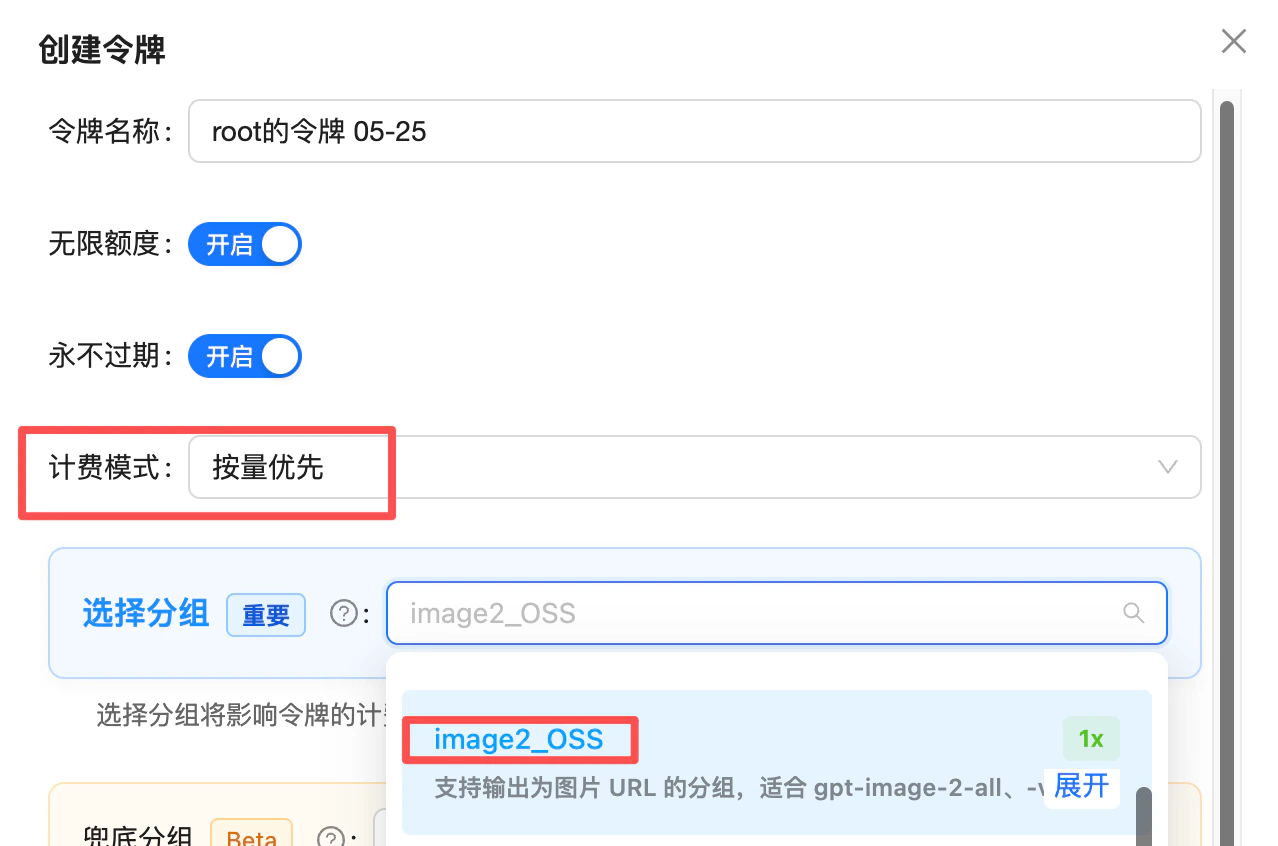
Token creation: set billing mode to "pay-as-you-go first" and pick the image2_OSS group (1x) — use it when you need deterministic URL output
image2Enterprise group: /en/live/2026-04/image2-enterprise-stable
Technical Specs
Endpoints
gpt-image-2-vip is compatible with the exact same two endpoints as gpt-image-2-all. Just swap the model field and add a size if needed:
Supported sizes (full 30-size table)
gpt-image-2-vip supports 10 aspect ratios × 3 resolution tiers = 30 sizes. Pass size: "WIDTHxHEIGHT" (lowercase ASCII x) directly in the request body.
1K Fast — drafts and low-cost iterations
2K Recommended — default tier (most production outputs)
4K Detail — large deliverables
size; quality is optional, see above):
Best Practices
Compress input images to under 1.5MB (image edit / multi-image fusion)
shell_api_error / Unknown error responses are most often triggered by oversized inputs — compressing measurably improves success rate and latency. Output resolution is governed by the size field, not by input size — shrinking the input only speeds things up, it does not hurt quality. Stuffing 4K / 8K into the prompt does not produce a 4K image; resolution is set by size, not by prompt fluff.Pick the size tier by deliverable
Use lowercase ASCII x in size
"size": "1536x1024" — not 1536×1024, not uppercase X.quality works up to high; do not pass n
quality in testing (not a commitment): the two 2.5 models take all six tiers (xhigh / max opened 2026-09-10), gpt-image-2-vip goes up to high and rejects xhigh / max; 2.5 high only equals gpt-image-2-vip medium, and 2.5 max equals its high. n returns 1 image per call regardless — for multiple images, call in parallel.Use a 300s timeout
Choose response format by need
b64_json for direct web rendering; url for server-side storage/forwarding.Share code with -all
model between gpt-image-2-all and gpt-image-2-vip as needed. Use vip when you need locked size, switch back to -all for fastest iteration.Error Codes and Retries
- Request timeout starting at 300 seconds (conservative; typical 90–150s, but 4K Detail + peak tails go higher)
- Use exponential backoff for 5xx and timeouts (2–3 retries recommended)
- Log the
request-idresponse header for debugging
FAQ
Why is vip so much slower?
Why is vip so much slower?
gpt-image-2-vip uses the Adobe reverse channel (Firefly) — typical 90–150 seconds, on par with the official gpt-image-2 (100–120s) and slower than ChatGPT-web-line gpt-image-2-all (30–60s). For latency-sensitive workloads, prefer gpt-image-2-all; switch to vip only when you need locked size or 4K.Does size have to be exactly from the table? What if I send 1024x768?
Does size have to be exactly from the table? What if I send 1024x768?
1024x1024 / 1600x1600), others are aligned to 16 (1920x1080 → 1920×1088), and undersized values are raised to the minimum edge (512x512 → 816×816). The image you get may not match the request, so keep to the 30 presets whenever the exact size matters.Why does 4K frequently return 500? How do I get reliable 4K?
Why does 4K frequently return 500? How do I get reliable 4K?
3840x2160 / 2880x2880), status_code: 500 errors are easier to trigger, with upstream returning invalid_request_error:- Prefer 2K Recommended (e.g.,
2048x1360/2048x2048) — significantly higher success rate, same $0.03/image - Send fewer input images for img2img / multi-image fusion — the reverse channel struggles under heavy input load, further pushing up 4K failure rates; pre-compressing each input image under 1.5MB also helps
- For guaranteed 4K — switch to the official-proxy
gpt-image-2+image2Enterprisegroup. The official-proxy 4K is pricier (~$0.3+/image), but markedly more stable — appropriate when 4K delivery is a hard requirement.
Should I compress input images? Does writing 4K / 8K in the prompt help?
Should I compress input images? Does writing 4K / 8K in the prompt help?
shell_api_error / Unknown error responses are most often triggered by oversized inputs, and compressing measurably improves success rate and latency. Note: 1.5MB is the recommended ceiling for reliability and speed; the 10MB number in the FAQ above is the gateway hard limit.Don’t worry about compression hurting quality — output resolution is governed by the size parameter, not by your input size. Shrinking the input only speeds things up.Stuffing 4K / 8K into the prompt does not actually produce 4K output. If your prompt says 8K ultra HD but you set size to 1024x1024, you still get a 1K-quality image. For 4K, set it in the size field — 1K / 2K / 4K all cost the same flat $0.03/image across the 30-size set.📖 Source: /en/live/2026-05/gpt-image-2-vip-unknown-errorIs 4K really not surcharged?
Is 4K really not surcharged?
3840x2160 / 2880x2880 etc.) costs the same $0.03/image as 1K and 2K.Does it support n? What happens if I pass n=3?
Does it support n? What happens if I pass n=3?
n=3 in the request, billing will be 0.03 × 3 = $0.09, but only 1 image is actually returned. Drop the n field to avoid wasted charges.If the content is rejected or the model replies 'I can't do that', is it billed?
If the content is rejected or the model replies 'I can't do that', is it billed?
- ✅ Pre-filter and warn users: add a keyword/scenario filter at the frontend or gateway (real-person names, copyrighted characters, sensitive topics) and surface a UI hint like “Celebrity / IP topics may fail and still be billed by upstream policy.” This cuts wasted charges sharply.
- ✅ Monthly reimbursement for consumer products: we understand consumer-facing products can’t fully gate user input. If your monthly spend is large enough ($1000+/month), you can batch your logs monthly (short-latency calls are usually soft refusals) and contact support for a one-off manual credit — no need to file per-call appeals.
Do I need to add data:image/png;base64, prefix to b64_json?
Do I need to add data:image/png;base64, prefix to b64_json?
b64_json is raw base64 without the data: prefix — decode it to write a file, or prepend the prefix yourself before rendering; earlier versions did include the prefix. Add a startsWith('data:') check in your code: if the prefix is present, use the value directly as img src; if not, decode or prepend first — this avoids double-prefixing or decoding a prefixed string into a broken image.What's the max reference image size and supported formats?
What's the max reference image size and supported formats?
png / jpg / webp. Overly large images may hit gateway limits. Each image in multi-image fusion must meet this limit.How long are the returned image URLs valid? Do I need to download them?
How long are the returned image URLs valid? Do I need to download them?
url field of a url-mode response is an R2 CDN link that expires in about 1 day (24 hours) — requests after that will 404.Strongly recommended: download and persist generated images to your own object storage (S3 / OSS / R2), CDN, or database shortly after generation.Does it support streaming?
Does it support streaming?
Can I use the official OpenAI SDK?
Can I use the official OpenAI SDK?
base_url to https://api.apiyi.com/v1 and set api_key to your APIYI token. client.images.generate(model="gpt-image-2.5-vip", size="2048x1360", prompt=...) works directly.Can I still generate images via /v1/chat/completions?
Can I still generate images via /v1/chat/completions?
/v1/images/generations and /v1/images/edits instead (more stable, and the same code works with the official-relay gpt-image-2).The chat-based style only makes sense in two scenarios: multi-turn iterative editing, or passing online image URLs directly. Note that when the image intent is ambiguous, the model may return plain text instead of an image (prepend a fixed prefix like “Generate an image:” to your prompt to reinforce it).For full parameters, see the chat-based API reference.When should I switch to the official gpt-image-2?
When should I switch to the official gpt-image-2?
quality tiers) — use the official gpt-image-2.5-flare / sunburst / gpt-image-2. See the Official vs Reverse comparison.Related Documentation
- GPT-Image-2-All Overview - Cheaper sister model ($0.025/image) with faster, steadier output, ideal when you don’t need to lock size and 1K–1.5K is enough
- ⚖️ Official vs Reverse Comparison - Side-by-side selection guide vs the official
gpt-image-2(covers-all/-vip) - Text-to-Image Playground -
/v1/images/generationscompatible endpoint, passsizeto lock dimensions - Image Editing Playground -
/v1/images/editsmulti-image fusion and editing - GPT-Image-2.5 / 2 Official - For precise mask inpainting / strict OpenAI-API field parity
- Deep dive: GPT-image-2.5 launch - The 2.5 dual-model launch
- GPT-Image Series Overview - Official GPT-Image comparison
- API Manual - General calling conventions
gpt-image-2.