

Overview
gpt-image-2.5-all and gpt-image-2-all are APIYI’s GPT image generation reverse-engineered models (ChatGPT web line). The ChatGPT web app has moved to Images 2.5 as a whole, sogpt-image-2-all already produces 2.5 images; the new gpt-image-2.5-all name simply makes that upgrade explicit — both names share the same price and behavior and are interchangeable; new projects should use gpt-image-2.5-all. With extremely competitive pricing at $0.025/image per call (cut from $0.03 on 2026-10-10), it generates images in about 30–60 seconds and supports text-to-image / single-image editing / multi-image fusion / natural-language editing — with high text-rendering fidelity and native support for Chinese prompts.
size and still describe size, aspect ratio, and style in the prompt. An explicit size takes priority; omitting it or passing auto preserves native behavior. Uses the OpenAI Images API standard endpoints: /v1/images/generations (text-to-image) and /v1/images/edits (image editing).For 4K requirements, see the 4K model choices below.Text-to-Image API
/v1/images/generations — generate images from text prompts.Image Editing API
/v1/images/edits — multipart upload with edit/fusion instructions.Let an AI Agent Do the Integration
Copy this prompt and paste it into Codex / Claude Code / Cursor
It first fetches the plain-text version of this page (append .md to any docs URL), then writes code in your project's own stack — timeout, base64 rendering, upload compression, and the parameters this model rejects are already baked into the requirements.
Integrate / troubleshoot gpt-image-2-all text-to-image and image editing in this project.
Read the docs before you touch code: fetch https://docs.apiyi.com/en/api-capabilities/gpt-image-2-all/overview.md for the plain-text version of this page. For finer parameter detail, append
.mdto …
- Timeout: raise the client timeout to 360 seconds. The image APIs are synchronous — there is no task ID, so if the client disconnects the result is lost …
6 requirements in total. Use the button below to copy the full prompt.
What this prompt saves you from
What this prompt saves you from
Core Features
Highly Competitive Pricing
High Text Rendering
Chinese Prompt Friendly
Multi-Image Fusion
Faster Output
gpt-image-2-vip and the official-relay gpt-image-2R2 CDN Accelerated
response_format: "url" explicitly for R2 CDN links with low-latency global deliveryNatural-Language Editing
Standard Endpoint Support
/images/generations and /images/editsPricing
- Flat pricing; no tiers by resolution, quality, or prompt length
- Failed requests are not charged (auth failures, parameter validation errors)
- For N images, call the API N times in parallel
Choosing a model for 4K
Group Setup
gpt-image-2-all lives on the Default group — no extra group needed. The reverse channel currently has stable supply, so there’s no enterprise-group fallback story like the official-relay gpt-image-2 has.
Need deterministic URL output → switch to the image2_OSS group
As measured in July 2026 on the default group, gpt-image-2-all (and gpt-image-2-vip) return b64_json when response_format is omitted; pass response_format: "url" explicitly to get an image URL. The default group’s output format is not guaranteed — it has historically defaulted to url with fallback to b64_json under load, and has changed across channel versions.
If your business depends on URL output (writing URLs straight to your database, frontend rendering by URL, base64 not acceptable), switch your token’s group to image2_OSS — a group purpose-built for deterministic URL output, at a 1x multiplier (no surcharge), effective for both reverse models gpt-image-2-all and gpt-image-2-vip. It guarantees the response always carries an image URL and never falls back to base64.
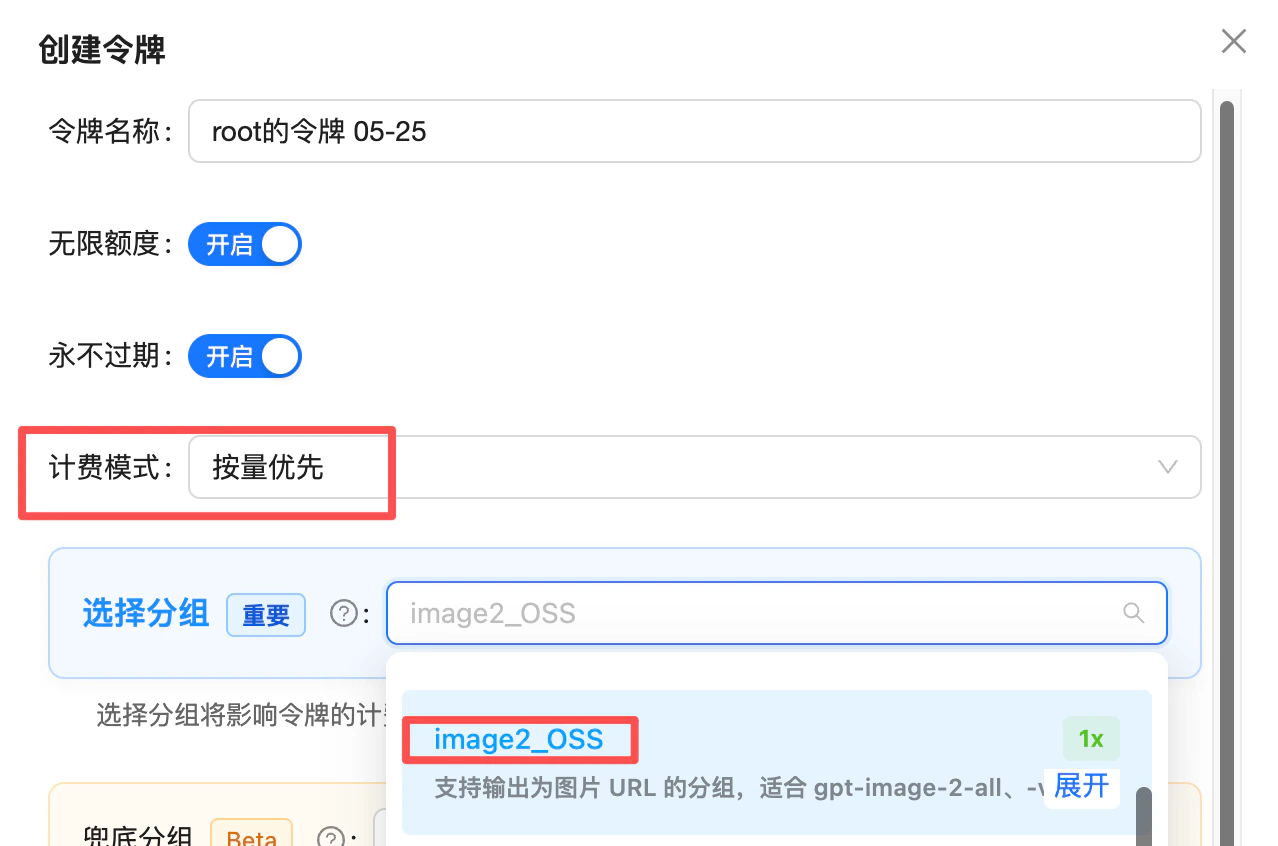
Token creation: set billing mode to "pay-as-you-go first" and pick the image2_OSS group (1x) — use it when you need deterministic URL output
image2Enterprise group: /en/live/2026-04/image2-enterprise-stable
Technical Specs
Endpoints
size, for example 1024x1024. It takes priority over dimensions or aspect ratios described in the prompt. Omit size or pass auto to preserve native behavior.Size and Aspect Ratio Control
gpt-image-2-all now supports the size parameter for target dimensions while retaining the ability to describe dimensions and aspect ratios in the prompt.
- Explicit
size: the suppliedWxHis the priority target, including when it differs from dimensions or ratios in the prompt. - Native behavior: either omit the
sizefield or sendautoas its value. Both options preserve native output; the model chooses dimensions using the prompt and composition. - Currently supported targets: common
WxHsizes with a long edge of 512–1536 pixels, including512x512,1024x1024, and1536x1536, plus dimensions that are not multiples of 16. This range applies to explicit targets; native outputs below may have longer edges.
Supported explicit sizes and request example
The common target examples below are not an exhaustive allowlist. Use a lowercasex in WxH. Verify the returned image’s actual dimensions when your workflow has strict requirements.
Native sizes: verified “prompt phrasing → actual resolution” table
The 8 phrasings below and their observed native dimensions remain reference values for requests withsize omitted or set to auto. Put the first-column phrasing at the start of your prompt to guide composition. These measurements are references rather than a guarantee of exact dimensions on every request:
- These native measurements sit in the ~1.5K-pixel tier (longest edge roughly 1500–2000 px); they describe native behavior rather than the accepted range for explicit
sizetargets. - Reproducibility is highest when the prompt only contains a phrasing from the table; mixing in other composition words can cause drift.
- The Chinese strings are the actual values you send; we recommend keeping them as-is rather than translating.
Stylistic phrasings (no fixed resolution)
Withsize omitted or set to auto, the phrasings below have no fixed verified resolution. Use them as composition or style guidance; pass an explicit size when you want a target such as 1024x1024:
Exposing this table to your end users
You can offer a “Target size” selector for supported explicitsize values, and a separate “Native / auto” mode that uses the 8 prompt prefixes above:
- For target-size options such as
512x512,1024x1024, or1536x1536, send the selected value assize. - For native / auto mode, omit
sizeor sendauto, then prepend the selected composition phrasing to the user’s prompt. - Label native dimensions as observed reference values, so users do not mistake them for exact guarantees.
Best Practices
Compress input images to under 1.5MB (image edit / multi-image fusion)
size sets the priority target for output dimensions. Omitting size or setting it to auto preserves native behavior. Input file size does not determine output dimensions. Stuffing 4K / 8K into the prompt does not establish support for those dimensions. Use supported size targets, or the native prompt table above for composition guidance.Choose a target size or native behavior
size for a target such as 1024x1024. Omit it or pass auto for native output; in that mode, put ratio, resolution, and composition words at the start of the prompt for better adherence.Use text elements confidently
Annotate multi-image order
image field is meaningful. Reference explicitly as “image1/image2/image3” in the prompt.Choose response format by need
b64_json for direct web rendering; url for server-side storage/forwarding.Use a 300s timeout
Trim rejected parameters
gpt-image-2-all does not support n, quality, or aspect_ratio — omit these fields. size is supported; use a common WxH target with a long edge of 512–1536 pixels, or auto.Error Codes and Retries
- Request timeout starting at 300 seconds (conservative; typical 30–60s, but image upload / download and reverse-channel peak tails cause wide variance — 120s causes frequent false timeouts)
- Use exponential backoff for 5xx and timeouts (2–3 retries recommended)
- Log the
request-idresponse header for debugging
FAQ
I see both gpt-image-2-all and gpt-image-2-vip — which should I pick?
I see both gpt-image-2-all and gpt-image-2-vip — which should I pick?
- Want faster and steadier output with common target sizes →
gpt-image-2-all(~30–60s,sizetargets with a long edge of 512–1536 pixels, or native / auto output guided by the prompt). - Need a different preset size → check
gpt-image-2-vip’s supported list. Its 4K generation can be slow and inconsistent, so it is not the first choice for 4K. - Need 4K → see 4K model choices for Nano Banana Pro / 2 / 2.1 and official-relay GPT-Image 2 / 2.5. Official-relay 4K with higher quality settings can be costly.
- Need a
qualityknob or full OpenAI-API field parity → use the officialgpt-image-2.
Can I generate multiple images at once?
Can I generate multiple images at once?
Does it support the n parameter? What happens if I pass n=3?
Does it support the n parameter? What happens if I pass n=3?
n=3 in the request, billing will be 0.025 × 3 = $0.075, but only 1 image is actually returned. Make sure to drop the n field from your requests to avoid wasted charges.If the content is rejected or the model replies 'I can't do that', is it billed?
If the content is rejected or the model replies 'I can't do that', is it billed?
- ✅ Pre-filter and warn users: add a keyword/scenario filter at the frontend or gateway (real-person names, copyrighted characters, sensitive topics) and surface a UI hint like “Celebrity / IP topics may fail and still be billed by upstream policy.” This cuts wasted charges sharply.
- ✅ Monthly reimbursement for consumer products: we understand consumer-facing products can’t fully gate user input. If your monthly spend is large enough ($1000+/month), you can batch your logs monthly (short-latency calls are usually soft refusals) and contact support for a one-off manual credit — no need to file per-call appeals.
Do I need to add data:image/png;base64, prefix to b64_json?
Do I need to add data:image/png;base64, prefix to b64_json?
b64_json is raw base64 without the data: prefix — decode it to write a file, or prepend the prefix yourself before rendering; earlier versions did include the prefix. Add a startsWith('data:') check in your code: if the prefix is present, use the value directly as img src; if not, decode or prepend first — this avoids double-prefixing or decoding a prefixed string into a broken image.Why am I getting a different size even though the prompt says 1024x1024?
Why am I getting a different size even though the prompt says 1024x1024?
1024x1024 only in the prompt guides composition; it does not replace an explicit target. Send size: "1024x1024" to make it the priority target. Omit size or pass auto to retain native adaptive output.The native prompt table above remains a reference for requests where size is omitted or set to auto. If dimensions are a strict requirement, verify the final image’s actual width and height.Should I compress input images? Does writing 4K / 8K in the prompt help?
Should I compress input images? Does writing 4K / 8K in the prompt help?
size sets the priority target for output dimensions. Either omit the size field or send auto as its value to preserve native behavior. Input file size does not determine output dimensions.Writing 4K / 8K in the prompt does not establish support for those dimensions. Use the supported size range for target dimensions, and the native prompt table for composition guidance in auto mode. For 4K requirements, see 4K model choices above.What's the max reference image size and supported formats?
What's the max reference image size and supported formats?
png / jpg / webp. Overly large images may hit gateway limits. Each image in multi-image fusion must meet this limit.How long are the returned image URLs valid? Do I need to download them?
How long are the returned image URLs valid? Do I need to download them?
url field of a url-mode response is an R2 CDN link that expires in about 1 day (24 hours) — requests after that will 404.Strongly recommended: download and persist generated images to your own object storage (S3 / OSS / R2), CDN, or database shortly after generation. Don’t hotlink the returned URL long-term.Two recommended approaches:- Server-side proxy: immediately
requests.get(url)after the response, store to your own storage, and return your own URL to the frontend; - Use
b64_json: add"response_format": "b64_json"to your request to get base64 image data directly — one less cross-origin download, ideal for frontend rendering or writing straight to a file.
Does it support streaming?
Does it support streaming?
Can I use the official OpenAI SDK?
Can I use the official OpenAI SDK?
base_url to https://api.apiyi.com/v1 and read api_key from the APIYI_API_KEY environment variable. You can pass size="1024x1024", omit it, or use auto. Inspect your final request to ensure it does not include unsupported n, quality, or aspect_ratio fields. Raw HTTP calls with requests / fetch are also supported.Are Chinese and English prompts meaningfully different?
Are Chinese and English prompts meaningfully different?
Can I still generate images via /v1/chat/completions?
Can I still generate images via /v1/chat/completions?
/v1/images/generations and /v1/images/edits instead (more stable, and the same code works with the official-relay gpt-image-2).The chat-based style only makes sense in two scenarios: multi-turn iterative editing, or passing online image URLs directly. Note that when the image intent is ambiguous, the model may return plain text instead of an image (prepend a fixed prefix like “Generate an image:” to your prompt to reinforce it).For full parameters, see the chat-based API reference.Related Documentation
- ⚖️ Official vs Reverse Comparison - Side-by-side selection guide vs the official
gpt-image-2 - Text-to-Image Playground -
/v1/images/generationscompatible endpoint - Image Editing Playground -
/v1/images/editsmulti-image fusion and editing - Nano Banana Pro - 4K image generation and editing
- Nano Banana 2 - 4K image generation and editing
- Nano Banana 2.1 - 4K image generation and editing
- GPT-Image 2 / 2.5 Official Relay - Token-billed size / quality control, mask inpainting, and 4K; higher quality settings increase cost
- GPT-Image-2-VIP - Sister model with a separate supported size list
- GPT-Image Series Overview - Official GPT-Image comparison
- Community: Luck GPT-Image 2 ComfyUI Nodes - Call
gpt-image-2-alldirectly in ComfyUI (dual endpoints: chat_completions / images_api) - Community: APIYI GPT-Image 2 Skills - Invoke from Codex CLI / Cursor / Gemini CLI and other AI coding tools with one sentence
- API Manual - General calling conventions